User's Manual
Arctic GPRS Gateway
Firmware Version 5.0.7 14 Document Version 1.6
Ethernet Connector
Arctic has an RJ45 connector for 10/100 Mbps Ethernet connection. Maximum
length of the Ethernet cable is 100m.
Note!
The cross-connected cable is only for connecting the Arctic to the PC’s
network interface card. When connecting to a local network (e.g. hub or
switch), a direct Ethernet cable must be used.
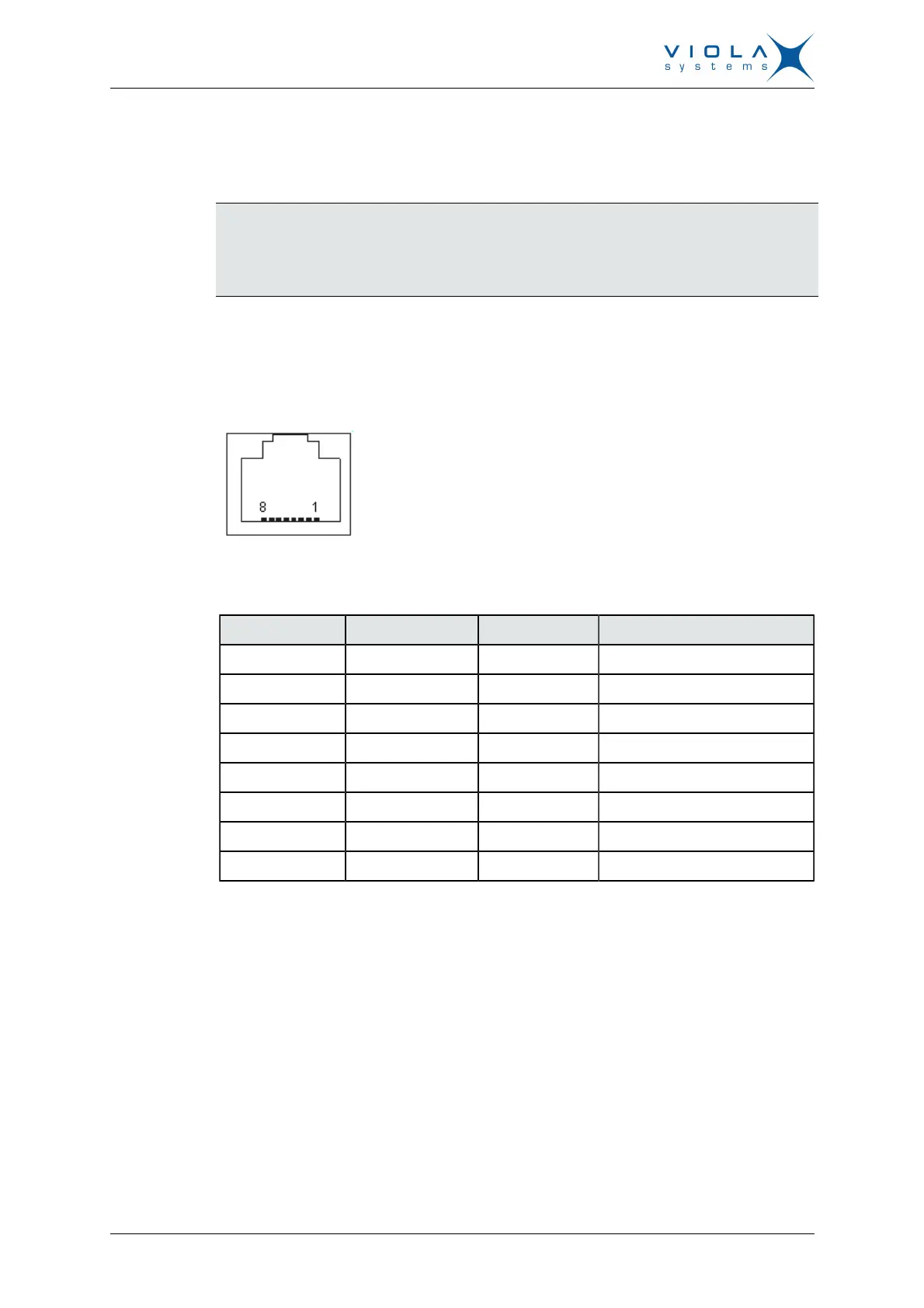
The figure and pin description of the Arctic’s RJ45 Ethernet connector is as
follows:
Figure 5. RJ45 Ethernet connector
Table 4: RJ45 Ethernet connector PIN Description
Pin Number Name Direction Explanation
1 Rx+ IN Data Receive Positive
2 Rx– IN Data Receive Negative
3 Tx+ OUT Data Transmit Positive
4 NC - -
5 NC - -
6 Tx– OUT Data Transmit Negative
7 NC - -
8 NC - -
2.2 Back Panel Description
The Arctic GPRS Gateway has an antenna connector and a slot for a SIM
card on the back panel.


 To Next Page