02
Product Introduction
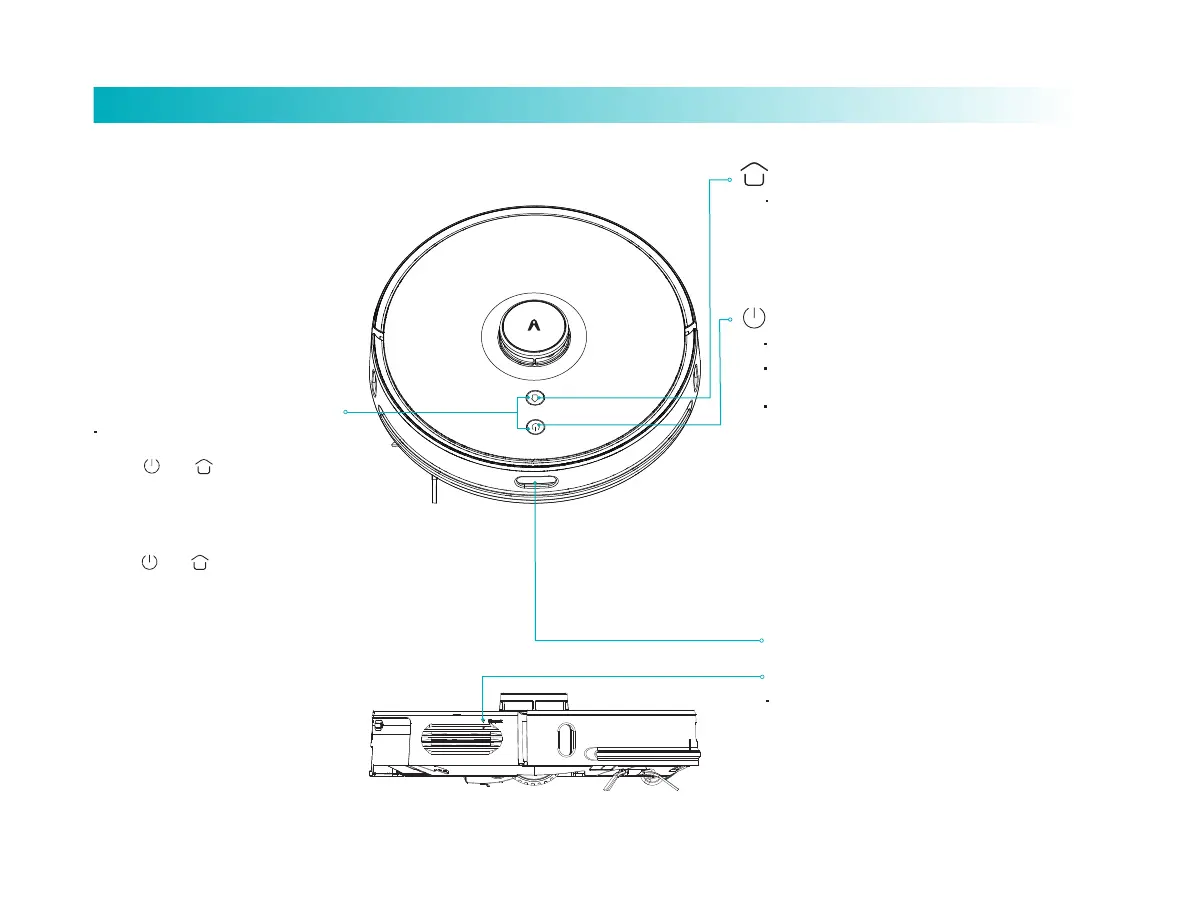
Smart recharging
Reset buon: for forcible shutdown.
Power on/off Global sweeping
IR sensor
When the robot is power-on,
simultaneously press down and
hold and keys for 5 seconds
till a voice prompt is given, and then
release them to activate network
configuration.
When the robot is power-on,
simultaneously press down and
hold and keys for 10 seconds
till a voice prompt is given, and keep
holding the keys for 10 seconds to
finish recovery to factory seings.
Network Configuration
The light is constantly on in blue color,
indicating successful connection/normal
operation/standby state.
Flicker in blue color, indicating power-on.
Flash slowly in blue color, indicating firmware
upgrade/recovery to factory seing.
Flash fast in blue color, indicating network
configuration.
Flicker in red color, indicating low baery level.
Flash fast in red color, indicating fault in
operation.
The LED indicator goes out, indicating
power-off/sleep.
Short press (for less than 3 seconds) to switch off.
Short press the buon to start/cease sweeping.
Long press the buon for 3 seconds to power
on/off.
Short press the buon to start smart
recharging.
The LED indicator keeps flash slowly in yellow
color, indicating recharging/ low baery level.
Flicker in yellow color, indicating recharging.



 To Next Page