4. Operation guide
4.1App installation
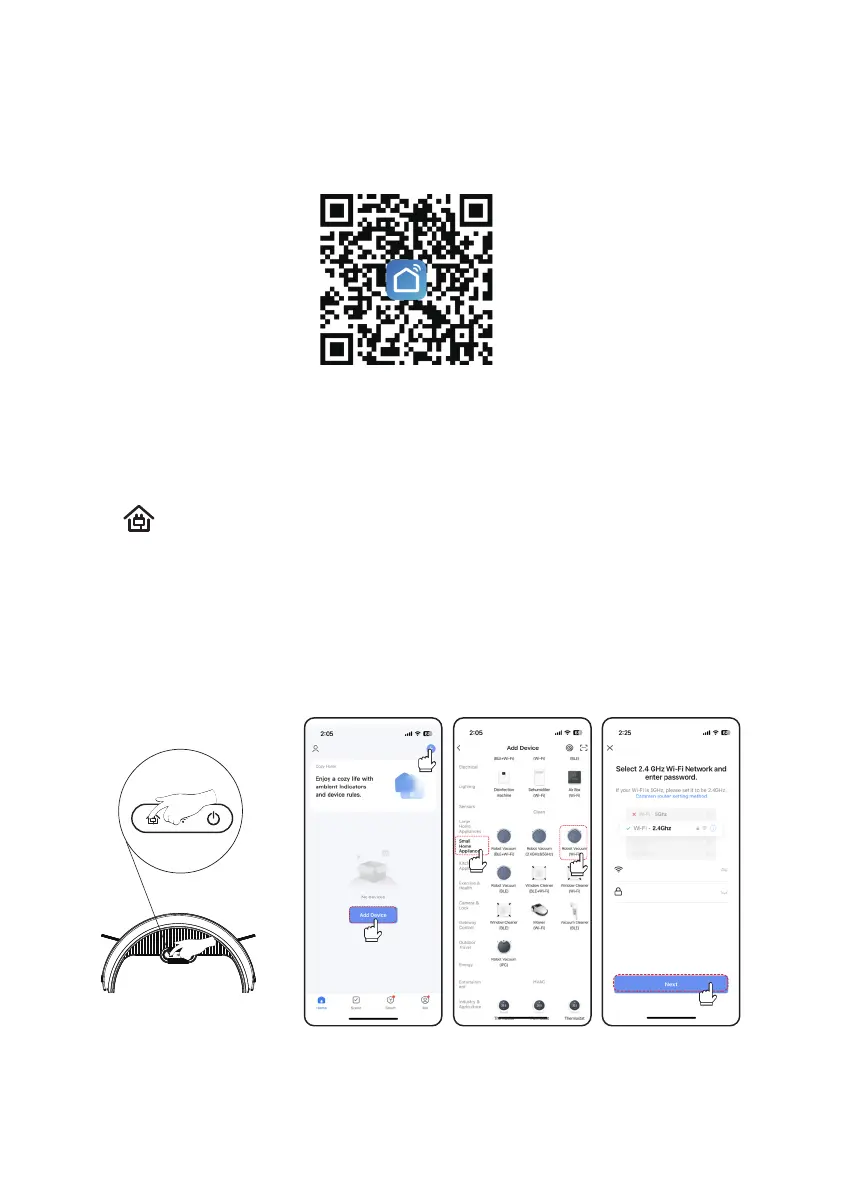
Scan the QR code on your mobile phone to download the Smart Life app (common to Apple
and Android) or search for "Smart Life" in the mobile app store to download, install, register an
7
account and log in.
The host supports two network configuration methods: WiFi quick connection and Bluetooth network
A:WiFi connection:
Open the application and the connection steps are as follows,
First, click "Add Device" shown in Figure 1, then select "Small Appliances", and then click "Robot
Vacuum (WiFi)" shown in Figure 2. Next, connect to your network, enter your password, and click
When your phone's Bluetooth is turned on, in the robot standby mode, press and hold the recharge
button for 3 seconds. You will hear the host beep. At the same time, please release the button.
The WiFi indicator light will continue to flash quickly. At this time, the machine can use Bluetooth or
WiFi Quick Connect has two modes for connection:
"Next" as shown in Figure 3.
distribution.
Note: This device only supports 2.4GHz WiFi connection.
4.2 App connection
Figure 1
Figure 2
Figure 3
WiFi name
Password



 To Next Page