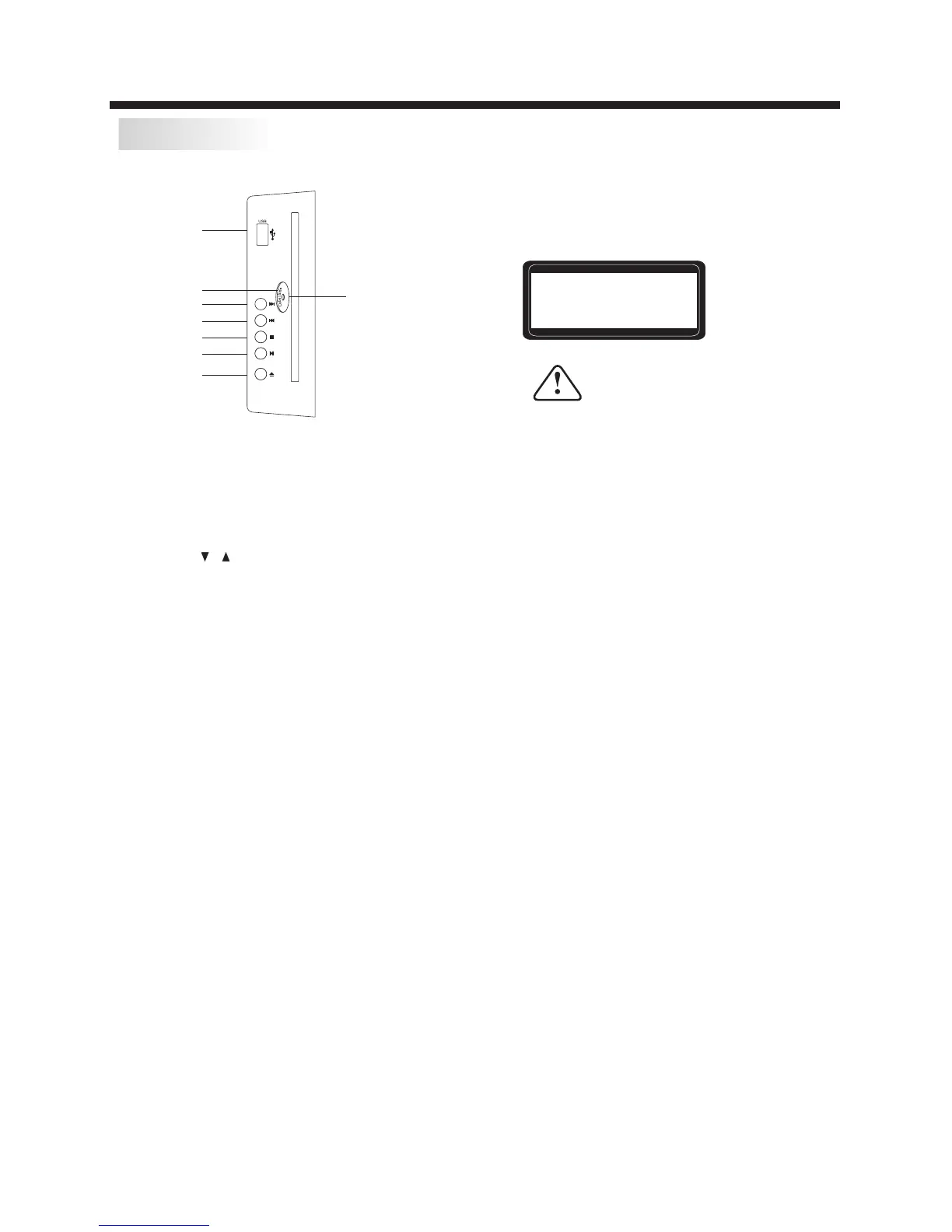
DVD SIDE PANEL
DVD OPERATION
-17-
OPEN/CLOSE
PLAY/PAUSE
STOP
PREV
NEXT
Disc data side
USB
Disc label side facing you
Please make sure to stop playing disc before
inserting a USB. You can play USB by pressing
keys on the remote control with the following
sequence.
1. DVD/USB key
2. UP/DOWN key to select DISC/USB
3. ENTER key to confirm
USB
In DVD mode when no disc is playing, insert
a USB drive (or an MP3 player with USB
interface) into the USB socket. Press the
DVD/USB button on the Remote Control unit,
and use the / keys to select USB mode for
playing MP3 or JPEG files.
CLASS 1 LASER
PRODUCT
Caution:
When using USB function, please do not insert
in the wrong direction, or else it will damage
the unit.
Caution
This DVD Player has a Class 1 laser which may be harmful
to your eyes. Do not attempt to disassemble the cabinet or
make any adjustments. Refer all servicing to a qualified
professional.


 To Next Page