-8-
INSTALLATION
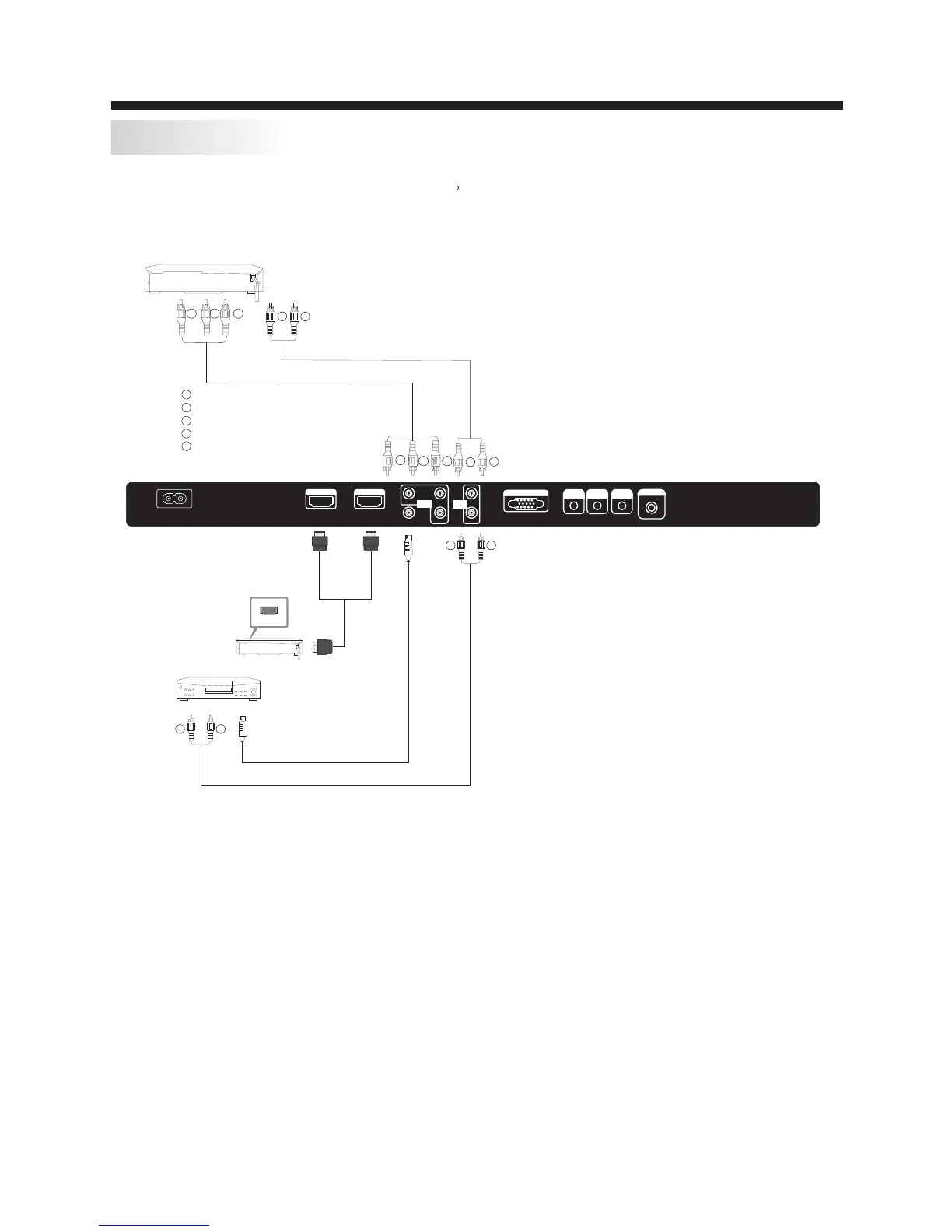
To audio outputs
VIDEO EQUIPMENT
TO VIDEO
output
Yellow (video)
White(audio L)
Red(audio R or Pr)
Y
W
R
W
R
W R
W R
G
B
R
G
R
B
Blue(Pb)
Green(Y)
B
G
AV EQUIPMENT
It can be connected to the following appliances: VCR, multi disc player, DVD, camcorder, video game
or stereo system, etc.....
YPbPr can support these video formats:480i,576i,480p,576p,720p,1080i.
This TV provides one group of AV ,one group of YPbPr for convenient connectionto VCR,DVD or
other video equipment. Please refer to the owner s manual of the equipment to be connected as well.
You can use the input terminals on TV set rear as follows.
VIDEO EQUIPMENT with YPbPr
W
R
HDMI
AC INPUT
100-24 0V~ 50/60Hz
HDMI1 I NPU T HDMI2 IN PUT
L
R
AV
Pr
Y
Pb
AUDI O
INPU T
HEADPHONE
PC AUDIO
INPUT
RF INPUT
VGA INPUT
COAXIA L
Y Pb Pr
INPU T


 To Next Page