-6-
INSTALLATION
STEPS:
PC
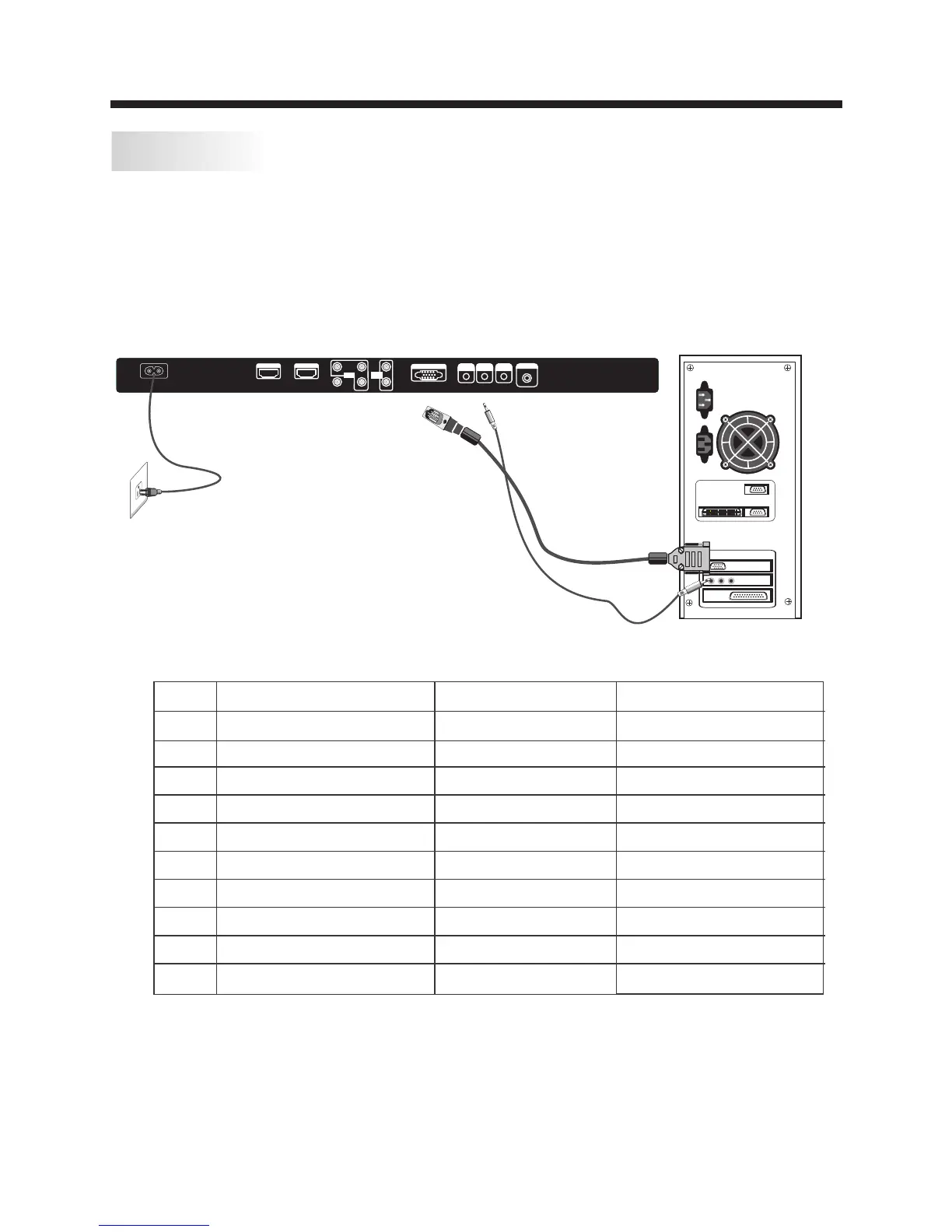
Be sure both the TV and computer are set to Power off.
1.Connect VGA and audio cable.
2.Connect the power cord.
3.Power on the TV, switch to VGA mode.
4.Power on the VGA.
This sequence is very important.
PRESET MODE
1
2
3
4
5
6
7
8
9
10
720*400
640*480
640*480
800*600
800*600
1024*768
1024*768
1024*768
1280*1024
1280*1024
70
60
75
60
75
60
70
75
60
75
31.47
31.47
37.50
37.88
46.88
48.36
56.48
60.02
63.98
80.00
RESOLUTION
V.Freq.(Hz) H.Freq.(KHz)
AC INP UT
100- 240V ~50/60 Hz
HDM I1 I NPUT HDM I2 INPU T
L
R
AV
Pr
Y
Pb
AUDI O
INPU T
HEADPHONE
PC AUD IO
INP UT
RF INPU T
VGA INP UT
COA XIAL
Y Pb Pr
INPU T


 To Next Page