Setting system with Control Knob
flashing select desired hour
brightness
press the knob
press the knob
same method as setting
same method as setting
clockwise
clockwise
to increase value
select desired
brightness
to decrease value
counterclockwise
press the knob
press the knob
rotate
the knob
rotate
the knob
rotate
the knob
rotate
the knob
select desired minuteflashing
to decrease value
rotate
the knob
press
the knob
clockwise
to decrease value
rotate
the knob
same method as setting
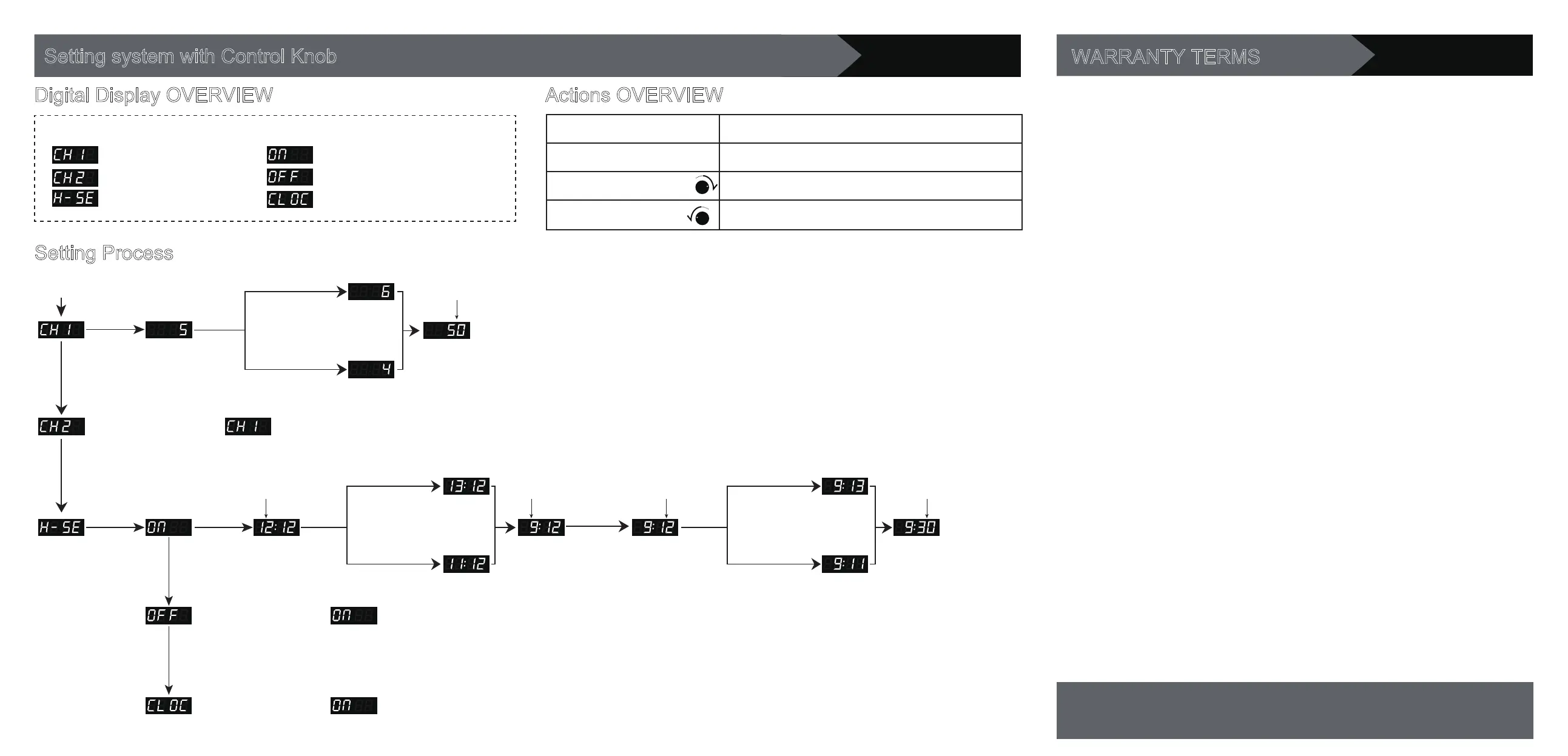
Sub-me nus of “H-SE”: Main menus:
: VEG channel
: BLOOM channel
: Timer setting
: Start-working time
: Off-working time
: Current time
Digital Display OVERVIEW
Setting Process
Press the knob to start
counterclockwise
to increase value
to increase value
counterclockwise
NOTE:
1. Keep pressing the knob around 3 seconds can turn off the light.
2. System will save settings and back to superior menu if no action within 3-5 seconds.
3. Timer controls both channels on/off together. Cannot turn VEG and BLOOM channel
on/off separately.
Action Function
Press the knob
Rotate clockwise
Rotate counterclockwise
1. power on/off
2. change mode 3. save settings
1. enter mode 2. increase value (+1)
1. enter mode 2. decrease value (-1)
Actions OVERVIEW
wait about 3-5 seconds to
save desired start-working
time and go to next step
press the knob to save
desired brightness and
go to next step
WARRANTY TERMS
Customer Service
Email: support@viparspectra.com
Phone: 1-844-504-3266(United States)
1.We offer three years warranty, from the date of purchase, for all of our products purchased
against manufacturing defects. If you need warranty assistance, please contact us as
soon as possible.
2.The warranty does not cover damage due to high moisture levels, water, power surges,
improper hanging/mounting, improper use, dust build-up or user modifications.
3. For USA buyers, if any lights stop working within 30 days, you can choose:
(A) Exchange. We will email you a prepaid return label, please ship the light back to our
USA warranty center. A replacement will be sent to you for free as soon as we receive the
defective light.
(B) Money back. We will email you a prepaid return label, please ship the light back to
our USA warranty center. You will get your money back as soon as we receive the defective
light.
(C) Repairing. We can send parts free of charge immediately if you’d like to repair simple
defect. Or we will email you a prepaid return label to bring light back, then ship back to you
after we repair it. All for free.
4. For buyers outside of the USA, if any lights stop working within 30 days, you can choose:
(A) Exchange. Please ship the light back to our warehouse, buyer pays return shipping.
A replacement will be sent to you for free as soon as we receive the defective light.
(B) Money back. Please ship the light back to our warehouse, buyer pays return shipping.
You will get your money back as soon as we receive the defective light.
(C) Repairing. We can send parts free of charge immediately if you’d like to repair simple
defect.
5.To all customers: if any lights stop working over 30 days after delivery, please contact us
to get a satisfactory solution.
6.If a light is sent in with damage that is not covered under warranty, we may still be able to
offer warranty service, however that is at our discretion and repairs may bear a cost which
will be assessed prior to repairing the light.
7. Our company reserves the interpretation right of this warranty terms. If you have any
questions about our warranty policy, please contact us.



 To Previous Page
 Loading...