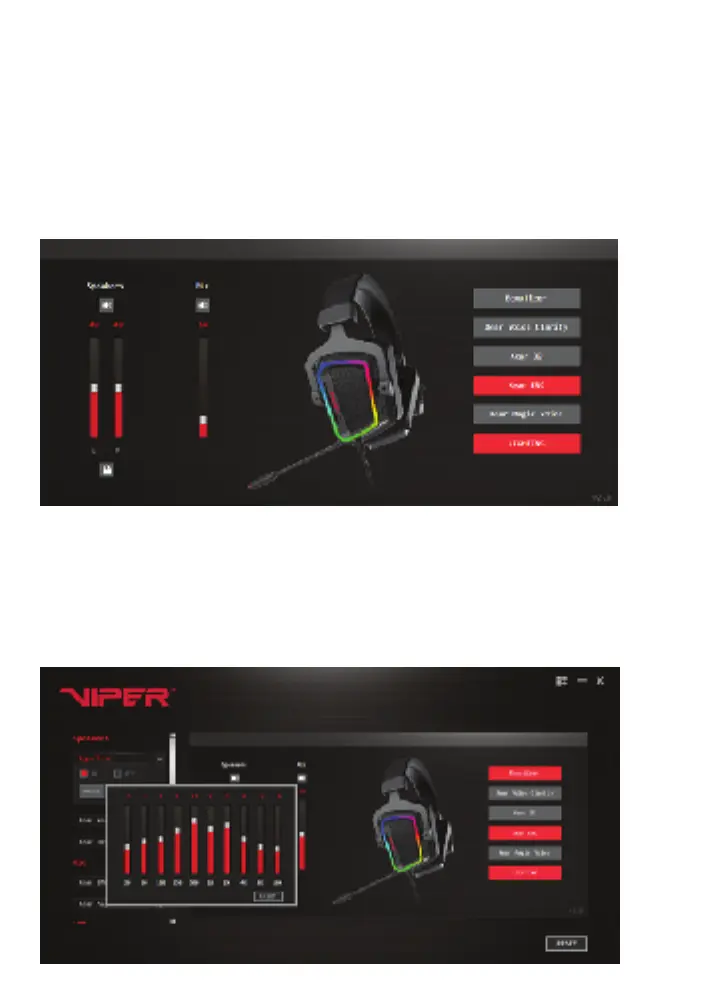
SPEAKER SETTINGS
Volume Controls
Adjust the L and R speaker volume to desired levels by moving sliders up or down. Click
on lock icon to adjust independently or together.
Adjust microphone volume in the same manner.
You can mute and unmute the speakers and mic by clicking on the speaker icon above
the sliders.
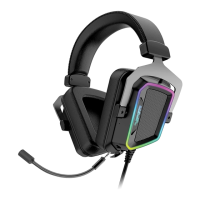
Equalizer Settings
Expand the equalizer settings on the left of the screen to turn ON/OFF the equalizer. You
may also turn ON/OFF equalizer by clicking the Equalizer button on the right of the
screen.
To adjust frequency, expand the equalizer settings on the left, turn ON, and click on
Default box to access the equalizer. Adjust frequencies to desired levels. The RESET
button will zero out the levels.


 To Next Page