INS TRUCTIONS MA NUAL
Proceed as follows:
“REFRIGERANT AVAILABLE” LED must light, if it is necess ary press the SEL key to switch
the light to “REFRIGERANT AVA ILABLE” LED.
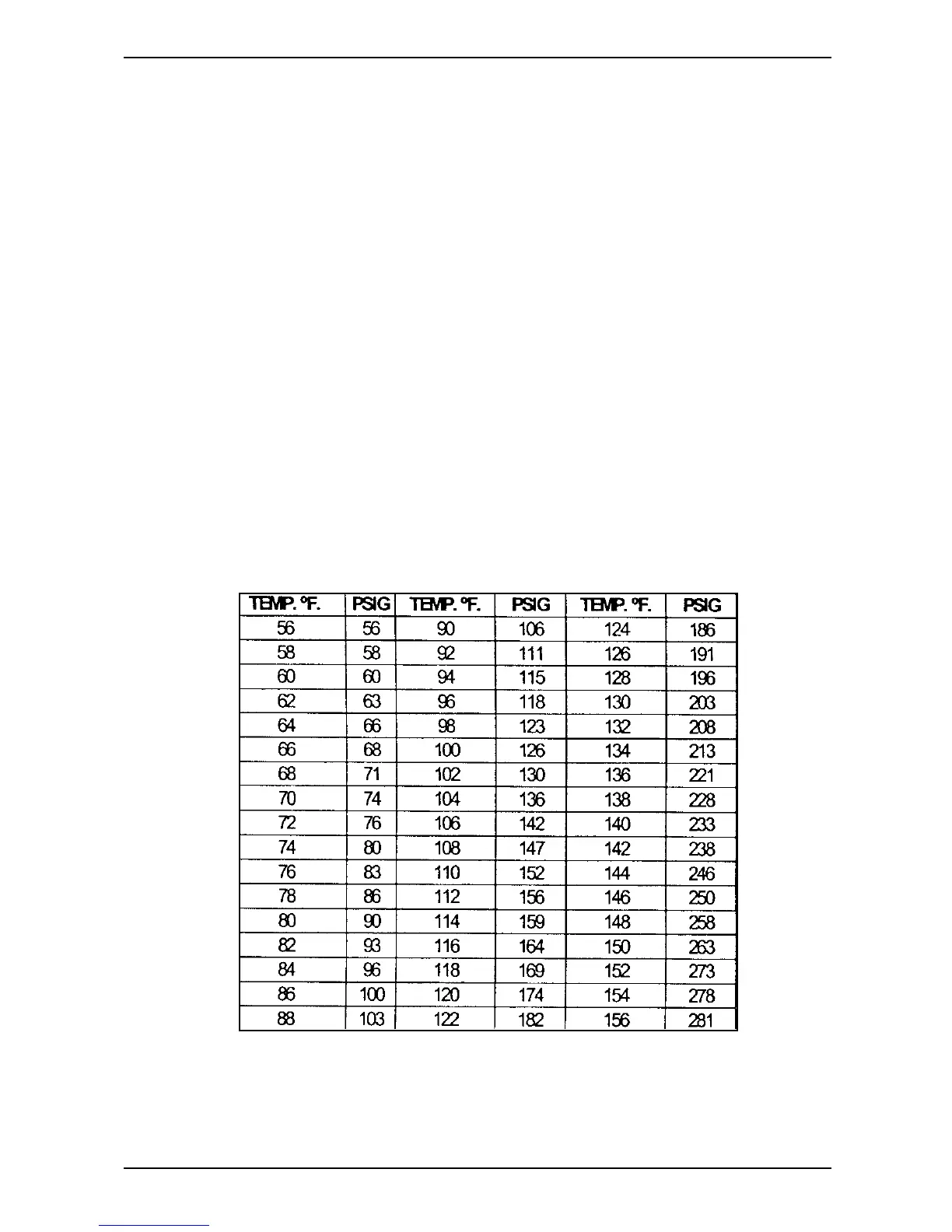
1. Press once the “°F” key in order to display the refrigerant tank temperature (in
Fahrenheit degree), press it a second time to display the temperature in Celsius
degree)
2. Read the storage tank pressure ofthe tank gauge
3. Find the temperature in the TEMP °F column for that tank then read the associated
PRESSURE colum n in ps ig.
4. If the related TANK PRESSURE gauge (A4, fig.5) reads LOWER or EQUAL than the
nominal pressure listed in the table for the respective tank temperature, IT IS NOT
NECESSARY to vent the non-condensable gases from the tank.
5. If the related TANK PRESSURE gauge (A4, fig.5) reads HIGHER than the nominal
pressure listed in the table for the respective tank temperature, you should vent the
non-condensable gases from the tank. This is accomplished by opening the air purge
valve as shown in figures 1,2,3, & 4.
6. Press the STOP key to exit the reading ofthe tank temperature
7. Slowlyopen the air purge valve (r,fig.2) counterclockwise (turn ~20 degree)
8. Once opened the air purge valve r,(fig.2) check the tank press ure gauge and the value
shown bythedisplay.
9. Close the air purge valve when the tank press ure comes down to the nominal
pressure listed in the table.
Fi
.13:Normal R-134° container
ressure chart
17


 To Next Page