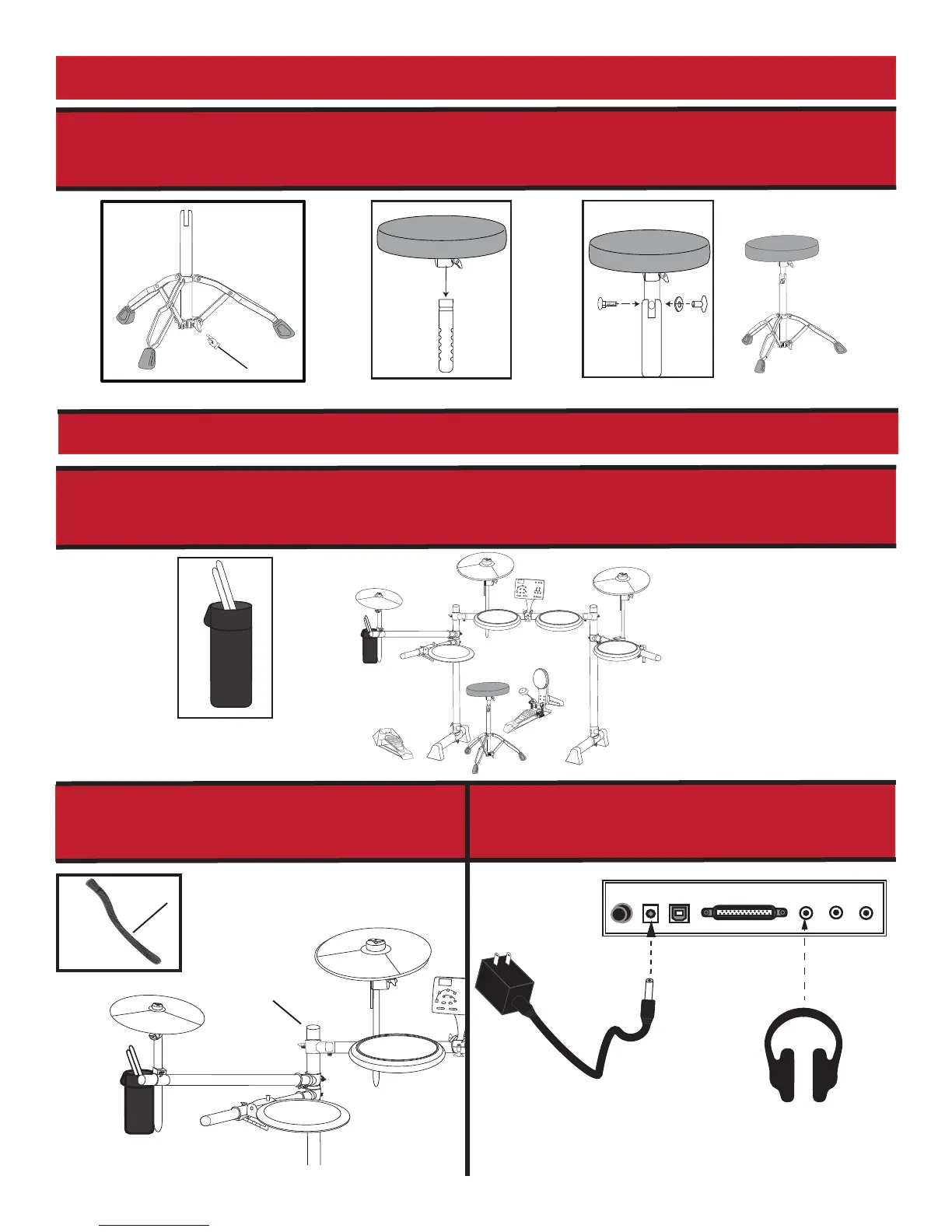
17. Extend the drum throne legs and secure the legs with the wingut. (g 16) Fasten the drum
throne stool to the height adjustment rod and secure the stool with the wingnut. (g 17) Set
up the drum throne at the desired height as shown below. (g 18)
18. Attach Drumstick Pouch (g 19) to drum frame as shown. (g 20)
DRUM THRONE ASSEMBLY
(g. 18)
(g. 17) (g. 13) (g. 16)
FINAL STEPS
POWER
OFF ON
DC 9V
USB
TRIGGER
HEADPHONE
LINE OUT LINE IN
velcro
drum frame
20. Attach the included power supply adapter
and the headphones to drum sound module
connector panel.
19.
Please use the included Velcro Strips to attach
the wiring harness to the drum frame. This will
help to make the wiring harness neat and orderly
against the drum frame.
(g 19)
(g 20)


 To Next Page