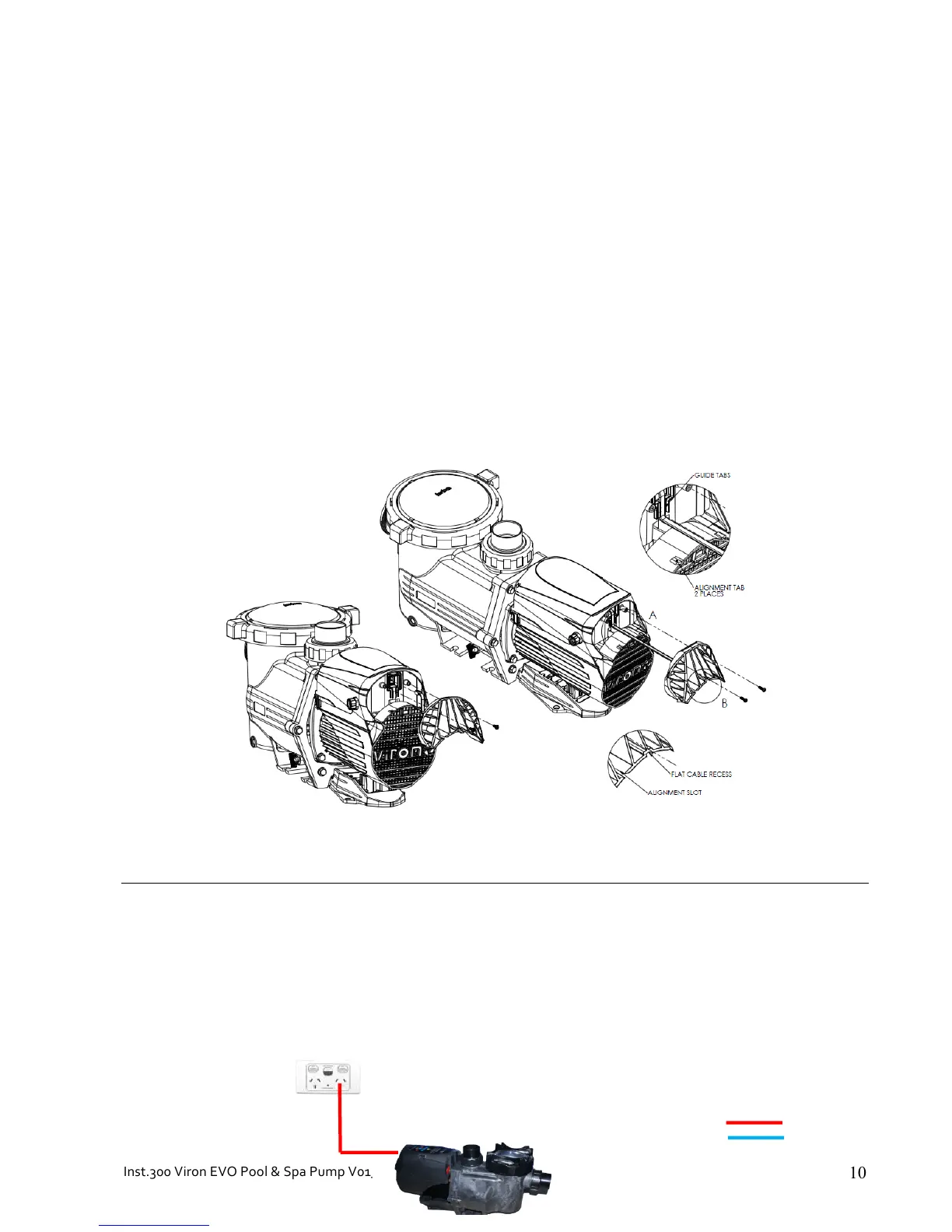
Data cable connector:
If a compatible AstralPool VX Salt Chlorinator, Viron Salt Chlorinator or Viron Connect Touch Screen, is connected
with the AstralPool communication cable, the speed of the pump and operating hours can be controlled by these
devices.
*
The*Viron*P320*&*P600*eVo*must*have*its*inbuilt*timer*deactivated*if*the*pump*operating*times*and*speeds*are*to*be*
operated*by*the*compatible*AstralPool*Salt*Chlorinator,*RolaChem*Dosin g *C o n tr o ller *or*Viron*Connect*remote*touch*
screen.*
*
Remove*2*philips*head*screws*from*rear*of*pump*and*the *da ta*po rt*co ve r*is*rem o ve d*by *ha nd .**Plug *RJ1 2*6 *wire *flat* cable*
purchased*from*AstralPool*into*rear*of*pump*and*reassemble.*To*achieve*a*proper*seal,*press*the*flat*cable*under*the*guide*
tabs*(detailed*view*A).*Slide*data*po rt*c ov e r*ba ck *on *b y*a lign ing *th e*ta bs *w ith*th e *slot s*an d *the *flat*c ab le*w ith *th e*re ce ss*
(detailedl*view*B).***
*
*
*
REMOTE!CONTROL!OF!SPEEDS!AND!TIMER!FUNCTIONS!
* *
• 4&bu ilt& in&t im er&periods &i n &pump
• 3&pr ogramma b le&speed&settings
• Low,&medi u m&or& high&speed&can&be&sel ected&in&e ach&timer&peri o d
• Priming&period&can&be&selected&from&2&to&120&minu tes
• Prime&RPM&can&be&selected&from&1275&to&2850&RPM



 To Next Page