6
Installation
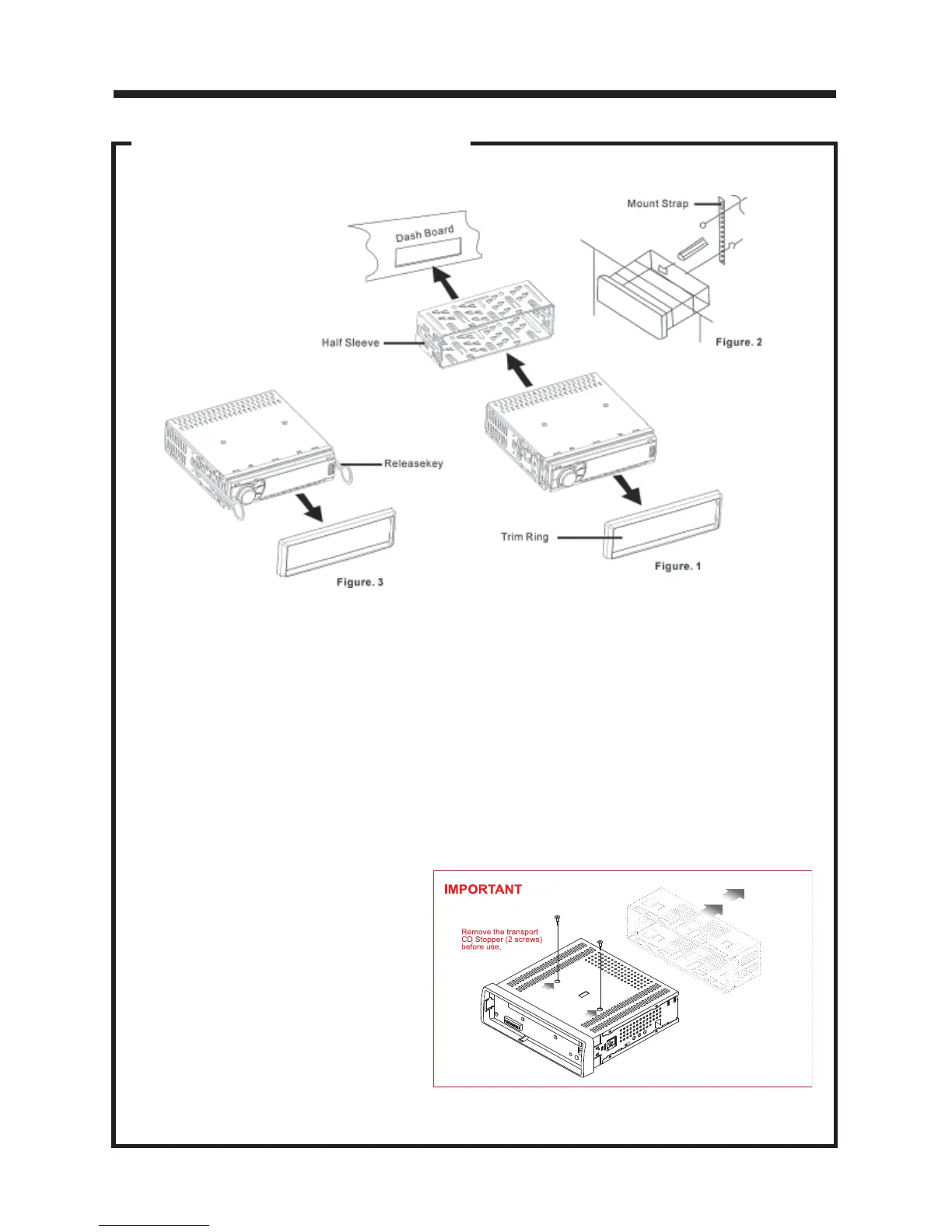
DIN FRONT-MOUNT (METHOD A)
Remove the
half sleeve
A
E
Remove the two transport screws from
the top of the unit before installing.
NOTE:
Unit should be installed horizontally or less than a 30° angle.
1. Insert Half Sleeve into dash-board hole and bend mount tabs outwards to
secure it.
2. If necessary, attach the mounting strap to the rear of the unit, then attach it with
the supplied nut as in fig. 2.
3. Insert the unit into the Half Sleeve until you hear a click sound
4. Place Trim Ring over the unit and installation is completed
(Some vehicles may not need Trim Ring)
Un-installation (Figure 3)
1. Remove Trim Ring and insert
Release Keys into left and right
side-end holes as shown figure 3
and pull the unit out of the dash-
board.



 To Next Page