12
Use and Care of the Remote
Point the remote control at the front panel
of the unit to operate.
Precautions:
• Using batteries improperly can cause
them to explode.
• Keep the battery out of the reach of chil-
dren.
• Should the battery be swallowed, imme-
diately consult a doctor.
• Use one CR2025(3V) lithium battery.
• Remove the battery if the remote control
is not to be used for a month or longer.
• Do not short-circuit or disassemble
• Dispose of spent batteries properly.
• Do not drop the remote control, it may
become jammed under the brake or ac-
celerator pedals.
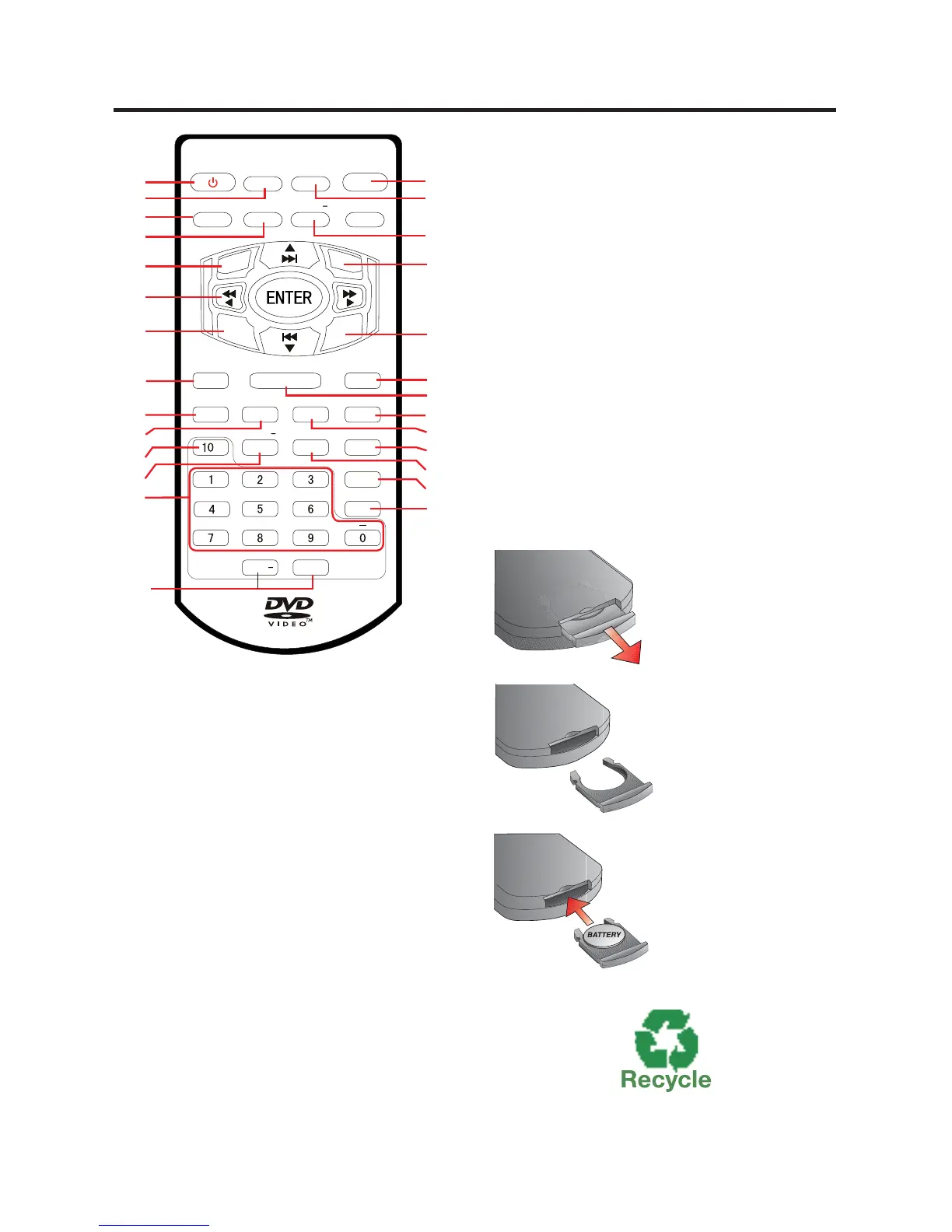
POWER MODE
MUTE
DIS P
EQ
T
IT
L
E
PBC
GOTO
RDM
AMS
SUB-T
LO C
ST
CLE AR
ZOOM
BAND
P/N
ANG LE P LAY
STOP
RPT
PROG
AUDIO
BACK
AB
VOL+
+
VOL
ME NU
SETU
P
SEEK+
SEEK
SLOW+
SLOW
1
15
16
20
21
19
18
22
23
24
25
26
27
17
2
5
4
7
6
10
12
14
8
9
11
13
3
Remote Control
1. POWER
2. MODE
3. DISP
4. EQ
5. SETUP
6. FAST REVERSE/
FAST FORWARD,
PREVIOUS TRACK/
NEXT TRACK,
UP/DOWN/LEFT/
RIGHT/ENTER
7. TITLE
8. ANGLE
9. GO TO
10. CLEAR
11. 10+ BUTTON
12. RPT/SEEK-
13. 0-9 NUMBER
BUTTONS
14. VOLUME UP/
DOWN
15. BACK
16. MUTE
17. SPEED +/-
18. MENU
19. PBC
20. STOP
21. PLAY
22. AMS/PROG
23. ZOOM
24. LOC/SUB-T
25. RDM/SEEK+
26. BAND/ P/N
27. ST/AUDIO
Changing the Battery
Turn the remote
over, then slide the
battery holder out
of the remote.
Insert battery into
battery holder with
positive side of the
battery facing up.
Insert battery
holder into the re-
mote control until
Dispose of All Batteries Properly
See page 8 for a detailed description of the button’s functions.


 To Next Page