EasyManua.ls Logo

Virtual Reality VRVD630 - DIN Rear Mount Installation Method; Parts; Verify Included Parts List

Virtual Reality VRVD630
28 pages
Print Icon
To Next Page IconTo Next Page
To Previous Page IconTo Previous Page
Loading...
10
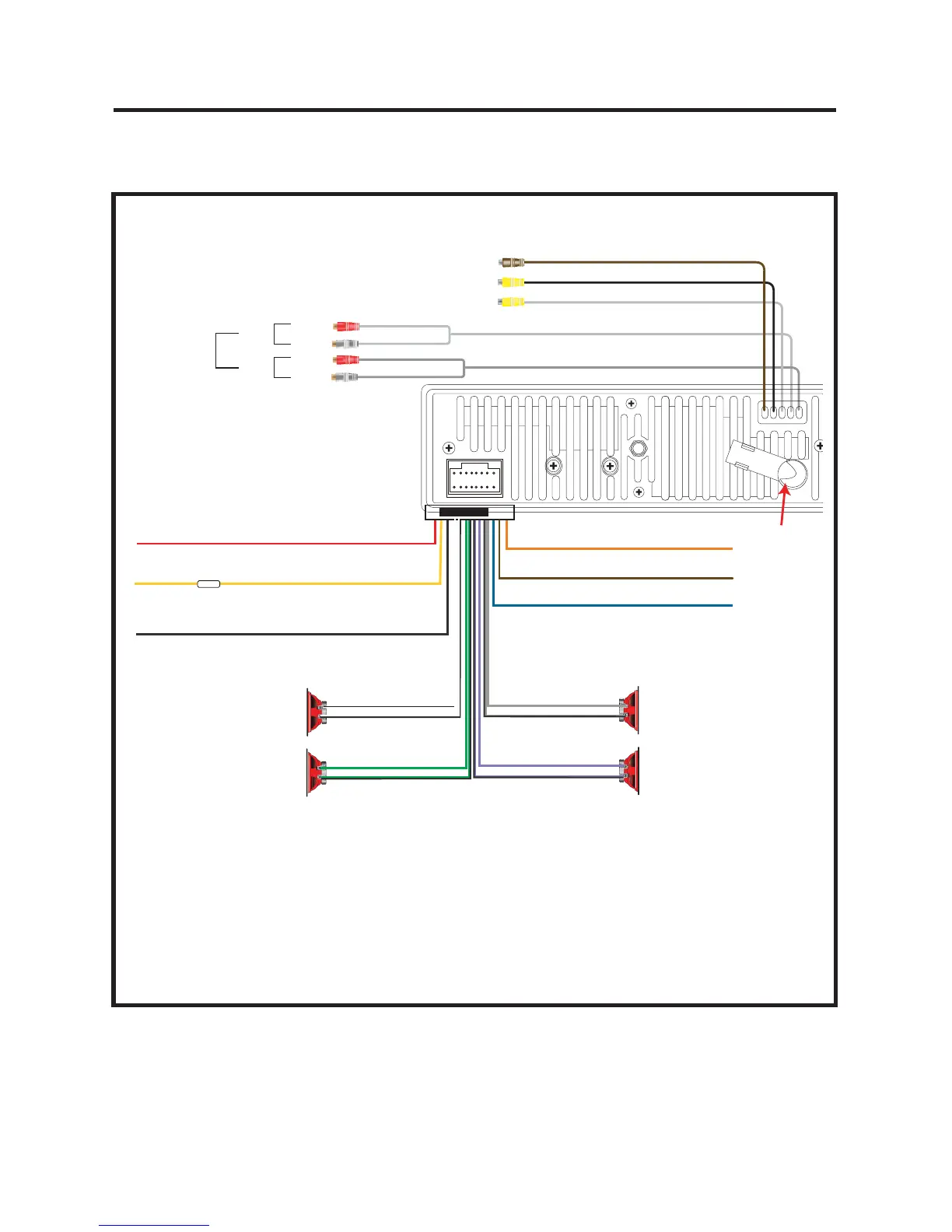
Wiring Connections
WHITE +
WHITE/BLACK -
GRAY +
GRAY/BLACK -
GREEN +
GREEN/BLACK -
VIOLET +
VIOLET/BLACK -
POWER ANTENNA OR AMPLIFIER
PARKING BRAKE
FUSE
ORANGE (+)
BROWN (-)
BLUE (+)
YELLOW (+)
MEMORY
REVERSE LIGHT
BLACK (-)
RED (+)
Connect YELLOW to battery or live + 12 Volts of power
Negative Ground -
12 Volt Negative -
Front Left
Front Right
Rear Left
Rear Right
IGNITION
RCA Line Out
Front
Rear
Rear Monitor Out
Left
Left
Right
Right
Subwoofer Out
Reverse Video In
Anten
n
• Before starting the installation, disconnect the negative battery cable
from the battery’s negative terminal.
)LMVYLÄUHSPUZ[HSSH[PVUVM[OL\UP[JVUULJ[[OL^PYPUN[LTWVYHYPS`THR-
ing sure the unit and the system work properly.
VRVD630

Related product manuals