9
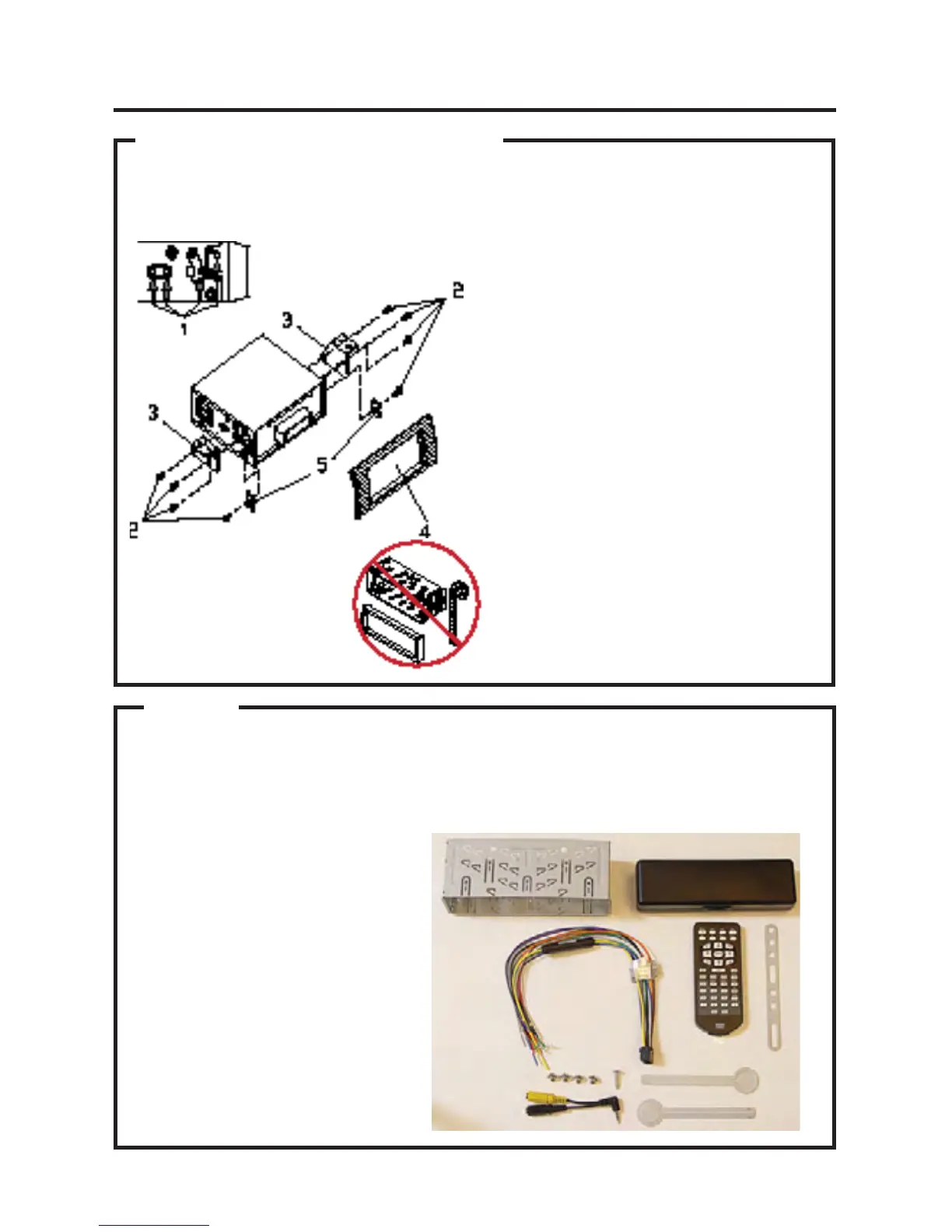
DIN REAR-MOUNT (Method B)
Installation using the screw holes on both sides of the unit.
1. Screw holes on the side of the unit.
2. Screws. Use either truss screws (5 x
TTVYÅ\ZOZ\YMHJLZJYL^Z_TT
depending on the shape of the screw
holes in the bracket.
3. Vehicle’s Factory Mounting Bracket
4. Dashboard or Console
5. Hook (Remove this part)
Note: The mounting sleeve, outer trim
ring, and the mounting strap are not
used for this method of installation.
Installation
PARTS
2 Keys
1 Mounting Sleeve
1 Sheet Metal Screw
1 Metal Support Strap
1 Mounting Bolt
1 Faceplate Case
1 1/8" Audio/Video Cable
1 Remote Control
Check All Included Parts
Open the VRVD630 box and remove all parts, then check all parts and compare them to
the parts list in the user manual. For replacement parts contact VR3 Customer Service at
customerservice@vr-3.com or call 1-800-445-1797.


 To Next Page