50
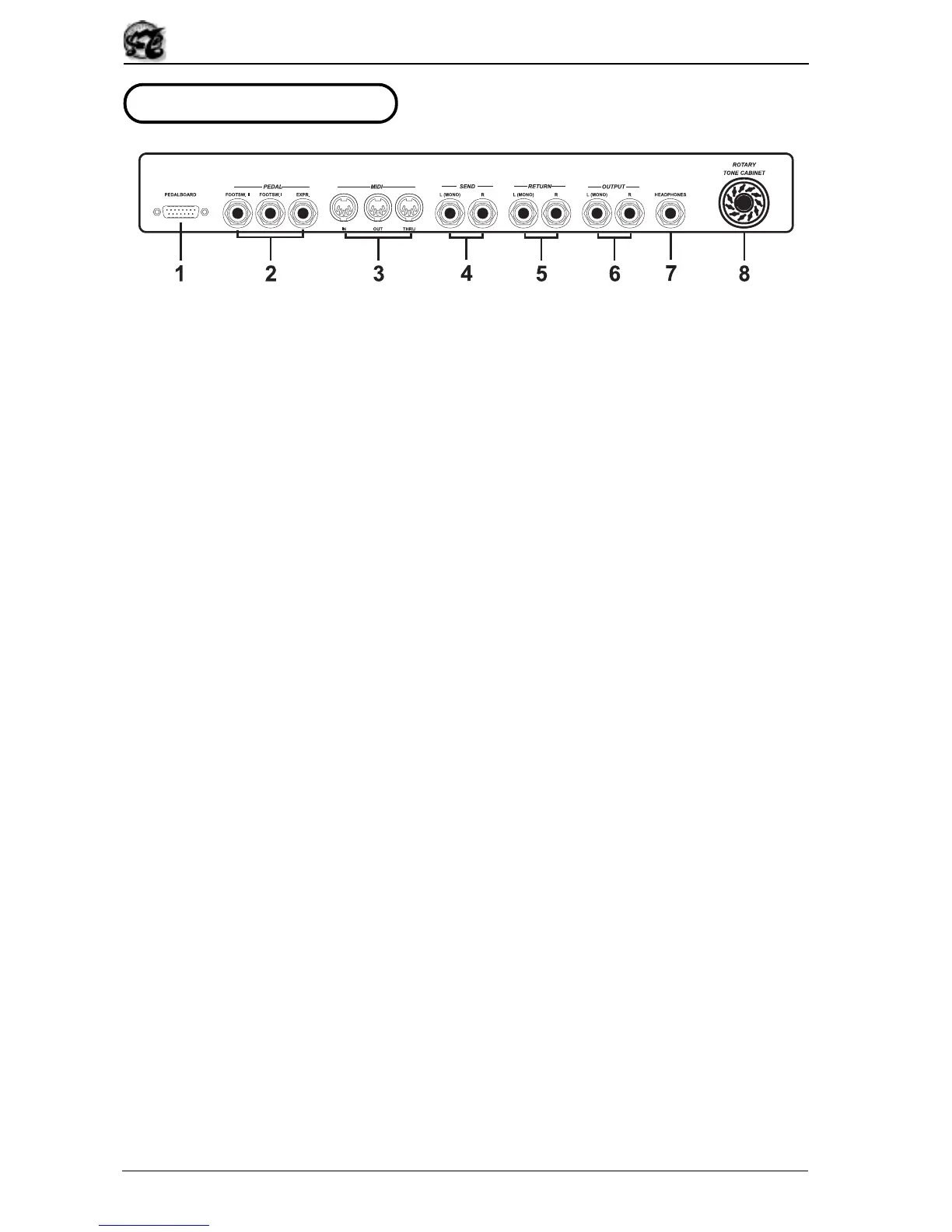
2.3 THE REAR PANEL
1. [PEDALBOARD] connector.
This connector allows connection of the optional pedalboard.
2. PEDAL [FOOTSW. I], [FOOTSW. II] and [EXPR.] jacks.
Two normally open footswitch pedals, to which a function can be assigned using the
system Utilities, can be connected to the [FOOTSW. I] and [FOOTSW. II] jacks, while the
[EXPR.] jack can be used to connect an expression pedal for control of the organ’s overall
volume.
3. MIDI [IN], [OUT] and [THRU] jacks.
These are five-pin DIN jacks for the exchange of MIDI data with remote MIDI units. The
MIDI [IN] connector allows receipt of the MIDI data delivered by a remote unit, the MIDI
[OUT] port allows sending of the MIDI data generated by the OB5, while the MIDI [THRU]
jack picks up the MIDI data received by the MIDI [IN] jack so that the data reaching the
OB5 can be transmitted as output.
4. SEND [L(MONO)] and [R] jacks.
You can use these jacks to send the signal generated by the OB5, in stereo format, to a
remote unit such as an effects processor, so that it can be processed with external effects.
If the receving device is monophonic, use the SEND [L(MONO)] jack only.
5. RETURN [L(MONO)] and [R] jacks.
These jacks can be used to receive the signal processed by a remote unit such as an
effects processor, to which you have sent the original OB5 signal by means of the SEND
L/R jacks. If the incoming signal is monophonic, use the RETURN [L(MONO)] jack only.
6. OUTPUT [L(MONO)] and [R] jacks.
These are general instrument outputs which send the audio signal in stereophonic form.
Connect an amplification system or a mixing bank to these jacks. If you have a monophonic
amplification system, use the [L(MONO)] jack only.
7. [HEADPHONES] jack.
A headphones set can be connected here.
8. [ROTARY TONE CABINET] connector.
As an alternative to the OB5’s internal Rotary effect, or a remote effects processor connected
to the SEND and RETURN jacks, you can use a real rotary tone cabinet which can be
connected to the 11 pin [ROTARY TONE CABINET] connecting.


 To Next Page