OB5
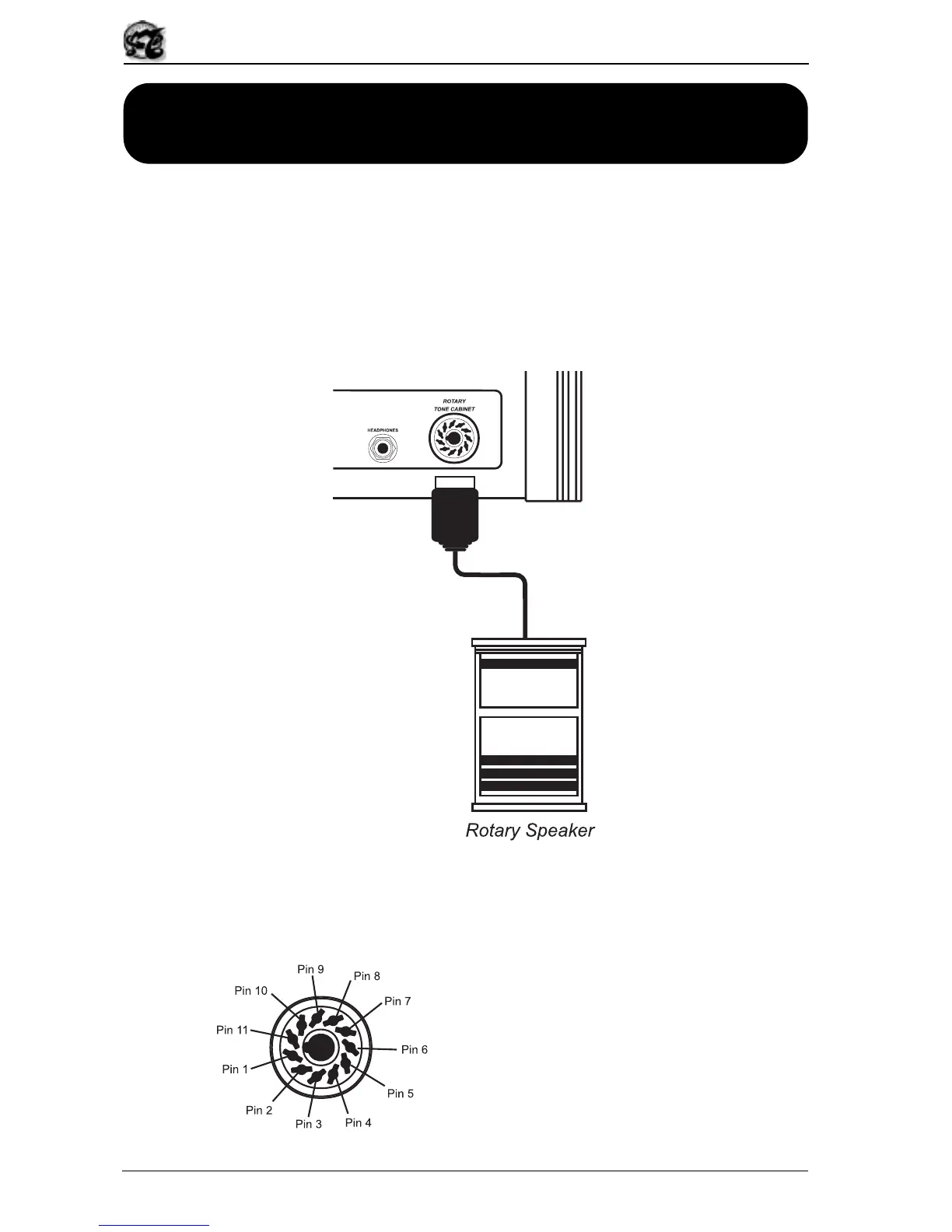
PIN 1: ROTARY OUT
PIN 2: N.C.
PIN 3: N.C.
PIN 4: GND AUDIO
PIN 5: GND
PIN 6: POWER ON/OFF CONTROL
PIN 7: FAST CONTROL
PIN 8: SLOW CONTROL
PIN 9: N.C.
PIN 10: N.C.
PIN 11: +24V IN
68
6. USING A REMOTE ROTARY TONE
CABINET
The OB5 allows you to connect a real rotary tone cabinet to the 11-pin rear jack [ROTARY
TONE CABINET], as an alternative to the internal ROTARY effect.
Thanks to its rotary speakers, this type of cabinet produces a very complex combination
of vibrato and tremolo, which changes with every harmonic and every note of the scale.
When a remote rotary tone cabinet is used, the internal Rotary effect will be disabled
automatically.
Before connecting the tone cabinet connector to the [ROTARY TONE CABINET] jack,
make sure that the pin layout of the connector is correct, to avoid malfunctions and
breakdowns. The jack on the OB-5 is wired as follows:


 To Next Page