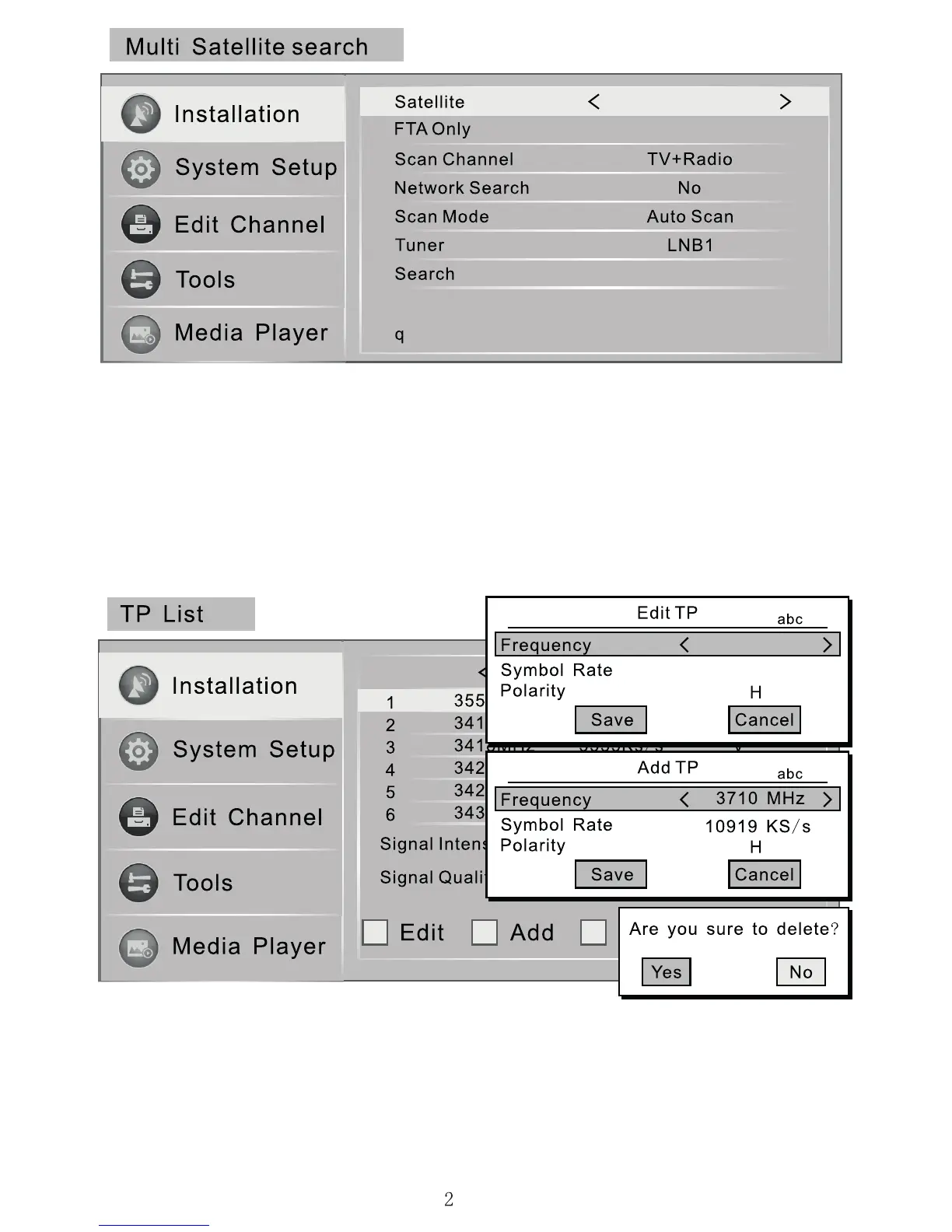
PLEASE NOTE This search mode is only used for motorised dishes.
Enter the "Multi Satellite Search" window. Press the "Left" and "Right" keys to
select a“Satellite”. Then change the search settings to match the satellites you
want to search for. (The available settings are the same as for “Single Satellite
Search”). Parameter information available from www.lyngsat.com or ysat.com
Before a Multi Satellite Search, you need to rst select the satellites you want
to searchfor in the "Satellite List" window. Press [OK] key to select the satellites
and they will be marked with a heart- shaped Icon.
If after searching you are still missing channels you want to view from a
satellite. You can enter the TP List menu to search by transponder. Select the
correct satellite using the arrow keys. You will then need to enter the frequency,
symbol rate and orientation of the transponder (these can be looked up on
sites like lyngsat.com). You can then search, edit, add or delete using the
indicated colour key.
Yes
(1/1) Astra 2E
Astra 1 Hotbird
10714
22000 KS/s


 To Next Page