EasyManua.ls Logo

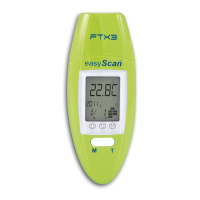
VISIOMED EASYSCAN FTX3 - User Manual

VISIOMED EASYSCAN FTX3
39 pages
Go to English
Print Icon
To Next Page IconTo Next Page
Loading...
Visiomed EasyScan User Manual V.4-102008 1/39
THERMOMETRE PARLANT 6
EN
1
FRONTAL ET AURICULAIRE
MODELE : EASYSCAN FTX3
MANUEL
D’UTILISATION
FRANCAIS
A
LIRE IMPERATIVEMENT
AVANT UTILISATION
0
482

Questions and Answers

  • J
    Jeremy CruzAug 13, 2025
    What to do if VISIOMED EASYSCAN FTX3 shows 'ErrE' on screen?
    • J
      James SmithAug 14, 2025
      If the VISIOMED Thermometer displays 'ErrE' on the screen, it indicates that the ambient temperature is out of the acceptable range. Avoid using the thermometer in extremely hot or cold environments.
  • K
    Kimberly DuarteAug 17, 2025
    What does 'ErrS' mean on my VISIOMED Thermometer?
    • S
      Sherri BowenAug 17, 2025
      If the VISIOMED Thermometer displays 'ErrS' on the screen, it indicates a sensor error. Avoid using the thermometer in extreme temperatures.
  • W
    william94Aug 20, 2025
    Why is there a battery symbol on my VISIOMED Thermometer LCD?
    • E
      Elizabeth GriffithAug 20, 2025
      If your VISIOMED Thermometer shows a battery symbol on the LCD, it means the battery is low. Replace it with a new one.
  • A
    Amber MooreAug 25, 2025
    What to do if VISIOMED Thermometer displays 'Lo' on screen?
    • C
      Carolyn FowlerAug 25, 2025
      If your VISIOMED Thermometer displays 'Lo' on the screen (result below 32°C or 89.6°F), make sure you are pointing the thermometer correctly at the eardrum or forehead, following the instructions in the User’s Manual.
  • T
    Thomas MartinezAug 28, 2025
    What does 'Hi' mean on my VISIOMED Thermometer display?
    • D
      Diana BartonAug 28, 2025
      If your VISIOMED Thermometer displays 'Hi' on the screen (above 42.9°C or 109.3°F), double-check your measurement technique. Refer to the User’s Manual for the correct measurement procedure.
  • T
    thompsonstephanieSep 1, 2025
    How to fix a VISIOMED Thermometer that shows no response?
    • A
      atkinsamySep 1, 2025
      If your VISIOMED Thermometer is not responding, it could be due to a depleted battery or incorrect battery polarity. Try replacing the battery with a new one, ensuring it's inserted with the correct polarity.
  • B
    barnescatherineSep 5, 2025
    What to do if VISIOMED EASYSCAN FTX3 Thermometer shows 'ErrU' on screen?
    • S
      Sharon WebbSep 5, 2025
      If the VISIOMED Thermometer displays 'ErrU' on the screen, it means it cannot measure. Ensure you follow the steps in the User’s Manual for proper use.
  • L
    Lindsey WatersSep 8, 2025
    What does 'ErrL' mean on my VISIOMED EASYSCAN FTX3 Thermometer?
    • R
      rsalazarSep 8, 2025
      If the VISIOMED Thermometer displays 'ErrL' on the screen, it indicates that the battery is low. Replace the battery.

Summary

Safety Precautions

Warning and Symbol Guide

Explains warning marks, symbols, and their meanings for user safety.

General Usage Warnings

Covers temperature limits, probe care, child safety, and general operational warnings.

Safety Notices and Recommendations

Important Safety Notices

Details critical notices regarding pain, ear issues, wet ears, and battery safety.

Usage Recommendations

Provides advice on product usage, cleaning, and environmental exposure.

Standard List

Introduction and Body Temperature Basics

Product Introduction

Introduces the EasyScan FTX3 thermometer and its key features.

Temperature Reading Diagnostics

Explains the color-coded LED indicators for temperature status.

Understanding Body Temperature

Discusses normal body temperature variations and influencing factors.

Body Temperature Measurement Guide

Normal Temperature by Age

Provides a table of normal body temperatures based on age groups.

Proper Thermometer Usage

Details correct procedures for ear and forehead temperature measurement.

Temperature Taking Hints and Functions

Temperature Taking Hints

Offers advice for accurate temperature readings, considering ear and environmental factors.

Main Functions Overview

Lists key features like date/time display, measurement ranges, LED status, and storage.

Device Description and Display

Unit Components Identification

Labels and identifies the physical parts of the EasyScan FTX3 thermometer.

LCD Display Indicators

Explains the various icons and signs shown on the thermometer's LCD screen.

Measurement Preparation and Procedure

Pre-Measurement Suggestions

Lists essential steps before taking temperature measurements for accuracy.

Measurement Process

Details the steps for ear and forehead measurements and result display.

Setting and Configuration

Clock and Standby Mode

Explains how to view time/temperature and activate voice prompts.

Setup Mode Operations

Guides users through setting the clock, date, and language.

Memory, Battery, and Maintenance

Memory Mode Access

Describes how to access and scroll through stored measurement records.

Battery Replacement Procedure

Instructs on how to safely replace the device's battery.

Maintenance, Storage, and Calibration

Covers cleaning, proper storage, and calibration information for the thermometer.

Troubleshooting and Specifications

Common Troubleshooting Guide

Lists common issues, checklists, and countermeasures for the thermometer.

Technical Specifications

Details the product's technical data, including ranges, dimensions, and power.

Warranty Information

Waste Disposal Information

Manufacturer and Contact Details

VISIOMED EASYSCAN FTX3 Specifications

General IconGeneral
Response Time1 second
DisplayLCD
Power Source2 x AAA batteries
Automatic Shut-offYes
Memory32 readings
Fever AlarmYes
TypeInfrared thermometer
Measurement Range32.0°C to 42.9°C
Accuracy±0.2°C
Measurement Distance1 to 5 cm

Related product manuals