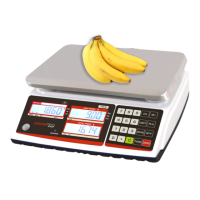
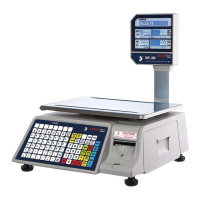
The TVP-B/TVP-P series of price computing scales are compact, reliable, and highly accurate devices designed for various weighing and pricing applications. These scales are equipped with an LCD display featuring white LED backlighting, offering different backlight operation modes for enhanced visibility.
Function Description:
The primary function of these scales is to accurately weigh items and compute their price based on a set unit price. They support unit conversions between kilograms (kg), pounds (lb), and ounces (oz). A key feature is the ability to store up to 10 indirect PLU (Price Look-Up) values, allowing for quick recall of frequently used unit prices. The scales also include accumulation and change functions, which are crucial for retail environments. The accumulation function allows for summing up multiple weighing operations, while the change function helps calculate the return amount after a transaction. An auto unit price clear operation simplifies workflow by automatically clearing the unit price when the scale returns to zero. For connectivity, a standard RS-232 output is integrated, enabling connection to receipt and label printers.
Important Technical Specifications:
The TVP-B/TVP-P series offers different models with varying capacities:
- TVP-12B/TVP-12P: 12lb / 6kg / 160oz capacity with 0.002lb / 0.001kg / 0.05oz readability.
- TVP-30B/TVP-30P: 30lb / 12kg / 480oz capacity with 0.005lb / 0.002kg / 0.1oz readability.
- TVP-60B/TVP-60P: 60lb / 30kg / 960oz capacity with 0.01lb / 0.005kg / 0.2oz readability.
All models feature a maximum of 6000 divisions and support lb/oz/kg weighing units. The display is a 0.59-inch/15mm digit LCD with white LED backlight. The platter size for bench models is 8 x 10.5 inches / 204 x 265mm. The housing is made of ABS plastic with a stainless steel pan.
The scales operate within a temperature range of 14°F to 104°F (-10°C to +40°C). Power is supplied via an AC Adaptor (12V/500mA) and a rechargeable 6V/3.2Ah battery, providing approximately 60 hours of battery life (without backlight). The keypad consists of 20 membrane keys.
Dimensions for bench models are 10.5 (W) x 12 (D) x 4 (H) inches / 265 (W) x 313 (D) x 108.8 (H) mm, with a gross weight of 9lb (4.1kg). Pole models have dimensions of 11 (W) x 14 (D) x 18 (H) inches / 288 (W) x 367 (D) x 479.8 (H) mm, with a gross weight of 9.9lb (4.5kg). The scales are NTEP certified (Certificate No. 19-038).
Usage Features:
- Power ON/OFF: The power switch is located below the right side of the scale. Pressing it turns the scale on, initiating a self-test. Pressing it again turns the scale off.
- Zeroing: The ZERO key returns the display to zero. This function is obsolete if the weight on the scale exceeds 2% of its full capacity.
- Tare Function: The TARE key subtracts the weight of a container, switching the scale to net mode. This can be done by placing the container and pressing TARE, or by pre-entering a known tare weight using numeric keys. The PT indicator illuminates when pre-tare is active.
- Unit Price Setting: Unit prices are set using numeric keys. The set unit price is displayed in the UNIT PRICE window, and the total price is shown in the TOTAL PRICE window. The 'C' key clears the previous unit price.
- Unit Conversion: The UNIT key cycles through kg, lb, and oz, with the corresponding indicator illuminating.
- Accumulator Operation: The scale can accumulate data manually by pressing the M+ key. This function can be enabled via parameter settings (F11-5232 > ñodE > EPSO). After weighing an item, pressing M+ adds its value to the total, displayed as "total x".
- Account Operation (Change Function): Enabled via parameter settings (F12 CHANGE > on). After accumulation, pressing the CH key displays the summed price in the WEIGHT window. Entering the paid amount via the keyboard shows it in the Unit Price window, and the change due appears in the Total Price window. The TARE key returns to normal weighing mode and clears memory, while the ZERO key returns without clearing memory. This function can also be used without prior accumulation, where the summed price is the current total price.
- Unit Price Memory (PLU): The scales can store 10 unit prices. To save a unit price, hold the PLU key for 3 seconds after entering the price, then select a memory location (0-9). To load a stored unit price, press the PLU key, then select the desired memory location (0-9).
- Backlight Control: In normal weighing mode, pressing and holding the backlight key (often combined with another key) displays backlight settings. The M+ key cycles through "Auto" (on when in use or weight is not zero), "on" (always on), and "OFF" (always off).
- Automatic Unit Price Clear: The SAVE key toggles this function. When the SAVE indicator is off, the unit price automatically clears when the scale returns to zero. When the SAVE indicator is on, this function is disabled.
- Commodities Without Weighing (QTY mode): Numeric keys can be used to input a unit price. Pressing the QTY key enters QTY mode, allowing the user to input a quantity in the weight window, and the total price will be automatically calculated. Pressing QTY again returns to normal weighing mode.
- RS-232 Output: The scales have a standard RS-232 output for connecting to DEP-50 receipt printers or DLP-50 label printers. Parameter settings (F11 > RS232 > mode > EP50/LP50) allow selection of the printer type.
- Parameter Settings: Accessing the parameter menu involves turning on the scale and pressing and holding the TARE key during self-test. After a brief "Pn" display, enter the default PIN "0000" (by pressing '0' four times), then press TARE to confirm. The menu allows configuration of various settings, including protocol type (GoDEX, CAS, POS, NCI-ECR, NCI-General, TEC, Easy Weigh), RS232 function (enable/disable, continuous data transmission, stable data sending), baud rate (1200 to 115200), and data bit/parity/stop bit settings.
Maintenance Features:
- Battery Charging: When the BATT symbol illuminates, the battery is low and requires charging. If charging is not done, "BAT LO" will display every 5 minutes, and the scale will shut down after 2 hours to protect the battery. The LED on the left side of the total price display indicates charging status: red for charging, green for full charge. It's recommended to charge for at least 1 hour after the LED turns green for a full charge.
- Level Adjustment: Before use, ensure the bubble is in the middle of the level indicator and adjust if necessary.
- Overload Warning: The scale displays "-OL-" and emits a beeping sound if overloaded. Remove the item immediately to prevent damage to the load cell.
- Error Messages: The manual provides a list of error messages and their solutions:
- Err 4 (Zero setting error): Zero setting range exceeded on startup. Ensure the platform is empty.
- Err 6 (A/D value out of range): Ensure the platform is empty, the pan is installed correctly, and check load cell connectors.
- Err 15 (Enter gravity error): Gravity range (0.9~1.0) issue.
- Err 19 (Initialize zero error): Calibration needed.
- --OL-- (Over range): Remove the load and recalibrate.
- FA. L (Calibration Error): Recalibrate.
- bA Lo (Battery low): Recharge battery and check voltages.

 Need help?
 General

 To Next Page