4
Section 7: Removing VitalPatch
Section 8: Return the Monitoring Equipment
Before removing the VitalPatch, disconnect the VitalPatch
from the VistaPhone. See Section6onPage3.
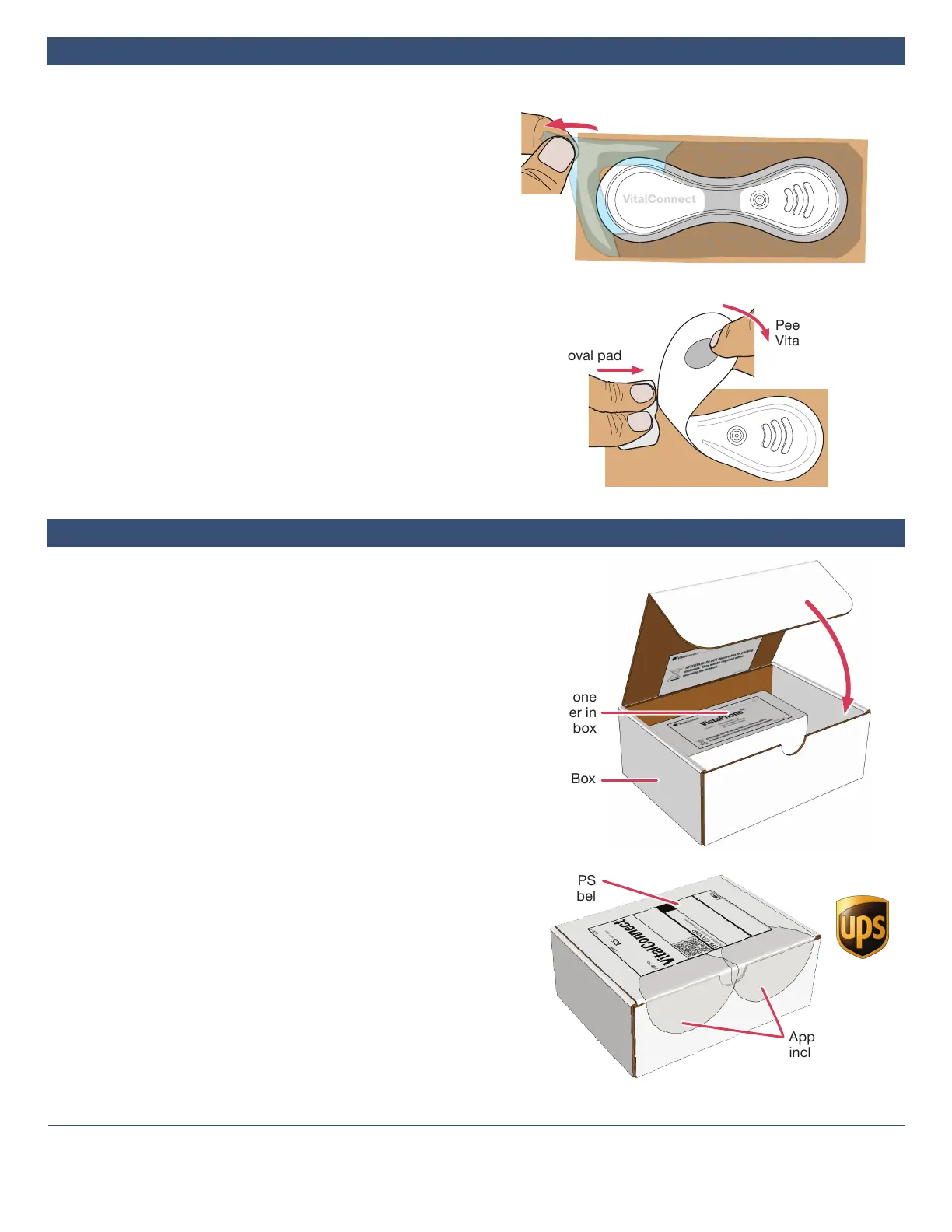
1. If Overlay Was Used, Peel off
a. Grasp a corner of the overlay and peel it o the skin.
b. Continue pulling the overlay o. Stretch the overlay
horizontally to help release it from the skin. The
VitalPatch may pull o with the overlay.
2. Peel off VitalPatch
a. Wipe an adhesive removal pad along the edge of the
VitalPatch.
b. Grasp a corner of the VitalPatch and peel it o the skin
while sweeping the adhesive removal pad underneath.
c. Dispose the VitalPatch according to local laws for routine
electronic waste.
d. Clean skin with an alcohol pad and allow to dry.
3. Apply New VitalPatch
If your monitoring period is longer than 7 days, replace the
VitalPatch. See Section2onPage1. If your monitoring
period is nished, see Section8below.
IMPORTANT: The monitoring equipment must be returned
immediately upon completion of the monitoring period.
Failuretoreturnmayresultindelayeddeliveryoftest
resultsandanadditionalbillforthecostofthedevice.
Use the following procedure to return:
a. Discard used VitalPatch biosensors, alcohol wipes, and
adhesive removal pads.
b. Place the phone, charger and charge cable in the box
labeled “VistaPhone.” If you have unused VitalPatch
biosensors (in their original, undamaged pouches), place
them in the box labeled “VitalPatch.”
c. If you received the monitoring kit from a hospital or your
doctor’s oce, return items to that location.
d. If the monitoring kit was shipped to you at home:
– Place the VistaPhone box (and the VitalPatch box if
returning an unused VitalPatch biosensor) in the
original shipping box.
– Close the box and tuck in the ap. Seal the box
closed using the provided clear circular stickers.
– Apply the UPS return shipping label to the shipping
box.
– Drop o the shipping box at any UPS shipping
location. To schedule a pick-up, contact UPS at
1-800-742-5877. Inform UPS that you have a pre-
paid label.
– Save the tracking number from the return UPS label
for your records.
Sweep adhesive
removal pad
Return To
Peel O
VitalPatch
Grasp a corner of the overlay and
stretch horizontally to remove
VitalConnect, Inc.
224 Airport Parkway, Suite 300, San Jose, CA 95110 | (408) 963-4600 | www.vitalconnect.com | support@vitalconnect.com
© 2021 VitalConnect. A list of our trademarks can be found at www.vitalconnect.com. All other marks may be trademarks of their respective companies.
Put VistaPhone
and charger in
this box
Tuck in
the ap
Shipping Box
Apply UPS
Return Label
Apply the
included clear
circular stickers
to seal package


 To Previous Page
 Loading...