3
Check VitalPatch Hours
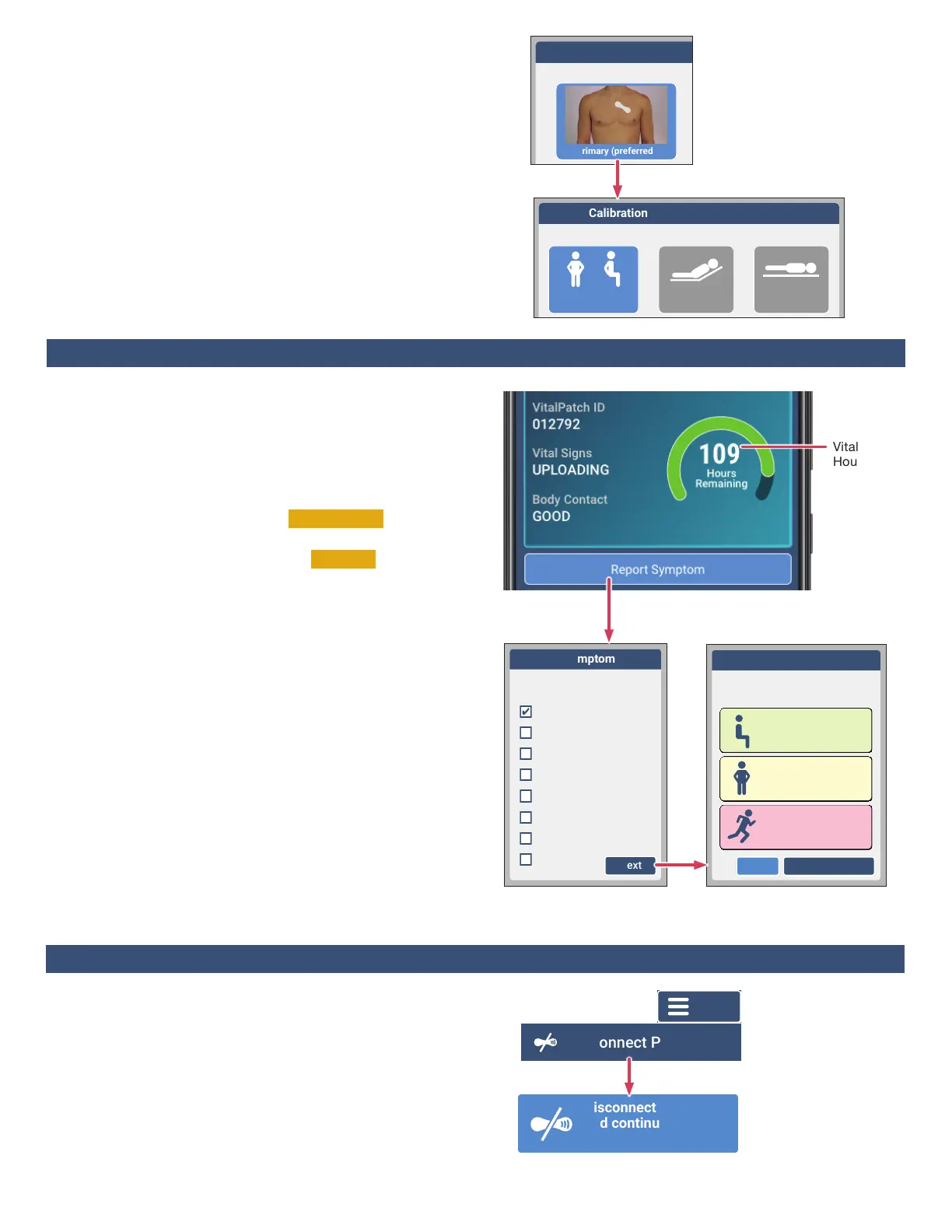
To check the status of your VitalPatch, look for the “hours
remaining” on the screen. Replace the VitalPatch when it
expires (or as directed by your care team).
Check VitalPatch Status
• If the screen shows Vital Signs Not Uploading , make sure
the VistaPhone and VitalPatch are near each other.
• If the screen shows Body Contact
Not Good , check that
the VitalPatch is adhered to the skin. If the patch appears
to have lifted o, contact Customer Support (1-800-219-
3000) for additional guidance.
Report Symptoms
If you feel a symptom, do the following:
a. When it is safe to do so, unlock the VistaPhone and tap
the ReportSymptom button.
b. From the list of options, tap one or more symptom(s) to
select. Tap Other if the symptom is not listed.
Tap Next.
c. If you selected Other as a symptom, you will be asked to
enter a description of the symptom(s). Enter the
information and tap Next.
d. Tap the activity level (Low, Medium or High) that you
experienced when the symptom occurred. Tap Send
Symptom when complete.
2. Select Patch Position
Select the Primary position image and then tap Next.
3. Select Body Position
• StandingorSitting (preferred) — Sit as upright as
physically capable.
• Elevated — Lie on a bed elevated at an angle of 30°.
• Supine — Lie down as at as possible.
Remain still in the current body position and tap Calibrate.
Conrm selections when prompted.
After calibration, the screen will display a dashboard with
VitalPatch and connection status.
VitalPatch
Hours
Posture Calibration
Step 1 Select Patch Position
Primary (preferred)
Posture Calibration
Step 2 Select Current Body Position
Bed is Flat
Supine
Bed Angle 30°
Elevated
(preferred)
Standing or Sitting
Anxious/Panic
What did you feel?
(select one or more)
Heart racing
Heart fluttering
Heart skipping beats
Shortness of breath
Dizzy or lightheaded
Chest pain
Fainted
Other
Next
Anxious/Panic
What was your activity level
when you felt the symptom?
Low
Sitting or resting
Medium
Standing or moving
High
Exercising
Back Send Symptom
Section 5: Daily Activities During Monitoring
Each VitalPatch will last up to 7 days. If your monitoring
period is longer than 7 days, replace the VitalPatch as
follows just prior to expiration:
a. Tap the Menu button and then tap DisconnectPatch.
b. Tap the DisconnectVitalPatchandcontinue
monitoringpatientbutton.
c. Remove the VitalPatch. See Section7onPage4.
d. Apply a new VitalPatch. See Section2onPage1.
Section 6: Replacing the VitalPatch
Disconnect VitalPatch
and continue
monitoring patient.
Menu


 To Next Page
 Loading...