Need help?
Do you have a question about the VitalConnect VitalPatch and is the answer not in the manual?
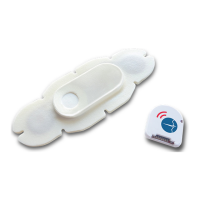
Details the orientation of the Logo and Battery sides of the VitalPatch device for correct patient placement.
Ensures hands are clean and dry before handling the VitalPatch device, recommending gloves for handling.
Prepare the application site on the upper left chest or below the sternum on the rib cage. Ensure the area is clean and dry.
Tear open the pouch carefully to remove the VitalPatch device without pressing the Power Button.
Press the Power Button and look for a temporary green light to confirm the device is powered on.
 General
| Device Type | Wearable biosensor patch |
|---|---|
| Category | Medical Equipment |
| Connectivity | Bluetooth Low Energy (BLE) |
| Water Resistance | IP67 |
| FDA Cleared | Yes |
| CE Marked | Yes |
| Sensors | ECG, accelerometer |
| Data Collected | Heart rate, respiratory rate, skin temperature, activity, posture |
| Data Storage | On-body storage and cloud storage |
| Intended Use | Remote patient monitoring, clinical trials, and general health monitoring |
| Functions | Continuous monitoring, data transmission |

 To Next Page