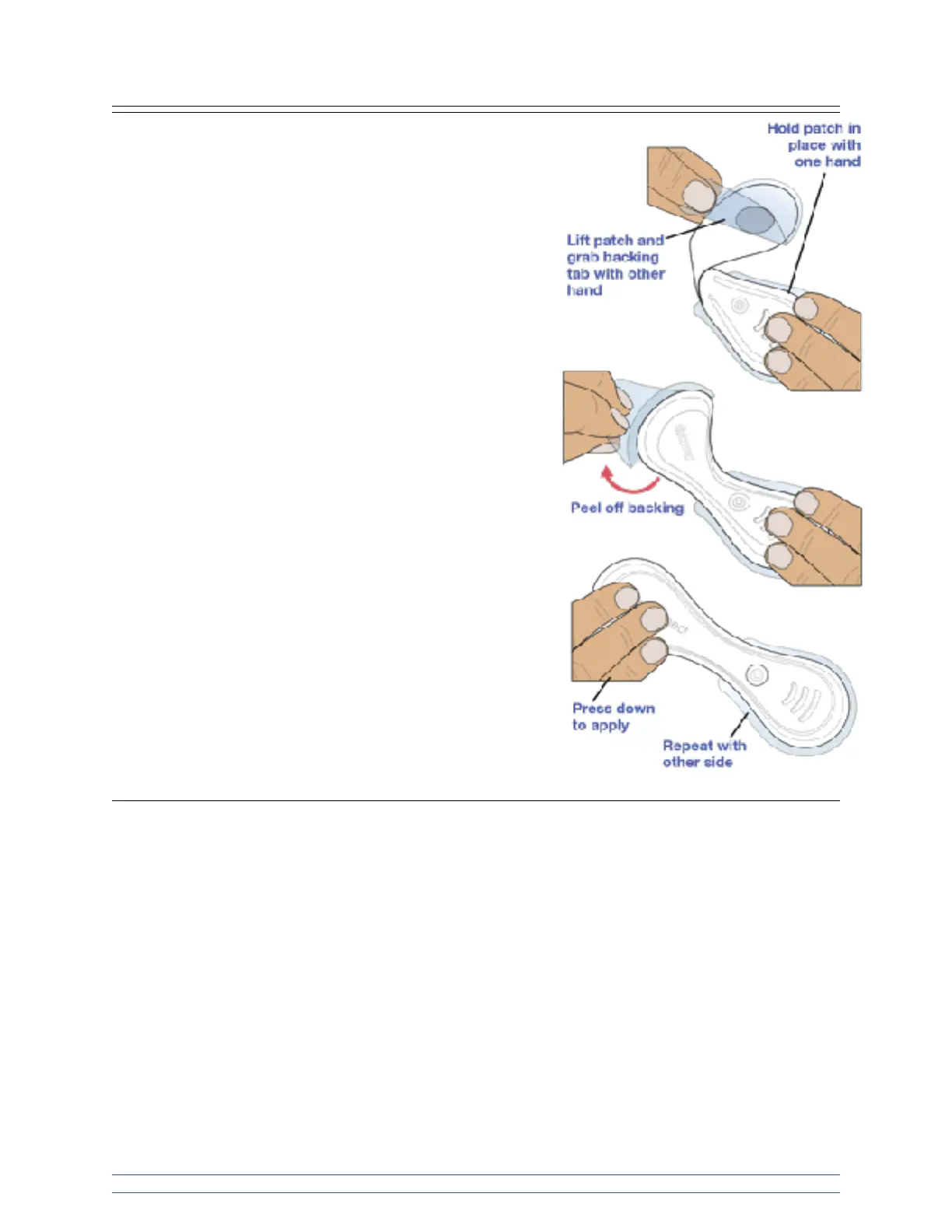
Step 5: Apply VitalPatch to body.
Hold one end of the VitalPatch against the chest. Lift the other
side and grab the adhesive backing tab located near the center
of the VitalPatch. Without touching the adhesive, pull the tab to
remove the adhesive backing and press the VitalPatch down to
apply. Repeat this process to apply the other side of the
VitalPatch.
Press down on both ends of the device to ensure it is well
adhered to skin. Avoid exercise for at least 30 minutes after
application.
Step 6: Connect VitalPatch.
Refer to your software application provider’s user manual for more instructions on how to connect to the
VitalPatch device. A connection is required to establish a start time in the data file. For calibrating your
VitalPatch device, refer to your software application provider’s user manual.
Should the software application indicate that a “Patch off” event has been detected but the patch has not
been removed – check if the patch has lifted from the skin. If it has noticeably lifted, remove the patch and
replace with a new one following the Skin Preparation and Application steps described previously.
Additionally, if multiple “Patch Off” notifications are received in a short period of time, remove the patch
and replace with a new one.
VitalPatch Removal and Disposal
Disconnect the VitalPatch device according to your software application provider’s user manual prior to
removing the device from the patient.


 To Next Page