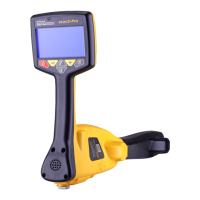
Step 2:
Now take the 8-pin ninety-degree
connector and plug it into the
accessory socket on the vLoc3
receiver.
Step 3:
Push the provided cable retainer,
over the blade and cable so that
the cable is secured.
Removing the vLoc3-MLA Accessory
Step 1:
To remove the MLA accessory
rstremovethecableretainerby
pulling it over the vLoc3 receiver
blade. Now unplug the accessory
from the vLoc3 receiver accessory
socket.
Step 2:
To remove the accessory from
the blade it is necessary to
simultaneously push the two-
yellow retaining buttons positioned
on both sides of the accessory. It is
best to use the thumb and middle
ngertodothis.Withthebuttons
depressed pull the accessory from
the blade of the vLoc3 receiver.
rrobertson@wctproducts.com | 13309 Beach Ave. Marina del Rey, CA 90292
Phone: 800-WCT-PROD (928-7763) | Fax: 310-306-9343 | www.wctproducts.com



 To Next Page
 Loading...