4
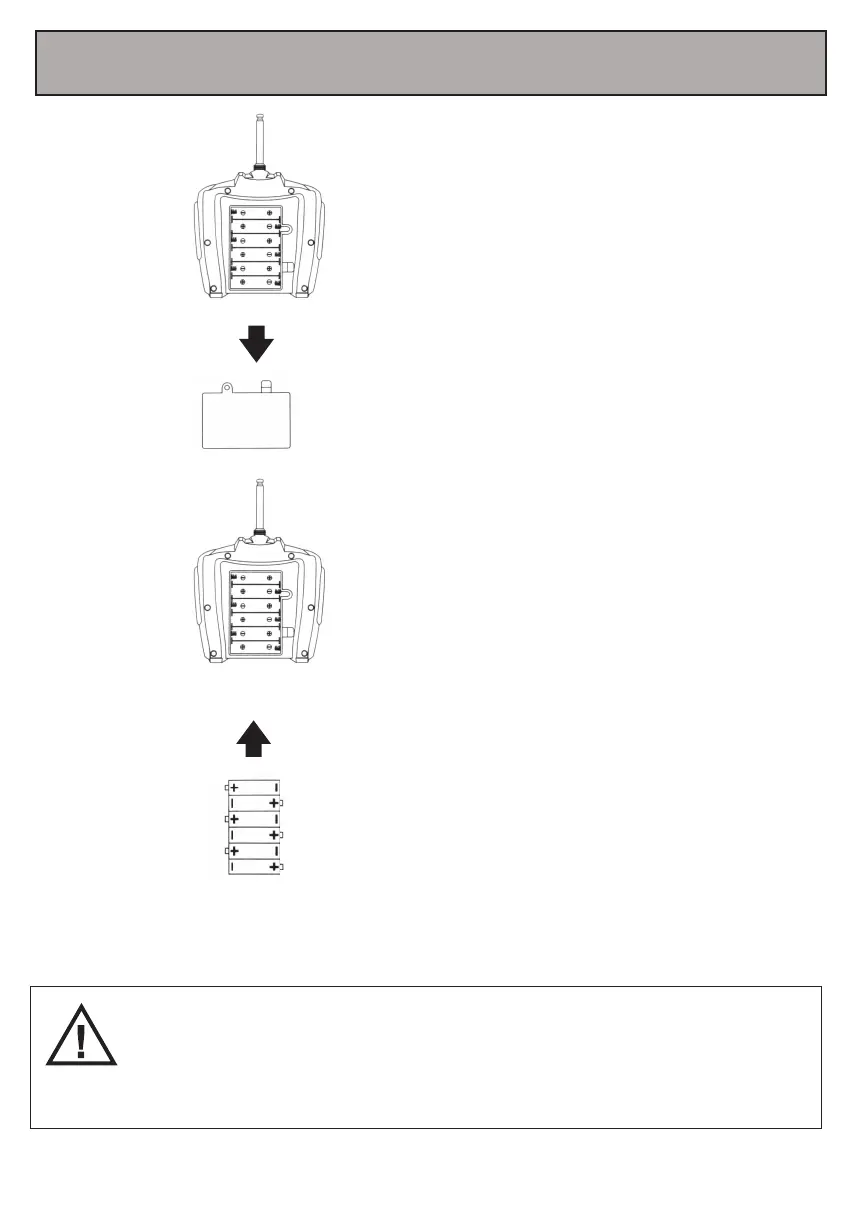
Screw the antenna onto the top of the
remote control .Then, use a screwdriver
to open up the battery compartment
located on the rear of your remote
control.
Insert 4 AA 1.5V batteries (not
included), making sure that the
batteries are inserted with the
correct polarity (+,-) as displayed in
the battery compartment.
Once the batteries are inserted, put
the battery compartment cover back
on the battery compartment, and
use a screwdriver to close it securely.
-Do not mix rechargeable and non-rechargeable batteries.
-Do not mix old and new batteries or different types of batteries.
-Remove exhausted batteries and dispose of them based on the rules of your local
municipality.
-Remove the batteries from your remote control if it will not be in use for an extended
period of time.
5. Inserting Batteries Into Your Remote Control
4“AA”Batteries
(Not Included)



 To Next Page