Available system settings:
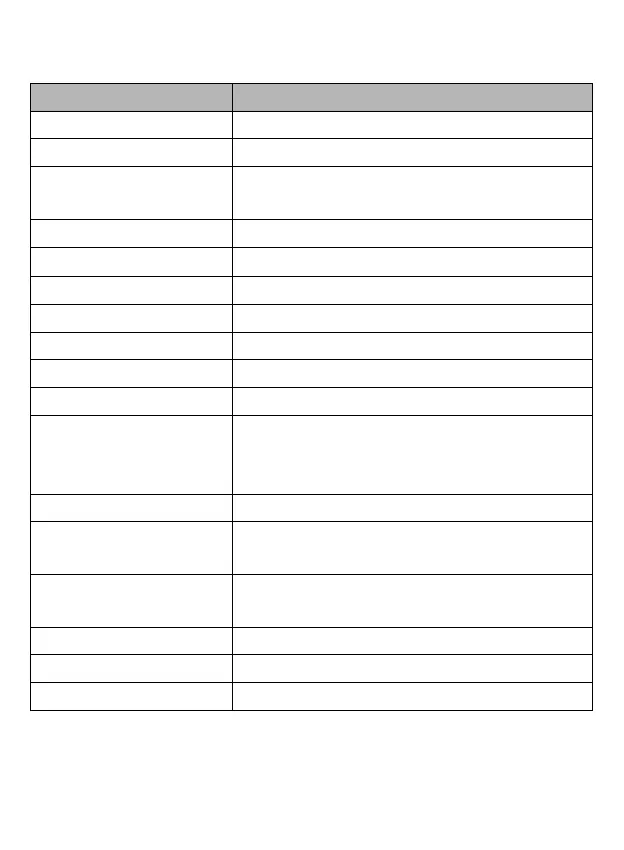
Sub-menu Menu content
Image Rotation Turn On/Turn Off (Press OK to switch)
Wi-Fi Turn On/Turn Off (Press OK to switch)
Wi-Fi Information
Tap to open the Wi-Fi name and password of
camcorder
Reset Wi-Fi Confirm /Cancel
Light Source Frequency Auto/50Hz/60Hz
LED Indicator (Night vision) Turn On/Turn Off (Press OK to switch)
Auto Screen Saver Turn Off/30s/1min/2min
Auto Power Off Turn Off/3min/5min/10min
Button prompt Sound High/Middle/Low/Turn Off
Startup Music Open
/Close
Language
Simplified Chinese/traditional
Chinese/English/Japanese/Korean/Russian/German/
French/Italian/Spanish/Portuguese/Thai
Time Format YYYY/MM/DD MM/DD/YYYY DD/MM/YYYY
Time Set
Set up the time of the camcorder
Hour/minute/second
Date Set
Set up the time of the camcorder
year/month/day
Format (SD Card) Format/Cancel
Device Info Product firmware version
Factory Reset Confirm/Cancel



 To Next Page