Need help?
Do you have a question about the Vivitek Qumi Q38 and is the answer not in the manual?
Legal statement regarding ownership and specifications of the projector.
Manufacturer's warranty, revision rights, and limitations of liability.
Acknowledgment of HDMI trademark and its licensing.
Explains symbols indicating notes, cautions, and warnings for safe operation.
Provides essential safety guidelines for projector operation and placement.
Guidelines for proper airflow around exhaust vents and avoiding obstructions.
Explains the manual's purpose, printer-friendly format, and printing suggestions.
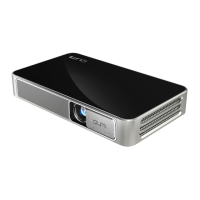
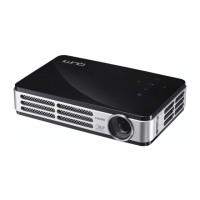
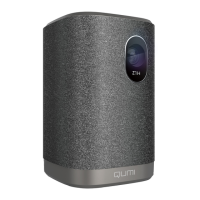
Provides a visual guide to the projector's front, top, and right views.
Lists included accessories like remote, power adapter, documentation, and HDMI cable.
Details the layout and functions of the projector's remote control buttons.
Instructions for battery replacement and information on the remote's operating range.
Lists external devices and peripherals required for connecting to the Qumi projector.
Guide to connecting HDMI-compatible devices like cameras, computers, and players.
Instructions for connecting USB flash drives, keyboards, mice, or microSD cards.
How to connect earphones or speakers via audio-out or Bluetooth.
Steps to charge the Qumi projector and explanation of LED indicator meanings.
Procedures for powering the projector on and off using the power button.
How to use the kickstand to set the projector's angle for optimal projection.
Instructions for mounting the projector on a tripod using the camera mount hole.
Introduces the Home Screen as the main interface for accessing projector functions.
Explains the central panel of the Home Screen for accessing key features.
Describes app categories for entertainment, work, and device connection.
Covers managing applications and accessing the app store.
Overview of various system settings like Display, Sound, WiFi.
Explains the panel for frequently used applications and settings.
Explains icons on the top right indicating connectivity status.
How to view and manage images from connected storage.
How to play video files from connected storage.
How to play audio files from connected storage.
How to open and manage document files from connected storage.
Instructions for managing app downloads and updates.
How to use the built-in web browser.
How to manage and operate installed applications.
Guide to setting up and managing wireless network connections.
Explains wireless mirroring using AirPlay, Google Cast, and Miracast.
Details the projector's On-Screen Display menu and its sub-menus.
Table summarizing settings and their ranges within the OSD menu.
Step-by-step guide to changing the projector's OSD language.
Instructions for selecting the video input source (HDMI, Android).
How to adjust display settings like contrast, brightness, and color.
Guide to adjusting audio settings like treble and bass.
How to adjust color temperature and RGB parameters for image quality.
Instructions for changing the image aspect ratio (e.g., 4:3, 16:9).
How to select projection methods (Front, Ceiling, Rear).
Guide to adjusting keystone correction for image alignment.
Overview of device, preferences, accessories, and personal settings.
Steps to reset the projector to its original factory settings.
How to view projector status like LED hours and software version.
Instructions for updating projector software via USB.
Guidelines for cleaning the projector's exterior safely.
Steps for cleaning the projector lens using appropriate solutions.
Common questions and solutions for projector issues.
General advice for diagnosing and resolving problems.
Instructions for rebooting the projector using a pinhole.
Solutions for issues like no image, blurred image, or trapezoid effect.
Troubleshooting steps for unresponsive remote controls.
Solutions for issues with no sound or distorted sound output.
Questions about connectivity, game consoles, and file formats.
Information on where to find support and product registration.
Illustrates the relationship between projection distance and projected image size.
A table showing image diagonal, width, height, and distance.
Lists resolutions and their corresponding horizontal/vertical synchronization rates.
Provides the physical dimensions (width, height, depth) of the projector.
Compliance statement regarding FCC rules for Class B digital devices.
Statement of compliance with Canadian ICES-003 regulations.
Lists various safety and compliance certifications for the projector and adapter.
Guidance on proper disposal of electronic waste according to laws.
 General
| Placement | Tripod |
|---|---|
| Product type | Short throw projector |
| Product color | White |
| Market positioning | Home cinema |
| Matrix size | 0.33 \ |
| Matrix type | DMD |
| Native aspect ratio | 16:9 |
| Projection distance | 0.5 - 3.5 m |
| Projection technology | DLP |
| Contrast ratio (typical) | 10000:1 |
| Screen size compatibility | 19 - 130 \ |
| Projector native resolution | WUXGA (1920x1200) |
| Keystone correction, vertical | -40 - 40 ° |
| Light source type | LED |
| Service life of light source | 30000 h |
| Focus | Auto |
| Offset | 100 % |
| Throw ratio | 1.2:1 |
| Focal length range | - mm |
| Power source | AC/Battery |
| AC input voltage | 100 - 240 V |
| Battery capacity | 12000 mAh |
| AC input frequency | 50 - 60 Hz |
| Battery life (max) | 2 h |
| Power consumption (standby) | 0.5 W |
| Power consumption (typical) | 60 W |
| Built-in display | No |
| RMS rated power | 4 W |
| Audio formats supported | AAC, AC3, APE, FLAC, MP3, OGG, WAV, WMA |
| Image formats supported | BMP, GIF, JPEG, PNG |
| Video formats supported | ASF, AVI, DAT, FLV, ISO, MOV, MPEG, MPG, RM, TS, VOB, WMV |
| Number of built-in speakers | 2 |
| HDMI version | 1.4b |
| Audio (L/R) in | 0 |
| HDMI connector type | Full-size |
| USB 2.0 ports quantity | USB 2.0 ports have a data transmission speed of 480 Mbps, and are backwards compatible with USB 1.1 ports. You can connect all kinds of peripheral devices to them. |
| Compatible memory cards | MicroSD (TransFlash) |
| Maximum memory card size | 64 GB |
| Noise level | 32 dB |
| Certification | CENB, REACH, WEEE, FCCID, TUV NORTH AMERICA, SRRC, CB, BQB |
| Operating system version | 6.0 |
| Operating system installed | Android |
| Cables included | AC, HDMI |
| Sustainability certificates | RoHS |
| Supported video modes | 480i, 480p, 576i, 576p, 720p, 1080i, 1080p |
| Analog signal format system | - |
| Supported graphics resolutions | 640 x 480 (VGA), 800 x 600 (SVGA), 1024 x 768 (XGA), 1280 x 1024 (SXGA), 1280 x 768 (WXGA), 1280 x 800 (WXGA), 1280 x 960, 1400 x 1050 (SXGA+), 1400 x 900, 1600 x 1200 (UXGA), 1680 x 1050 (WSXGA+), 1920 x 1080 (HD 1080), 1920 x 1200 (WUXGA) |
| Wi-Fi standards | 802.11b, 802.11g, Wi-Fi 4 (802.11n) |
| Bluetooth version | 4.0 |
| Quantity per pack | 1 pc(s) |
| Storage temperature (T-T) | -10 - 40 °C |
| Operating temperature (T-T) | 5 - 35 °C |
| Storage relative humidity (H-H) | 5 - 70 % |
 Weight and Dimensions
| Depth | 118 mm |
|---|---|
| Width | 188 mm |
| Height | 34 mm |
| Weight | 746 g |


 To Next Page