EasyManua.ls Logo

Vivitek Q3PLUS - User Manual

Vivitek Q3PLUS
55 pages
Print Icon
To Next Page IconTo Next Page
Loading...
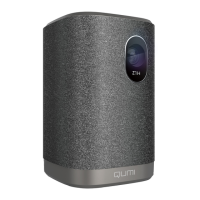
The user manual of the HD Pocket Projector
Product name: HD Pocket Projector
Trade: VIVITEK
Mode: Q3PLUS
FCC ID: H79Q3PLUS
User Manual

Questions and Answers

  • R
    Ryan MillerAug 16, 2025
    How to troubleshoot no image on Vivitek Q3PLUS screen?
    • M
      marshlisaAug 16, 2025
      If your Vivitek Projector isn't displaying an image, first ensure your PC is properly configured. If the issue persists, try closing all connected devices and then powering them on again in the correct sequence.
  • G
    gstephensAug 18, 2025
    What to do if my Vivitek Q3PLUS has no sound?
    • R
      Robert FrostAug 18, 2025
      If there is no sound from your Vivitek Projector, first adjust the volume of the audio source. If that doesn't work, check the audio cable connections. Try using another loudspeaker to test the audio source output. If the issue still persists, the Qumi may require maintenance.
  • M
    Melissa PerezAug 21, 2025
    Why is my Vivitek Q3PLUS remote not working?
    • L
      Loretta VaughanAug 21, 2025
      If your Vivitek Projector isn't responding to the remote, try these steps: 1. Align the remote controller with the remote sensor on the Qumi. 2. Ensure there are no obstacles blocking the path between the remote and the sensor. 3. Try closing fluorescent lamps in the room, as they can interfere with the signal. 4. Check the battery polarity and replace the batteries if needed. 5. Close other equipment that emits infrared rays. If problems persist, the remote may need maintenance.
  • A
    amatthewsAug 25, 2025
    How to fix a blurry image on a Vivitek Projector?
    • M
      Margaret NunezAug 26, 2025
      If the image on your Vivitek Projector is blurry, try operating the projector using the remote controller. Also, ensure that the distance between the Qumi and the screen is within the specified limits. If the projector lens is dirty, gently clean it with a cleaning cloth designed for optical lenses.
  • T
    tsnyderAug 28, 2025
    What causes sound distortion in Vivitek Projector?
    • T
      thomasfernandezAug 28, 2025
      If you're experiencing sound distortion with your Vivitek Projector, check the audio cable connections first. Then, test the audio source output using another loudspeaker. If the distortion continues, the Qumi might need maintenance.
  • J
    James HurleyAug 31, 2025
    How to correct trapezoid image on Vivitek Q3PLUS?
    • J
      James HillAug 31, 2025
      If you're seeing a trapezoid effect (image wider at the top or bottom) on your Vivitek Projector, adjust the Qumi to make it as vertical to the screen as possible. You can also adjust the trapezoid correction configuration in the OSD or enable automatic trapezoid correction.
  • P
    phillipsmargaretSep 3, 2025
    What to do if Vivitek Q3PLUS Projector shows a striped image?
    • R
      Ryan KennedySep 3, 2025
      If the image on your Vivitek Projector appears striped, restore the 'Frequency' and 'Track' settings in the 'Computer' menu of the OSD to their default values. Also, connect the Qumi to another computer to determine if the video card is causing the issue.
  • K
    Karina LeeSep 6, 2025
    How to adjust contrast on Vivitek Q3PLUS?
    • M
      Matthew TaylorSep 6, 2025
      If your Vivitek Projector image lacks contrast, adjust the 'Contrast' setting in the 'Image' menu of the OSD.
  • R
    reeveschristopherSep 8, 2025
    How to fix color mismatch on Vivitek Projector?
    • D
      daniel15Sep 8, 2025
      If the colors of the projected image from your Vivitek Projector don't match the source image, adjust the 'Color temperature' in the 'Image' menu of the OSD.
  • B
    Brandon PatelSep 12, 2025
    How to correct inverted image on Vivitek Q3PLUS?
    • C
      charlesmcintyreSep 12, 2025
      If the image on your Vivitek Projector is inverted, check the configured direction of 'Projection method' in the 'Configuration' menu of the OSD.

Summary

Foreword

Copyright and Disclaimer

Details copyright ownership and liability disclaimers.

Trademark Notice

Lists registered trademarks and their owners.

Important Safety Information

Safety Symbols and Precautions

Explains warning symbols and general safety rules for projector use.

Installation Precautions

Airflow and Ventilation Requirements

Details spacing and airflow needed for proper projector operation.

Power Supply Safety

Qumi Cleaning and Care

Main Product Characteristics

Chapter 1: Product Views

Front, Top, and Right View

Illustrates the front, top, and right side of the projector.

Rear, Top, and Left View

Bottom View

Standard Accessories Included

Remote Controller Functions

Remote Controller Setup and Use

Battery Replacement Guide

Instructions for changing the battery in the remote controller.

Operating Range and Angle

Defines the operational range and angle for the remote controller.

Chapter 2: Getting Started

Required Equipment

Lists the necessary equipment and connections for using the projector.

HDMI Connection Guide

Connecting External Devices

USB Drive and Audio Connections

Explains USB drive and audio output connections.

Charging the Projector Battery

Powering the Projector On and Off

Happycast: Android Screen Mirroring

Happycast: iOS Screen Mirroring

Chapter 3: User Interface

UI Overview and Core Functions

Overview of the projector's user interface and its main functions.

Photo Viewing and Options

Video Playback Guide

Music Playback Guide

File Management and Access

App Store Navigation and Search

Web Browsing Features

Application Management

WiFi Connection Setup

System Settings Menu

Chapter 4: OSD Settings

OSD Menu Navigation and Overview

Explains OSD menu navigation and provides a setting overview.

OSD Menu Overview Details

Setting OSD Menu Language

Setting Display Mode

Setting Audio Mode

Setting Color Temperature

Setting Zoom Mode

Setting Projection Method

Setting Electronic Trapezoid Correction

Setting Software Update (USB)

Setting Reset All

Viewing System Status

Chapter 5: Maintenance

Qumi Cleaning Procedures

Instructions for cleaning the projector to ensure normal operation.

Cleaning the Lens

Steps for cleaning the projector's optical lens safely.

Troubleshooting

FAQs and Solutions

Common problems and their solutions for projector application.

Troubleshooting Skills

Tips and methods for effective problem-solving.

Reset Key Operation

How to use the reset key for troubleshooting.

Image Problems

Remote Controller Problems

Audio Problems

Frequently Asked Questions

Specifications

Projection Distance and Size

Vivitek Support Website

Projection Distance and Size Specifications

Compatible Signal List

Qumi Dimensions

Regulatory Compliance

FCC Warning and Canada Compliance

Warnings about FCC regulations and Canadian compliance statements.

Safety Certifications and Recycling

Lists safety certifications and waste disposal guidelines.

Hazardous Substances Information

FCC Statement

FCC RF Radiation Exposure

Vivitek Q3PLUS Specifications

General IconGeneral
Brightness500 lumens
Light SourceLED
Lamp Life30, 000 hours
Lamp Life (LED)30, 000 hours
Aspect Ratio16:9
Throw Ratio1.66:1
Projection TechnologyDLP
Lamp Life (Eco mode)30, 000 hours
Input ConnectorsHDMI, USB, MicroSD
Contrast Ratio5000:1
Weight460 grams
Speakers2W x 1
Noise Level30 dB

Related product manuals