16
Chapter 3 Qumi User Interface
Views
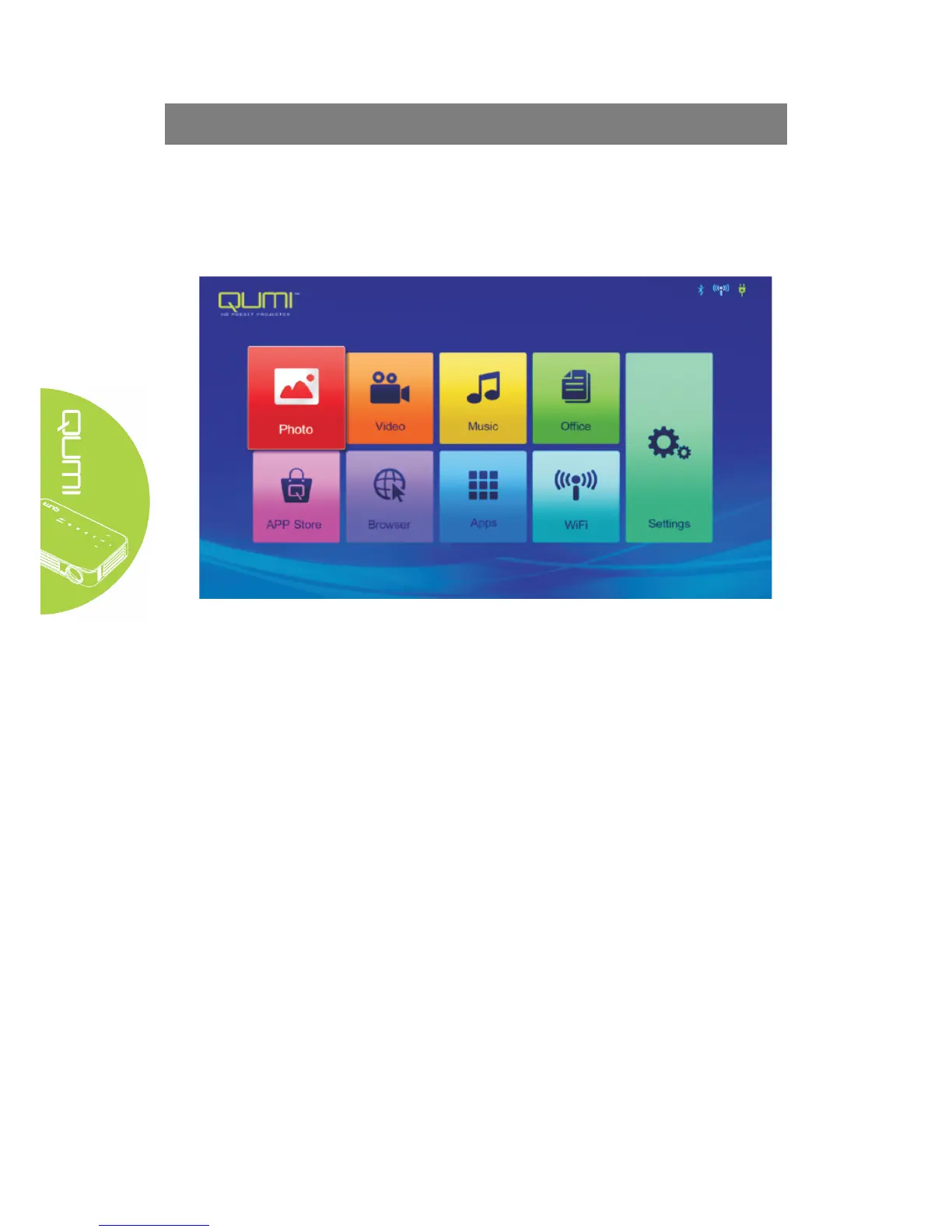
Qumi user interface (UI) is designed for setting and convenient operation. UI enables a
complete medium experience by accessing medium files via smart devices (phones or pads) or
USD drives.
UI mainly comprises nine functions:
y Photo - display photo and provide slide function; the available images in connected
USBdrives or devices are listed in the “Photo” menu.
y Video - play film files; the available videos in connected USB drives or devices are
listed in the “Video” menu.
y Music - play audio files; the available music files in connected USB drives or devices
are listed in the “Music” menu.
y Office -play the files; the available files in connected USB drives or devices are listed
in the “File” menu.
y APPStore - manage downloads, updates and accesses to the APPStore.
y Browser- display HTML files of the web page servers or file systems (an application
for standard and general markup languages) and achieve user-file interaction.
y Apps - manage and operate all application program settings related to QUMI.
y WiFi - achieve mutual wireless connection among PC, portable devices (e.g., PAD,
mobile phone) and other terminals.
y Settings - access to Display, Audio file, Wireless linkage, Bluetooth, Memory,
General, Application and System.



 To Next Page