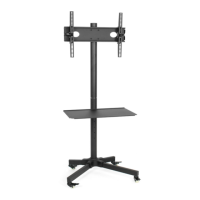
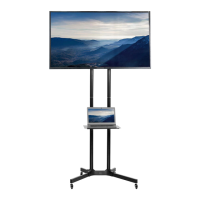
This document is an instruction manual for the VIVO Black Mobile TV Cart, SKU: STAND-TV01B. It provides detailed assembly steps, a list of package contents, and important safety warnings.
Function Description:
The VIVO Black Mobile TV Cart is designed to provide a portable and adjustable solution for displaying televisions. It features a sturdy base with wheels for easy mobility, adjustable poles for height customization, and shelves for holding media devices or accessories. The cart is suitable for various environments such as offices, classrooms, conference rooms, or homes, offering flexibility in TV placement and viewing angles. The design incorporates cable management features to maintain a tidy appearance.
Important Technical Specifications:
- Weight Capacity: The TV cart has a maximum weight capacity of 110 lbs (49.9 kg). Exceeding this limit may result in serious injury or damage.
- SKU: STAND-TV01B
- Dimensions (implied from parts): The cart includes poles (G) that can be extended, and various bolts and spacers for assembly, indicating a customizable height and robust construction. The base accommodates wheels (E, F) for mobility.
- Compatibility: The TV brackets (N, M) are designed to attach to the back of televisions using various bolt sizes (M-A, M-B, M-C, M-D, M-E) and metal spacers (M-F, M-G, M-H), ensuring compatibility with a range of TV models.
- Tilt Angle: The TV can be tilted from +10° to -10° for optimal viewing.
Usage Features:
- Mobility: Equipped with two regular wheels (E) and two locking wheels (F), the cart can be easily moved and secured in place.
- Adjustable Height: The poles (G) feature a button-press mechanism to extend and secure the desired pole length, allowing for height adjustment of the television and shelves.
- Shelf System: The cart includes two shelves (J) that can be mounted at desired heights using shelf brackets (L, K) and secured with clips (O). This provides space for media players, gaming consoles, or other accessories.
- TV Mounting: TV brackets (N, M) attach to the back of the television and then hang onto a central plate (I) on the cart. A security bolt on the bottom of the brackets helps secure the television in place.
- Tilt Adjustment: The TV's tilt angle can be adjusted by loosening knobs on the TV brackets, setting the desired position (between +10° and -10°), and then re-tightening the knobs.
- Cable Management: Rubber cable grommets (H) are provided to help manage and route cables, contributing to a clean and organized setup.
Maintenance Features:
- Regular Inspection: The manual advises checking carefully for any missing or defective parts before installation and during use to prevent damage or injury.
- Cleaning: While not explicitly detailed, the materials (metal, plastic) suggest that the cart can be cleaned with appropriate cleaning agents.
- Tightening Fasteners: The assembly process involves tightening various bolts and nuts using a 5mm Allen wrench (P-H), an 8mm Allen wrench (P-I), and a wrench (P-G). Regular checks to ensure these fasteners remain tight would be beneficial for stability and safety.
- Tipover Prevention: The manual includes a "TIPOVER WARNING" emphasizing the importance of never allowing children to climb, stand, hang, or play on any part of the TV or TV cart. It also recommends using a tipover restraint or anchoring the stand to a wall to reduce, though not eliminate, the risk of tipover.
Assembly Overview:
The assembly process is broken down into seven steps:
- Step 1: Attaching the feet (A, B) and wheels (E, F) to the base using bolts (P-A), metal spacers (D), nuts (P-F), and wrenches (P-H, P-G).
- Step 2: Extending the poles (G), inserting cable grommets (H), and securing the poles to the base using bolts (P-C), washers (P-D), and an 8mm Allen wrench (P-I).
- Step 3: Attaching the central plate (I) to the poles at the desired height using bolts (P-B), washers (P-E), nuts (P-F), and wrenches (P-H, P-G).
- Step 4: Assembling the shelves (J) with shelf brackets (L, K) and mounting them to the poles using clips (O).
- Step 5: Attaching the TV brackets (N, M) to the back of the television using various bolts (M-A, M-B, M-C, M-D, M-E) and metal spacers (M-F, M-G, M-H) with a Phillips head screwdriver.
- Step 6: Hanging the TV brackets (with the TV attached) onto the plate (I) and tightening the security bolt.
- Step 7: Adjusting the TV tilt angle and managing cables.
The manual includes a prominent "WARNING!" section advising users to understand directions, check for missing/defective parts, and call a qualified technician if in doubt. It explicitly states not to exceed the weight capacity and warns against improper installation. A "WARNING: CHOKING HAZARD" for small parts is also included, requiring adult supervision for children under 3 years.

 Need help?
 General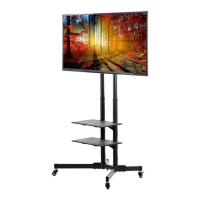

 To Next Page