EasyManua.ls Logo

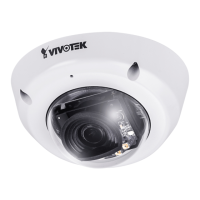
Vivotek FD8365HV - User Manual

Vivotek FD8365HV
217 pages
Print Icon
To Next Page IconTo Next Page
Loading...
Rev. 1.0
User’s Manual
Fixed Dome
Network Camera
2/1.3MP WDR Pro II 30/20M IR Smart IR
FD8365(E)HV / 8355(E)HV
3DNR Smart Focus SNV IP66 IK10
Rev. 1.2
Question and Answer IconNeed help?

Do you have a question about the Vivotek FD8365HV and is the answer not in the manual?

Summary

Overview and Installation

Camera Overview and Features

Details the camera's core features, resolution, WDR Pro II, Smart IR, and IP66/IK10 ratings.

Camera Physical Description and Installation

Illustrates camera components, ports, and provides initial installation guidance.

Cabling Assembly and Connections

Guides on routing power, I/O, and Ethernet cables, and connector assembly.

Network Setup and Access

Network Deployment Options

Explains general connection without PoE and Power over Ethernet (PoE) setup.

Internet Connection Setup via Router

Details connecting via router, port forwarding, static IP, and PPPoE configurations.

Accessing Camera via Web Browser and RTSP

Steps for accessing the camera using web browsers and RTSP players.

System and Media Configuration

System General Settings Configuration

Configures host name, system time, and homepage layout options.

Camera Image Settings Adjustment

Adjusts brightness, contrast, saturation, sharpness, exposure, and day/night modes.

Camera Audio Input;Output Settings

Configures audio mute, microphone gain, and audio codec types.

Network and Security Configuration

Network Connection and IP Settings

Configures network type (LAN/PPPoE), IP address, subnet mask, and DNS.

HTTP and RTSP Streaming Protocols

Details HTTP and RTSP streaming authentication, ports, and access names.

Security Configuration and Access Control

Manages user accounts, privileges, HTTPS, and access lists for security.

Advanced Applications and Features

PTZ Control and Patrol Scheduling

Configures digital PTZ operation, pan/tilt/zoom speeds, and patrol schedules.

Event Triggers and Motion Detection Setup

Sets up events, triggers (motion, DI), actions, and alarm configurations.

Recording and Storage Management

Configures recording settings, schedules, and manages SD card/NAS storage.

Appendix and Specifications

URL Commands API Reference

Provides syntax and examples for controlling the camera via URL commands.

Camera Technical Specifications

Details hardware components, features, performance metrics, and environmental ratings.

Compliance, Licensing, and EMC Information

Covers technology licenses, FCC, CE, VCCI compliance, and liability statements.

Summary

Overview and Installation

Camera Overview and Features

Details the camera's core features, resolution, WDR Pro II, Smart IR, and IP66/IK10 ratings.

Camera Physical Description and Installation

Illustrates camera components, ports, and provides initial installation guidance.

Cabling Assembly and Connections

Guides on routing power, I/O, and Ethernet cables, and connector assembly.

Network Setup and Access

Network Deployment Options

Explains general connection without PoE and Power over Ethernet (PoE) setup.

Internet Connection Setup via Router

Details connecting via router, port forwarding, static IP, and PPPoE configurations.

Accessing Camera via Web Browser and RTSP

Steps for accessing the camera using web browsers and RTSP players.

System and Media Configuration

System General Settings Configuration

Configures host name, system time, and homepage layout options.

Camera Image Settings Adjustment

Adjusts brightness, contrast, saturation, sharpness, exposure, and day/night modes.

Camera Audio Input;Output Settings

Configures audio mute, microphone gain, and audio codec types.

Network and Security Configuration

Network Connection and IP Settings

Configures network type (LAN/PPPoE), IP address, subnet mask, and DNS.

HTTP and RTSP Streaming Protocols

Details HTTP and RTSP streaming authentication, ports, and access names.

Security Configuration and Access Control

Manages user accounts, privileges, HTTPS, and access lists for security.

Advanced Applications and Features

PTZ Control and Patrol Scheduling

Configures digital PTZ operation, pan/tilt/zoom speeds, and patrol schedules.

Event Triggers and Motion Detection Setup

Sets up events, triggers (motion, DI), actions, and alarm configurations.

Recording and Storage Management

Configures recording settings, schedules, and manages SD card/NAS storage.

Appendix and Specifications

URL Commands API Reference

Provides syntax and examples for controlling the camera via URL commands.

Camera Technical Specifications

Details hardware components, features, performance metrics, and environmental ratings.

Compliance, Licensing, and EMC Information

Covers technology licenses, FCC, CE, VCCI compliance, and liability statements.

Vivotek FD8365HV Specifications

General IconGeneral
BrandVivotek
ModelFD8365HV
CategorySecurity Camera
LanguageEnglish

Related product manuals