
 Need help?
Do you have a question about the Vivotek FD8369A and is the answer not in the manual?
Details changes and version updates of the manual.
Lists all items included in the camera's package for user verification.
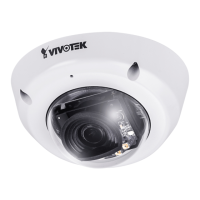
Provides a visual and textual description of the camera's external and internal components.
Explains how to access the camera's interface via web browsers.
Details how to view the camera's stream using RTSP players.
Guides on accessing the camera stream from mobile devices.
Instructions on integrating the camera with VIVOTEK recording software.
Configures basic system settings like host name and system time.
Covers firmware upgrades and system reboots for camera maintenance.
Sets exposure measurement windows, levels, modes, and time for optimal image quality.
Enables blocking sensitive zones in the video feed to address privacy concerns.
Configures stream settings, including resolution, frame rate, and multiple streams.
Configures the network connection type, LAN or PPPoE.
Configures HTTP and RTSP streaming protocols, including authentication and ports.
Explains how to use SNMP for network management and monitoring.
Manages user accounts, passwords, and privileges for accessing the camera.
Enables secure, encrypted communication over SSL/TLS for enhanced security.
Controls access permissions by verifying client PC IP addresses and enabling/disabling filtering.
Configures port-based network access control for enhanced network security.
Controls electronic pan, tilt, and zoom operations for detailed viewing without physical movement.
Specifies the cause or stimulus that activates a camera event.
Detects incidents like redirection, blocking, or defocusing of the camera.
Details the syntax and parameters for controlling the camera via URL commands.
Configures privacy mask windows to block sensitive zones in the video feed.
Enables and configures 3D privacy masks for enhanced privacy control.
Defines the number of media streams supported per channel.
Configures audio input settings for the camera's microphone or line input.
Defines day/night mode switch capabilities and IR settings.
Adjusts basic image parameters like brightness, contrast, saturation, and sharpness.
Selects the exposure mode, such as auto, shutter priority, or manual.
Controls the state of digital output pins, allowing them to be active or inactive.
Retrieves the current status of digital input channels.
Captures a single snapshot image from a selected video channel and stream.
Manages user accounts, including adding, deleting, editing, and setting privileges.
Provides instructions for upgrading the camera's firmware.
Details compliance with FCC Rules Part 15 regarding radio frequency energy and interference.
 General
| Weatherproof Rating | IP66 |
|---|---|
| Video Compression | H.264, MJPEG |
| Camera Type | Dome |
| Resolution | 1920x1080 |
| Lens Type | Fixed |
| Focal Length | 2.8mm |
| IR Range | 30m |
| Power Supply | IEEE 802.3af PoE Class 2, DC 12V |
| Maximum Frame Rate | 30fps |
| Ethernet | 10/100Base-TX |
| Day/Night | Yes |











 To Next Page