EasyManua.ls Logo

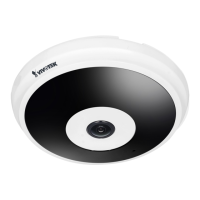
Vivotek FE8173 - User Manual

Vivotek FE8173
11 pages
Print Icon
To Next Page IconTo Next Page
Loading...

Other manuals for Vivotek FE8173

Question and Answer IconNeed help?

Do you have a question about the Vivotek FE8173 and is the answer not in the manual?

Summary

FE8173 Network Camera Quick Installation Guide

Safety and Package Contents

Important Safety Warnings

Essential safety precautions to observe before and during camera installation.

Package Contents Overview

Details the items included in the FE8173 network camera package.

Physical Description

Inner View Components

Illustrates and labels the internal parts and connection points of the camera.

Outer View Components

Illustrates and labels the external parts and features of the camera.

Hardware Installation Steps

Opening the Dome Cover

Procedure for safely opening the camera's dome cover for access.

MAC Address Recording

Instruction to record the camera's MAC address prior to installation.

Connecting and Routing Cables

Mounting the Camera

Ceiling or Wall Mounting

Detailed steps for attaching the camera base to a ceiling or wall surface.

Junction Box Mounting Option

Guidance for installing the camera onto a standard 4-inch junction box.

Attaching the Dome Cover

Network Deployment

General Connection (Non-PoE)

Instructions for connecting the camera via Ethernet and external power.

Power over Ethernet (PoE) Setup

Guidance for connecting the camera using PoE switches or injectors.

Software Configuration and Usage

Assigning an IP Address

Steps to assign an IP address using the VIVOTEK Installation Wizard.

Ready to Use Verification

How to confirm camera operation and install optional software.

Summary

FE8173 Network Camera Quick Installation Guide

Safety and Package Contents

Important Safety Warnings

Essential safety precautions to observe before and during camera installation.

Package Contents Overview

Details the items included in the FE8173 network camera package.

Physical Description

Inner View Components

Illustrates and labels the internal parts and connection points of the camera.

Outer View Components

Illustrates and labels the external parts and features of the camera.

Hardware Installation Steps

Opening the Dome Cover

Procedure for safely opening the camera's dome cover for access.

MAC Address Recording

Instruction to record the camera's MAC address prior to installation.

Connecting and Routing Cables

Mounting the Camera

Ceiling or Wall Mounting

Detailed steps for attaching the camera base to a ceiling or wall surface.

Junction Box Mounting Option

Guidance for installing the camera onto a standard 4-inch junction box.

Attaching the Dome Cover

Network Deployment

General Connection (Non-PoE)

Instructions for connecting the camera via Ethernet and external power.

Power over Ethernet (PoE) Setup

Guidance for connecting the camera using PoE switches or injectors.

Software Configuration and Usage

Assigning an IP Address

Steps to assign an IP address using the VIVOTEK Installation Wizard.

Ready to Use Verification

How to confirm camera operation and install optional software.

Vivotek FE8173 Specifications

General IconGeneral
Camera TypeFisheye
Sensor TypeCMOS
Lens TypeFixed focal
ApertureF2.0
Day/NightYes
Video CompressionH.264, MJPEG
Maximum Frame Rate30 fps
Local StorageMicroSD/SDHC/SDXC card slot
Power over EthernetYes
Weatherproof RatingIP66
Ingress ProtectionIP66
Focal Lengthf = 1.05 mm
Field of View180° (horizontal), 180° (vertical), 180° (diagonal)
Shutter Time1/5 sec to 1/32, 000 sec
Minimum Illumination0.5 Lux @ F2.0
Audio CompressionG.711
Ethernet10/100 Base-T
Network InterfaceEthernet
ProtocolsIPv4, HTTP, HTTPS, TCP, UDP, RTSP, RTP, SMTP, FTP, DHCP, DNS, DDNS, NTP, UPnP, SNMP, 802.1X, QoS, Bonjour
Power SupplyPoE (IEEE 802.3af)
Frame Rate30fps
Power InputDC 12V

Related product manuals