Need help?
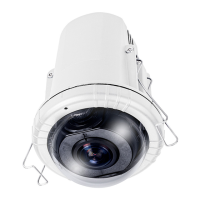
Do you have a question about the Vivotek FE8172V and is the answer not in the manual?
Guide for configuring the camera for internet access, including port forwarding.
Details on connecting the camera using PoE-enabled switches or injectors.
Using the bundled software utility to find and set up the network camera on the LAN.
How to access the camera's interface via web browsers like IE, Firefox, or Netscape.
Configure basic system settings like hostname and system time.
Restore factory defaults, upgrade firmware, and reboot the camera.
Adjust white balance, brightness, saturation, contrast, sharpness, and gamma curve.
Set exposure level, mode, time, gain control, and day/night settings.
Block sensitive zones in the video feed to ensure privacy.
Select between Fisheye mode and 1080P Full HD mode for dewarped views.
Configure frame size, maximum frame rate, and codec for multiple video streams.
Configure audio input gain, mute, audio codec, and bit rate.
Configure HTTP authentication, ports, and access names for streams.
Set up RTSP streaming, including authentication and access names.
Set the administrator password for the camera.
Define user privileges (Admin, Operator, Viewer) and permissions.
Create, modify, or delete user accounts for camera access.
Steps to create and install a certificate for secure HTTPS communication.
Enable and configure IEEE 802.1x port-based network access control.
Control camera pan, tilt, zoom, and focus electronically.
Set up events based on triggers like motion detection or digital input.
Define actions to perform when an event trigger is activated.
Steps to set up motion detection windows, sensitivity, and percentage.
Define adaptive recording, source, schedule, and capacity.
Details on using URL syntax for camera control and data retrieval.
 General
| Maximum Resolution | 1920x1080 |
|---|---|
| Lens Type | Fixed |
| Focal Length | 2.8 mm |
| Aperture | F2.0 |
| Video Compression | H.264, MJPEG |
| Audio Capability | Two-way audio |
| Day/Night | Yes |
| Minimum Illumination | 0.5 Lux @ F2.0 (Color) |
| IR Illuminators | Yes |
| Maximum Frame Rate | 30 fps |
| Audio Compression | G.711, G.726 |
| Ethernet | 10/100Base-T |
| Protocols | IPv4, IPv6, TCP/IP, HTTP, HTTPS, UPnP, RTSP/RTP/RTCP, IGMP, SMTP, FTP, DHCP, NTP, DNS, DDNS, PPPoE, CoS, QoS, SNMP, 802.1X |
| Local Storage | MicroSD/SDHC/SDXC card slot |
| Operating Temperature | -10°C ~ 50°C (14°F ~ 122°F) |
| Power Supply | 12V DC |
| Shutter Time | 1/5 sec to 1/32, 000 sec |


 To Next Page