VIVOTEK
64 - User's Manual
Color: Select to display color or black/white video streams.
Power line frequency: Set the power line frequency consistent with local utility settings to eliminate image
ickering associated with uorescent lights.
Video orientation: Flip - vertically reflect the display of the live video; Mirror - horizontally reflect the
display of the live video. Select both options if the Network Camera is installed upside-down (e.g., on the
ceiling) to correct the image orientation. Please note that the preset locations will be cleared after you
congure the ip/mirror option.
Video orientation: Flip - vertically reflect the display of the live video; Mirror - horizontally reflect the
display of the live video. Select both options if the Network Camera is installed upside-down (e.g., on the
ceiling) to correct the image orientation. Please note that if you have preset locations, those locations will
be cleared after ip/mirror setting.
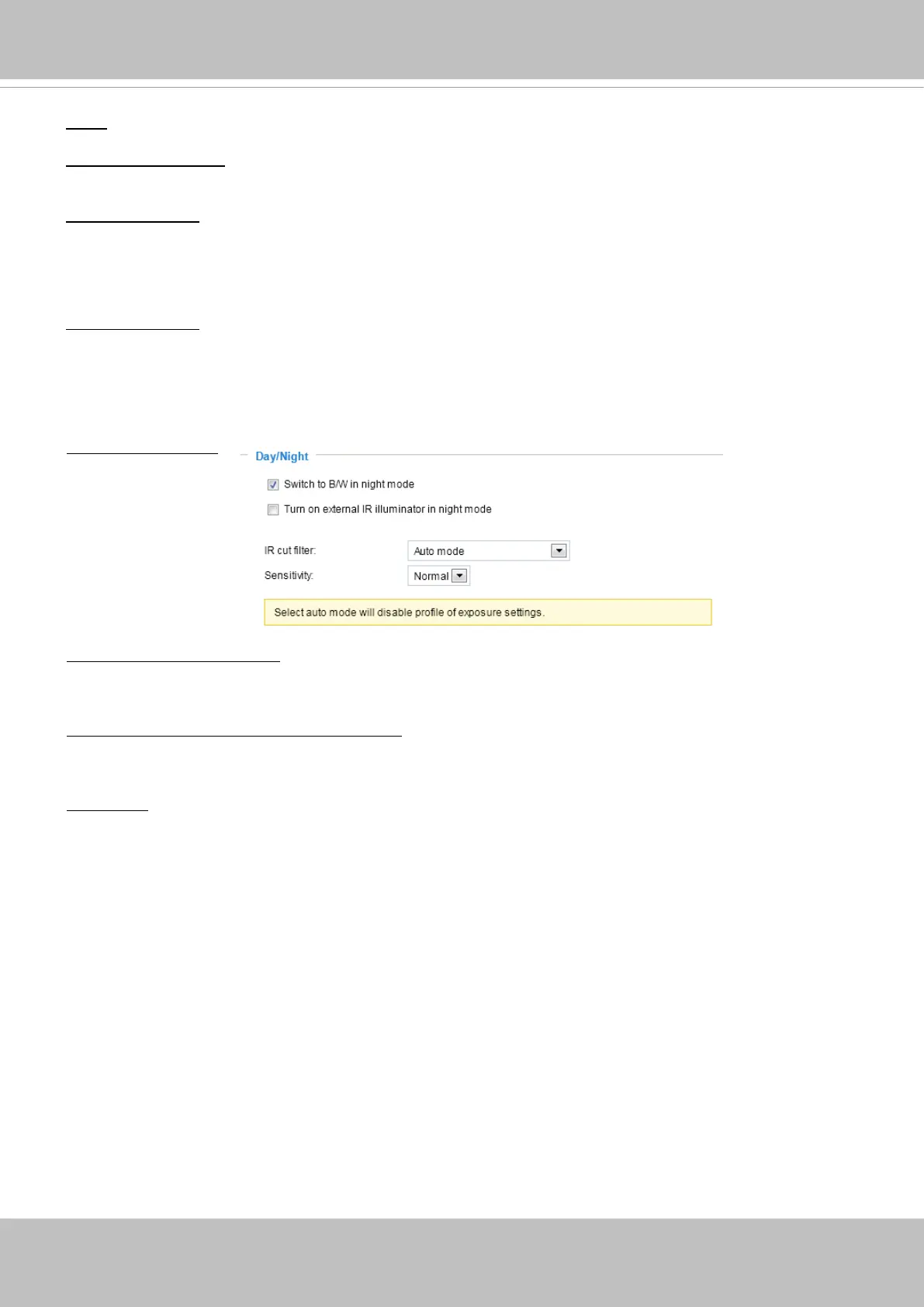
Day/Night settings
Switch to B/W in night mode
Select this checkbox to enable the Network Camera to automatically switch to Black & White display
during the night mode.
Turn on external IR illuminator in night mode
If your camera is installed with an IR illuminator and the digital output signals are connected to it, you can
let system rmware turn on the supplementary illuminator during low-light conditions.
IR cut lter
With a removable IR-cut lter, this Network Camera can automatically remove the lter to let Infrared
light pass into the sensor during low light conditions.
■ Auto mode (The Day/Night Exposure Prole will not be available if Auto mode is selected)
The Network Camera automatically removes the lter by judging the level of ambient light.
■ Day mode
In day mode, the Network Camera switches on the IR cut lter at all times to block infrared light from
reaching the sensor so that the colors will not be distorted.
■ Night mode
In night mode, the Network Camera switches off the IR cut lter at all times for the sensor to accept
infrared light, thus helping to improve low light sensitivity.



 To Next Page