VIVOTEK
User's Manual - 147
IMPORTANT:
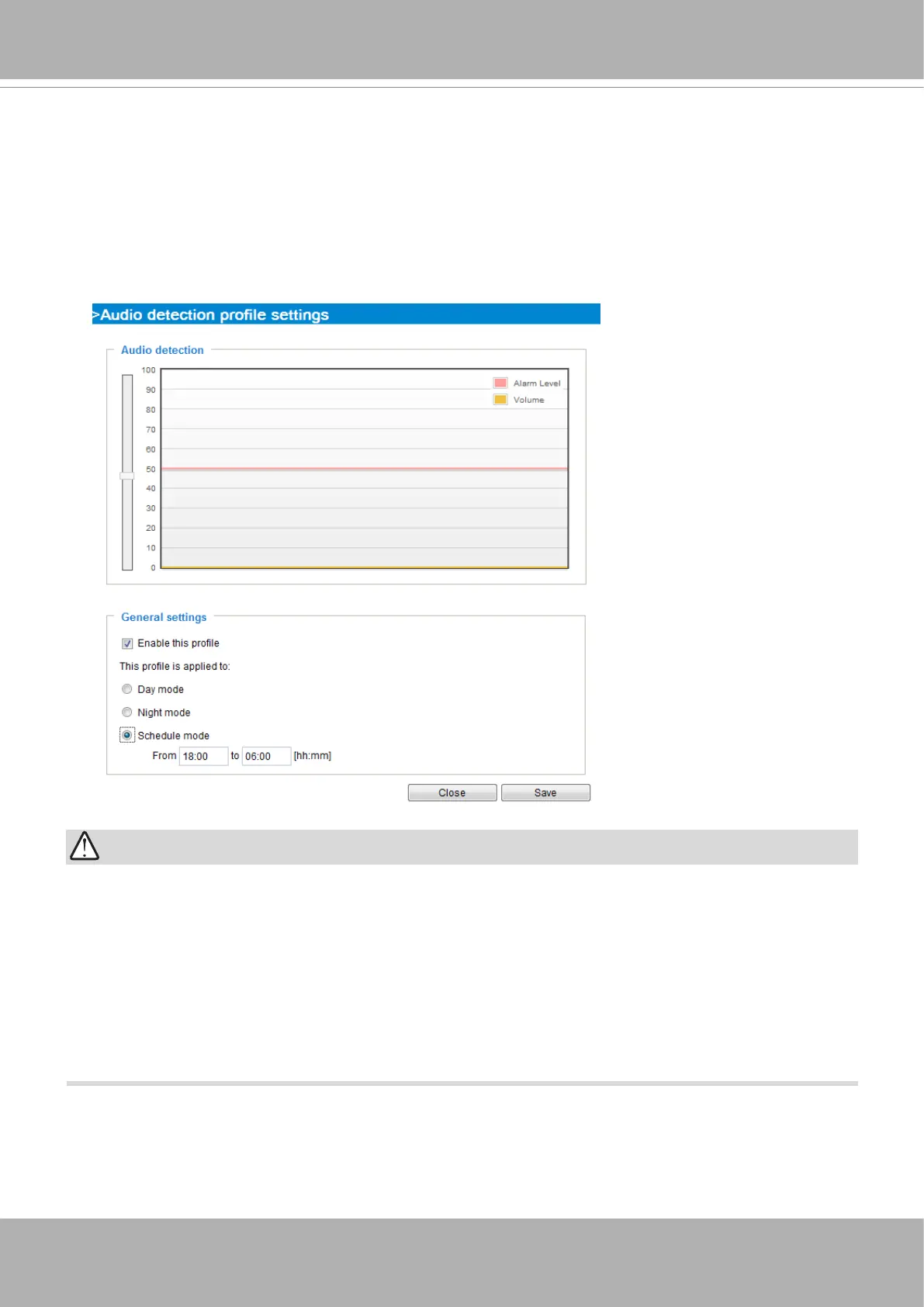
• If the Alarm level and the received volume are set within a range of 20% on the wave
diagram, frequent alarms will be triggered. It is recommended to set the Alarm level farther
apart from the detected sound level.
• To congure and enable this feature, you
must not
congure video stream #1 into
Motion
JPEG
. If an external microphone input is connected and recording of audio stream is
preferred, audio stream is transmitted between camera and viewer/recording station
along
with stream #1
.
• Refer to page 89 for Audio settings, and page 79 for video streaming settings.
You can use the
Prole
window to congure a dierent Audio detection setting. For example, a place
can be noisy in the day time and become very quiet in the night.
1. Click on the
Enable this prole
checkbox. Once the Audio detection window is opened, the current
sound input will be interactively indicated by a uctuating yellow wave diagram.
2. Use a mouse click to drag the
Alarm level
tab to a preferred location on the slide bar.
3. Select the
Day
,
Night
, or
Schedule
mode check circles. You may also manually congure a period
of time during which this prole will take eect.
4. Click
Save
and then click
Close
to complete your conguration.



 To Next Page