Need help?
Do you have a question about the Vivotek IB8354-C and is the answer not in the manual?
Describes how to connect the camera using Power over Ethernet (PoE).
Guides on configuring the camera for internet access through a router.
How to access the camera's interface via web browsers.
Basic camera settings like hostname and system time.
Adjusting white balance and image parameters like brightness, contrast, and sharpness.
 General
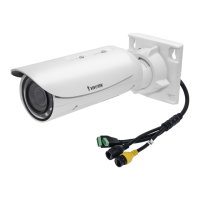
| Camera Type | Bullet |
|---|---|
| Resolution | 1920x1080 |
| Maximum Resolution | 1920 x 1080 |
| Lens Type | Fixed |
| Day/Night | Yes |
| WDR | WDR Enhanced |
| Compression | H.264, MJPEG |
| Frame Rate | 30 fps @ 1920x1080 |
| Network Interface | RJ-45 |
| Ingress Protection | IP66 |
| Lens | Fixed |
| IR Range | 30 meters |
| Minimum Illumination | 0 Lux with IR on |
| Ethernet | 10/100Base-TX |
| Power Supply | PoE (802.3af) |
| Power Input | 12V DC |
| Operating Temperature | -20°C ~ 50°C |


 To Next Page