Need help?
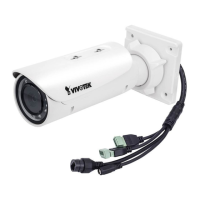
Do you have a question about the Vivotek IB8367-R and is the answer not in the manual?
Steps for setting up internet access for the network camera through a router.
Steps to access the network camera's interface via web browsers.
Instructions for viewing the camera's stream using RTSP-compatible media players.
Configuring basic system settings like host name and system time.
Procedures for restoring factory defaults and upgrading firmware.
Settings for automatic switching to B/W mode and IR illuminator control.
Adjusting white balance, brightness, contrast, saturation, sharpness, and WDR.
Setting exposure level, mode, time, gain control, and iris mode.
Selecting network connection type (LAN, PPPoE) and IP address settings.
Setting up RTSP streaming authentication and port details.
Setting the permanent administrator password for the camera.
Creating, modifying, or deleting user accounts and their privileges.
Steps to create and install a digital certificate for secure HTTPS connections.
Controlling camera pan, tilt, and zoom digitally within the view.
Defining causes or stimuli for triggering events (motion, digital input, etc.).
Specifying actions to be performed when a trigger is activated.
Reference for external HTTP-based API commands for camera control.
Defines system parameters like hostname, date, time, NTP, and timezone.
 General
| Resolution | 1920 x 1080 |
|---|---|
| Lens Type | Fixed |
| Focal Length | 2.8 mm |
| IR Distance | 30 m |
| Compression | H.264, MJPEG |
| Day/Night | Yes |
| Maximum Frame Rate | 30 fps |
| Ingress Protection | IP66 |
| Audio | Two-way audio |
| Power Supply | 12V DC, PoE |
| Minimum Illumination | 0.05 Lux |
| WDR Technology | Yes |
| Supported Protocols | HTTP, HTTPS, FTP, RTSP |
| Ethernet | 10/100 Mbps |
| Power Consumption | 6.5 W |
| Housing | IP66-rated |
| Network Interface | RJ-45 |


 To Next Page