VIVOTEK
User's Manual - 147
percentage.
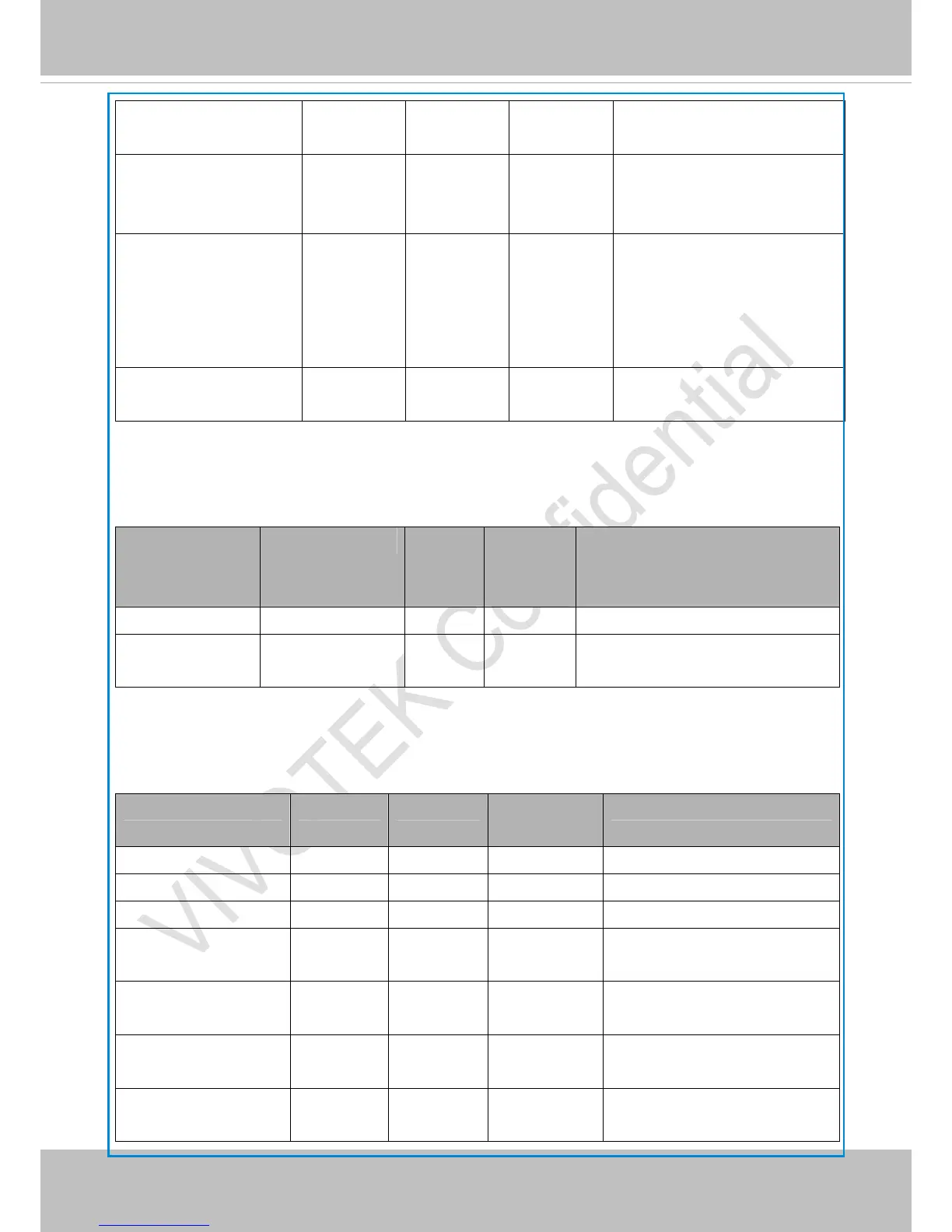
Softer 0 <-> 100 Sharper
dnr_mode 0~1 0 4/4 3D noise reduction.
0: off
1: on
dnr_strength 1~100 50 4/4 3D noise reduction strength.
0: low
1: medium
2: high
lowlightmode <boolean> 1 4/4 Enable/disable low light
mode.
7.10 Time Shift settings
Group: timeshift, c for n channel products, m is stream number
NAME VALUE DEFAUL
T
SECURIT
Y
(get/set)
DESCRIPTION
enable <boolean> 0 4/4 Enable time shift streaming.
c<0~(n-1)>_s<0~(
m-1)>_allow
<boolean> 0 4/4 Enable time shift streaming for
specific stream.
7.11 Motion detection settings
Group: motion_c<0~(n-1)> for n channel product
NAME VALUE DEFAULT SECURITY
(get/set)
DESCRIPTION
enable <boolean> 0 4/4 Enable motion detection.
win_i<0~2>_enable <boolean> 0 4/4 Enable motion window 1~3.
win_i<0~2>_name string[14] <blank> 4/4 Name of motion window 1~3.
win_i<0~2>_left 0 ~ 320 0 4/4 Left coordinate of window
position.
win_i<0~2>_top 0 ~ 240 0 4/4 Top coordinate of window
position.
win_i<0~2>_width 0 ~ 320 0 4/4 Width of motion detection
window.
win_i<0~2>_height 0 ~ 240 0 4/4 Height of motion detection
window.



 To Next Page