VIVOTEK
164 - User's Manual
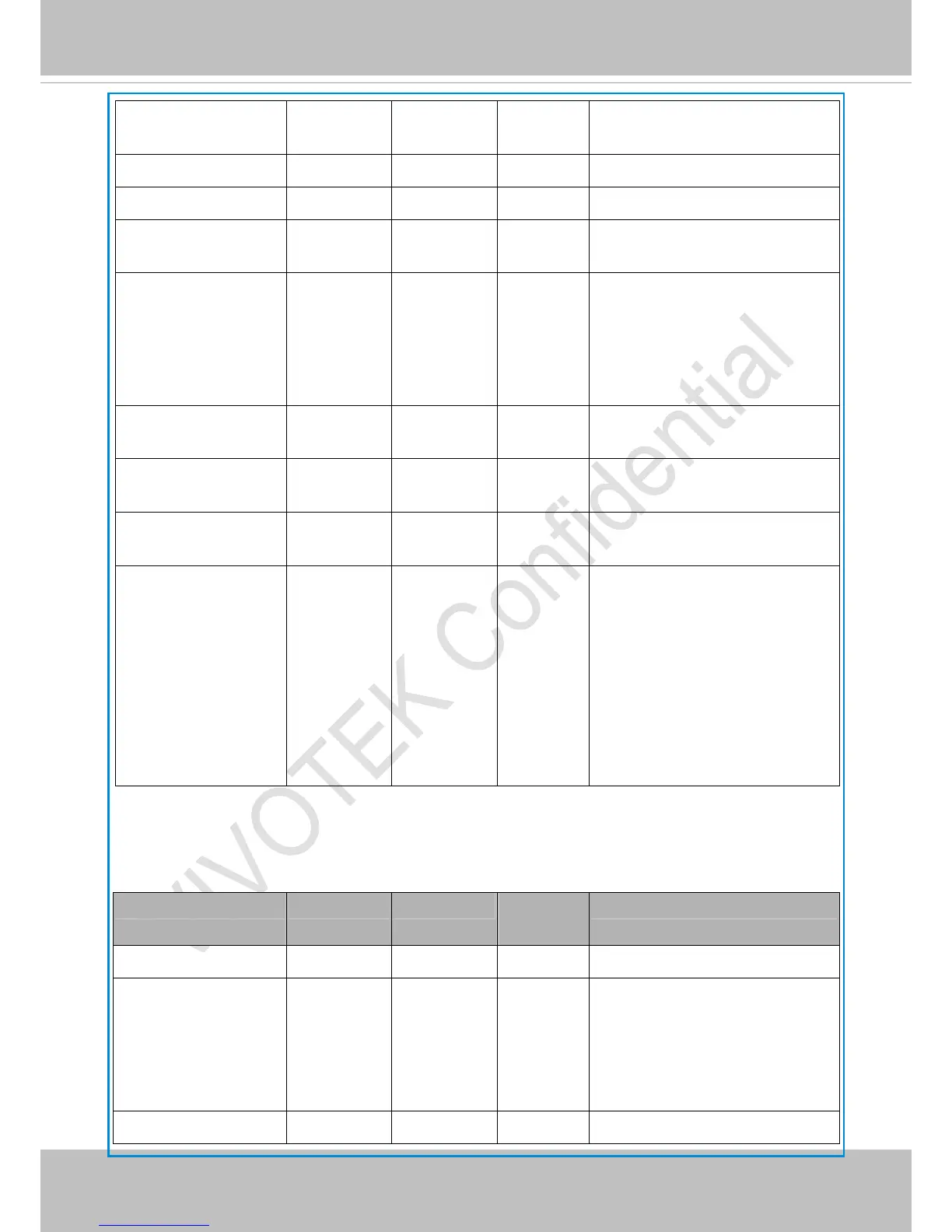
action_cf_enable 0. 1 0 6/6 Enable media write on CF or other
local storage media
action_cf_folder string[128] NULL 6/6 Path to store media.
action_cf_media NULL, 0~4 NULL 6/6 Index of the attached media.
action_cf_datefolder <boolean> 1 6/6 Enable this to create folders by date,
time, and hour automatically.
action_cf_backup <boolean> 0 6/6 Enable the capability of backing up
recorded files to the SD card when
network is lost.
0: Disabled
1: Enabled
action_server_i<0~4>_en
able
0, 1 0 6/6 Enable or disable this server action.
action_server_i<0~4>_m
edia
NULL, 0~4 NULL 6/6 Index of the attached media.
action_server_i<0~4>_da
tefolder
<boolean> 0 6/6 Enable this to create folders by date,
time, and hour automatically.
action_server_i<0~4>_fo
ldername
string[40] %Y%M%D%
H
6/6 The template of the folder name to be
created. Slashes can be used in the
template, and following placeholders
can also be used:
%Y: Year (e.g. 2010)
%M: Month
%D: Date
%H: Hour
7.23 Server setting for event action
Group: server_i<0~4>
PARAMETER VALUE DEFAULT SECURITY
(get/set)
DESCRIPTION
name string[40] NULL 6/6 Identification of this entry
type email,
ftp,
http,
ns
email 6/6 Indicate the server type:
“email” = email server
“ftp” = FTP server
“http” = HTTP server
“ns” = network storage
http_url string[128] http:// 6/6 URL of the HTTP server to upload.



 To Next Page