VIVOTEK
User's Manual - 69
Cropping Setting
Advanced Mode
Click Cropping Setting to open the Cropping Settings page.
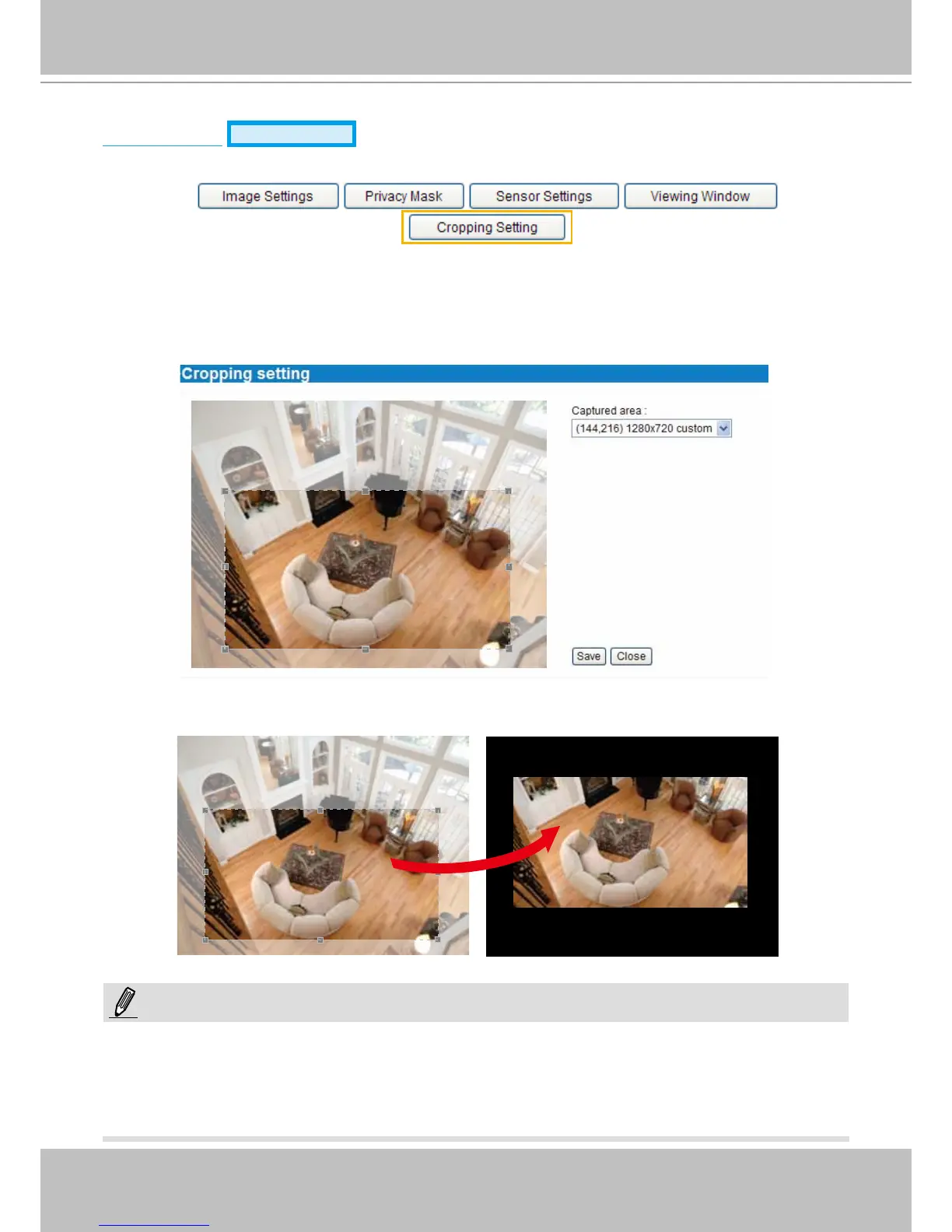
Please follow the steps below to set up cropping mode for mutiple streams:
1. Click Cropping Setting to open the window as shown below.
2.
Select a Captured area from the drop-down list. The oating frame, same as that in the Global View
window on the home page, will resize accordingly. If you want to set up a customized viewing region,
you can also resize and drag the oating frame to a desired position with your mouse.
3. Click Save to enable the settings and click Close to exit the window. Below is the illustration of
cropped image:
► In cropping mdoe, the maximum frame rate will be up to 30fps if the width is under 1280 and the
height is under 720; otherwise, the maximum frame rate may be reduced to 15fps.
► Selecting cropping mode will clear the settings in the Viewing Window and disable Motion Detection,
Privacy Mask, and Preset Position you previously congured.
cropped image
NOTE:



 To Next Page