VIVOTEK
12 - User's Manual
1
2
3
4
5
6
7
8
(D)
(B)
(C)
(A)
(E)
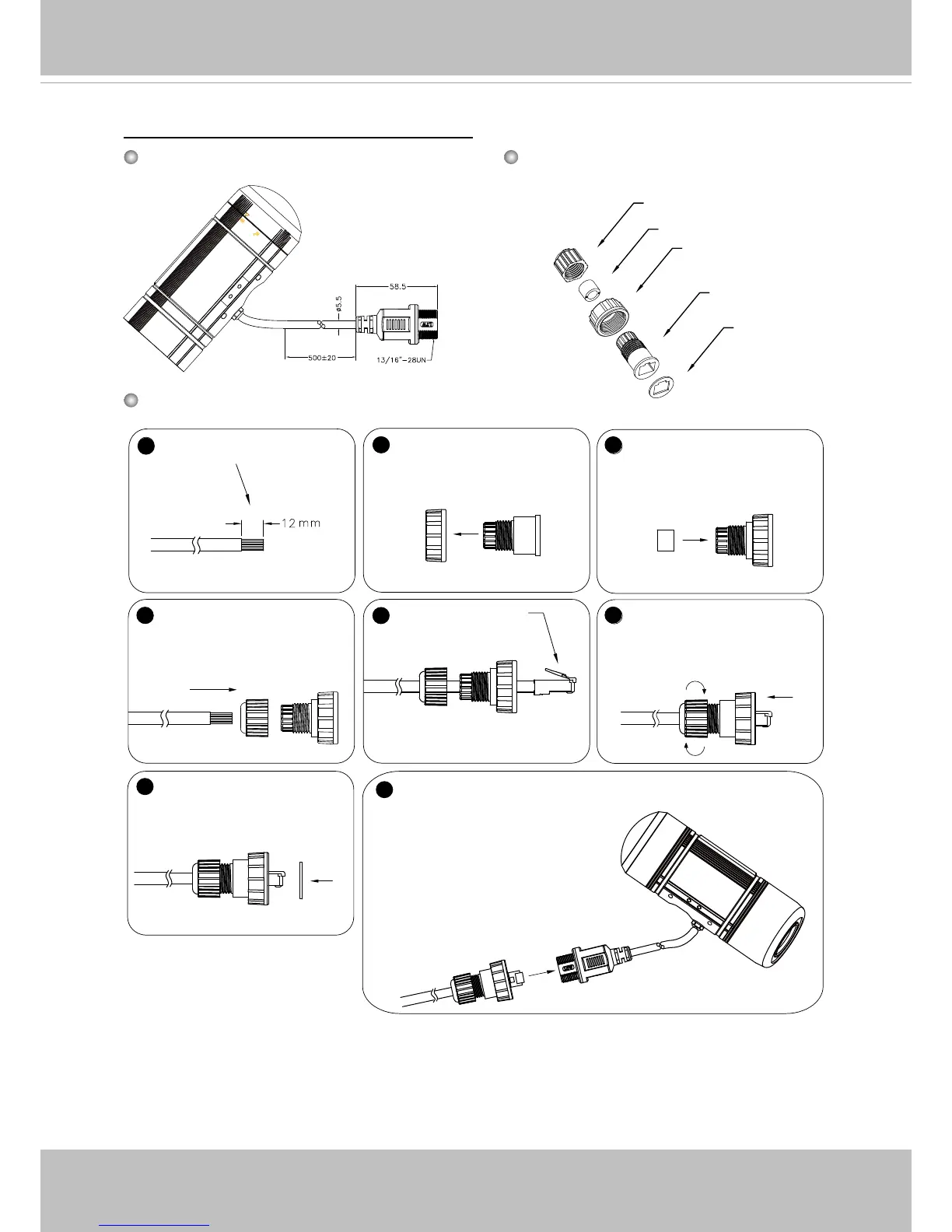
Components of the Waterproof
Connector
Screw Nut (C)
Housing (D)
Gasket (E)
Seal (B)
Sealing Nut (A)
RJ45 Cable Dimension (unit: mm)
Prepare an Ethernet
cable and strip part of the
sheath.
Insert the housing into
the screw nut.
Insert the seal into the
housing.
Insert the stripped Ether-
net cable through the seal-
ing nut and the housing.
Clamp the cable
with an RJ45 plug.
Push the RJ45 plug into
the housing, then secure
the sealing nut tightly.
Attach the gasket to the
front of the housing.
Assembling Steps
Recommended cable gauge: 24AWG (0.51 mm)
Connect the Ethernet cable to the RJ45 cable and
secure the connectors tightly.
Cabling Assembly: RJ45 Cable Connector



 To Next Page