VIVOTEK
112 - User's Manual
PTZ
Mechanical PTZ Operation
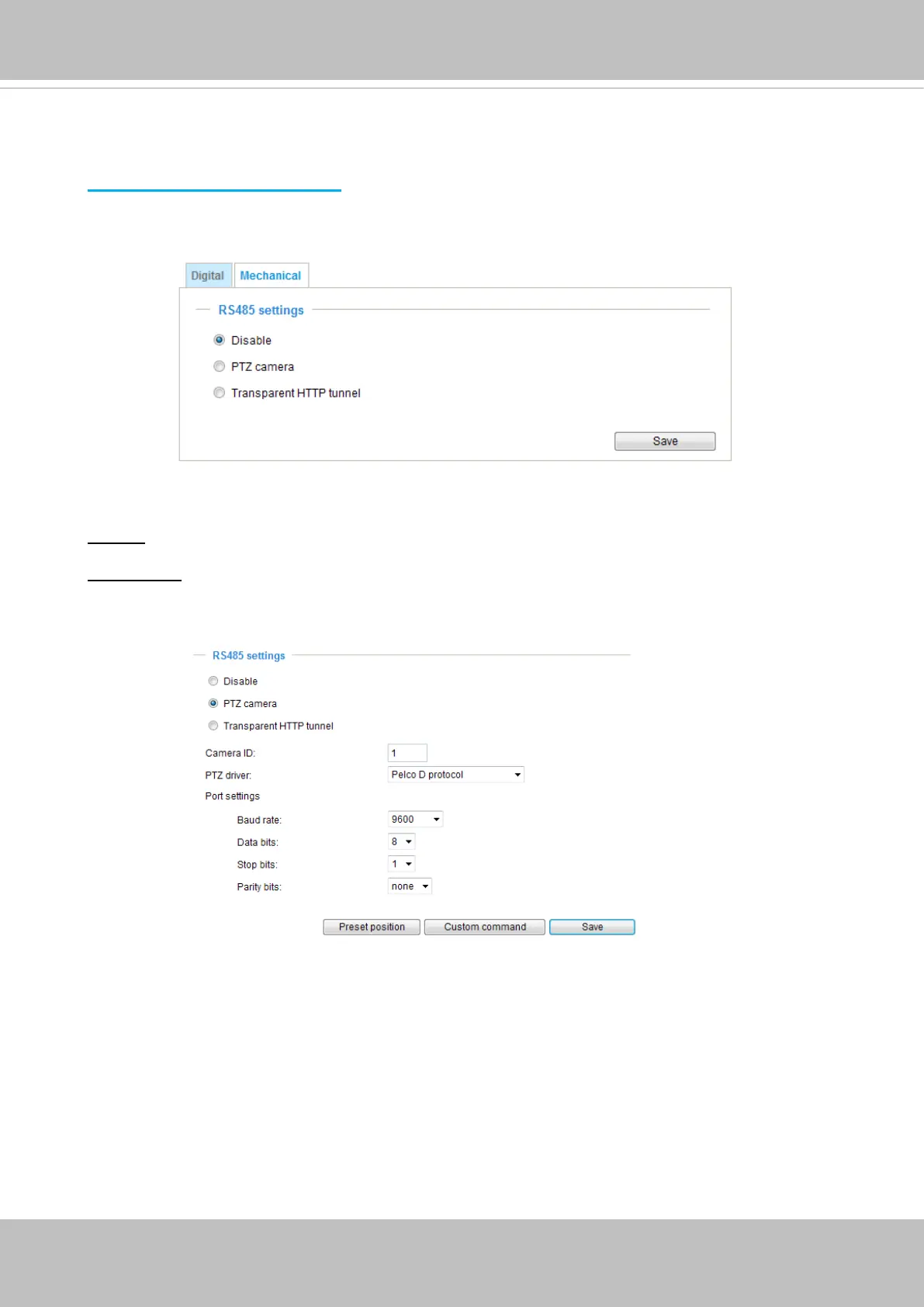
Select the “Mechanical” tab to display the RS485 Settings:
RS485 Settings
Disable: Select this option to disable this function.
PTZ camera: Select this option to enable PTZ operation.
To utilize this feature, please connect the Network Camera to a PTZ driver or scanner via RS485
serial interface first. Then you can configure the PTZ driver and RS485 port with the following
settings.
VIVOTEK provides the following PTZ drivers: DynaDome/SmartDOME, Lilin PIH-7x00, Pelco D,
and Pelco P protocol. If none of the above PTZ drivers is supported by your PTZ scanner, please
select Custom camera (scanner). Please refer to the documentation of your PTZ scanner to
determine the Camera ID, PTZ driver, and Port settings. The Camera ID is necessary to control
multiple cameras. If you click Save to enable this function, the camera control panel will be
displayed on the main page.



 To Next Page