VIVOTEK
User's Manual - 15
0002D1730202
IB8360-W 192.168.4.151 00-02-D1-73-02-02
IP9165-HP
Network Camera
Model No: IP9167-HP
Made in Taiwan
This device complies with part 15 of the FCC rules. Operation is subject to the following two conditions:
(1)This device may not cause harmful interference, and
(2) this device must accept any interference received, including interference that may cause undesired operation.
Pat. 6,930,709
MAC:0002D1730202
R o HS
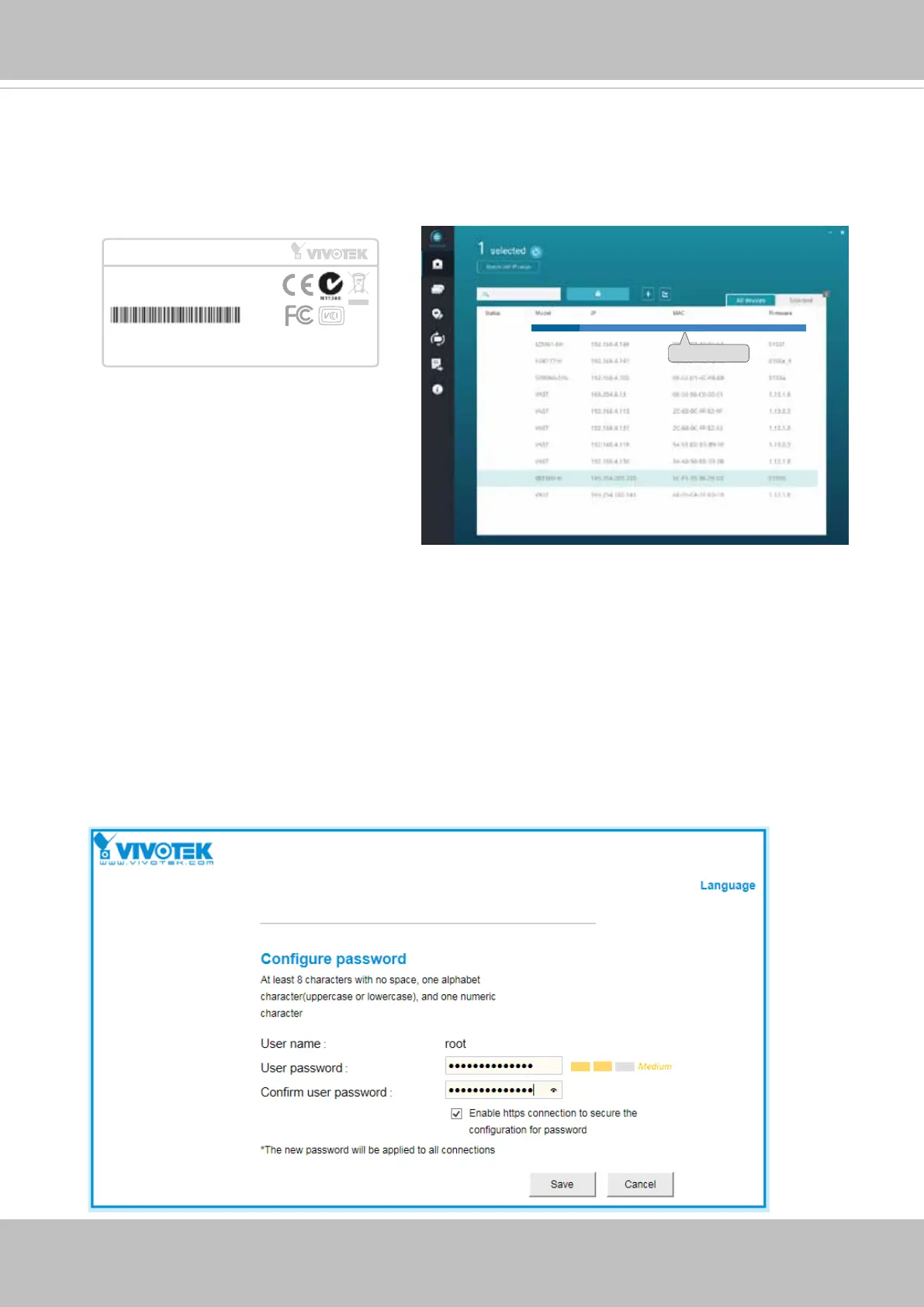
9-3. The program will search for all VIVOTEK network devices on the same LAN.
9-4. After a brief search, the installer window will prompt. Click on the MAC and model
name that matches the one printed on the product label. You can then double-click on
the address to open a management session with the Network Camera.
Forceful Password Conguration
10. The first time you log in to the camera, the firmware will prompt for a password
conguration for security concerns.
10-1. Enter the combination of alphabetic and numeric characters to fulll the password
strength. requirement. The default name for the camera administrator is “root”, and can
not be changed.



 To Next Page