VIVOTEK
32 - User's Manual
General Connection
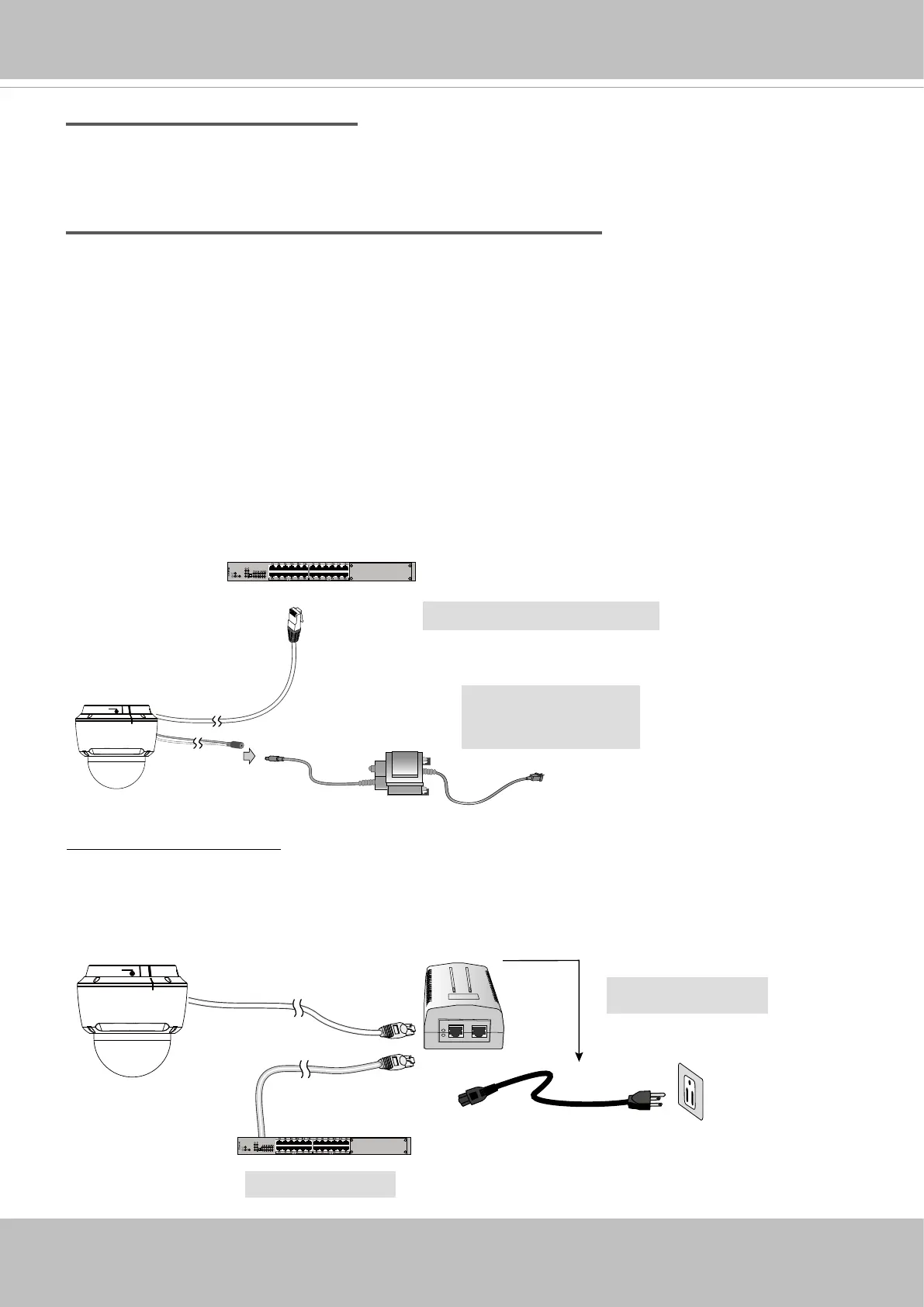
1. Connect the Network Camera's Ethernet cable (CAT5e) to a 802.3at PoE Plus switch.
When using a non-PoE switch
Use a PoE power injector (separately purchased) capable of 15W output or higher to connect
between the Network Camera and a non-PoE switch.
Non-PoE Switch
PoE Power Injector
2. Connect the power wires to an AC or DC 24V power adaptor (user-supplied).
You can connect both power sources for redundancy in power supply.
Power over Ethernet
AC 24V 3.5A
Adapter (Separately
purchasedied)
PoE Switch (15W output)
and / or
Internet connection with static IP
Choose this connection type if you are required to use a static IP for the Network Camera.
Please refer to LAN on page 87 for details.
Internet connection via PPPoE (Point-to-Point over Ethernet)
Choose this connection type if you are connected to the Internet via a DSL Line. Please refer to
PPPoE on page 88 for details.


 To Next Page