
 Need help?
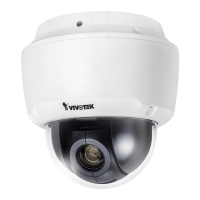
Do you have a question about the Vivotek SD9161-H and is the answer not in the manual?
Important information and warnings to review before installing or using the network camera.
Guides users through setting a strong password for the camera for the first time for security.
Details how to tune white balance and image adjustment settings for optimal visual output.
Covers enabling password protection and creating multiple user accounts with different privilege levels.
Explains how to control the camera's Pan/Tilt/Zoom (PTZ) operation and configure preset positions.
Details how to configure the camera to enable motion detection by setting up detection windows.
Guides on configuring adaptive recording, recording source, schedule, and capacity for video recording.
 General
| Maximum Resolution | 1920x1080 |
|---|---|
| Wide Dynamic Range | WDR Pro |
| Video Compression | H.264, MJPEG |
| Audio Support | Two-way audio |
| Weather Resistance | IP66 |
| Vandal Resistance | IK10 |
| Camera Type | Dome |
| Lens Type | Varifocal |
| Aperture | F1.6 ~ F4.7 |
| Pan/Tilt Range | Pan: 360° endless; Tilt: 90° |
| Day/Night | Yes |
| Minimum Illumination | 0.05 lux (color) |
| Maximum Frame Rate | 30 fps @ 1920x1080 |
| Ethernet | 10 Base-T/100 Base-TX Ethernet |
| Power over Ethernet | 802.3at PoE |
| Power Supply | 24V AC, 802.3at PoE |
| Protocols | IPv4, IPv6, TCP/IP, HTTP, HTTPS, UPnP, RTSP/RTP/RTCP, IGMP, SMTP, FTP, DHCP, NTP, DNS, DDNS, PPPoE, CoS, QoS, SNMP, 802.1X |

 To Next Page
