• Set the CO2 pressure to 65 psi
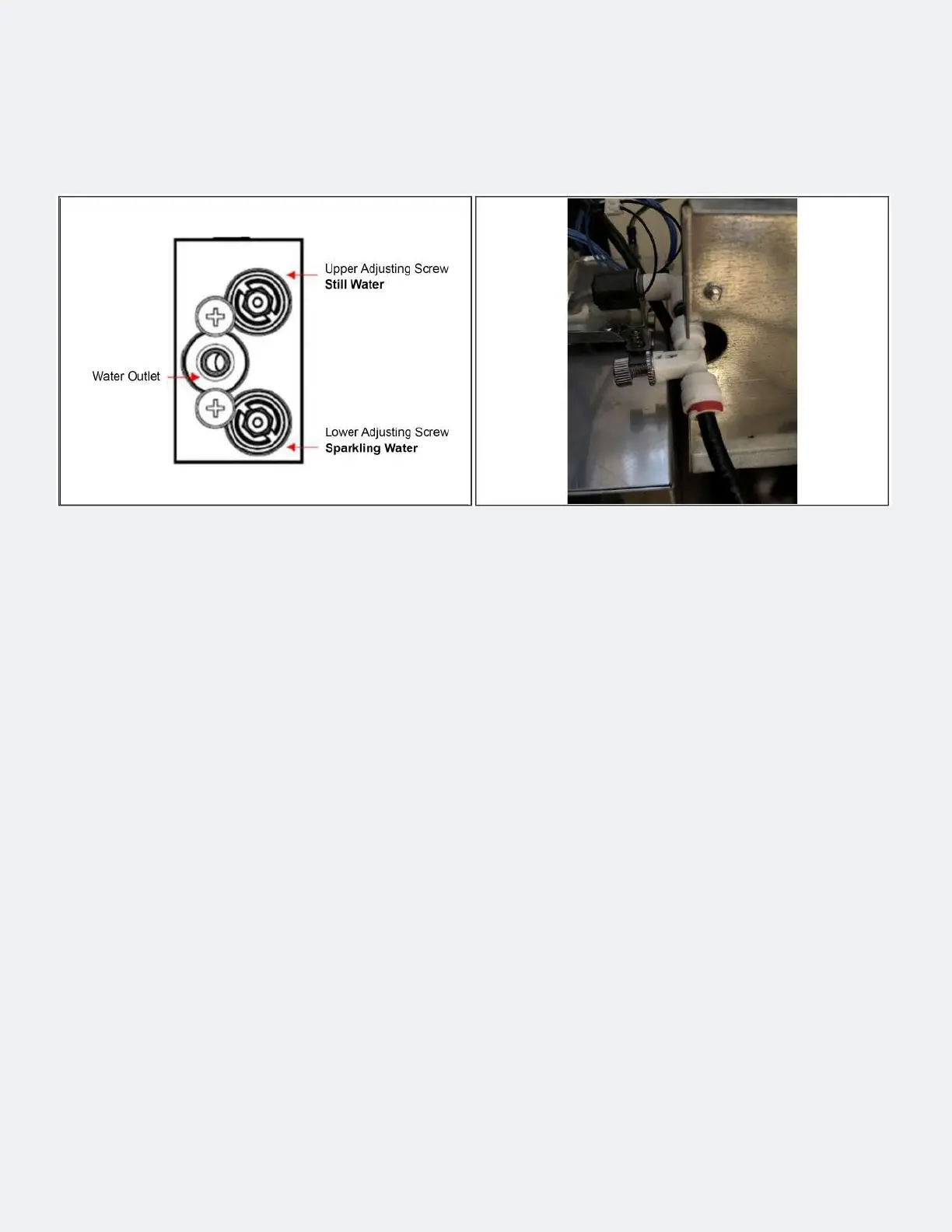
• Draw o the sparkling water and measure the ow rate per minute. This must be less than 1.7 l / min.
If the ow rate is too high, turn the lower adjusting screw in slightly and measure the ow rate again.
Repeat this until the ow rate is between 1.6 and 1.7 l / min.
• If the value cannot be reached because the water inlet pressure is too low, the highest possible value
must be set and this must be taken into account in the subsequent setting.
• Draw o still (chilled or uncooled) water and measure the ow rate per minute. In principle, this
should be a little lower than with soda. Setpoint 1.5-1.6 l / min. Adjustment is made using the upper
adjusting screw.
• Draw o the medium water and check the visual appearance of the water. If the water appears milky,
screw in the upper adjusting screw slightly and check again.
• The jet pattern of the water jet can now be adjusted by slightly turning the needle valve (Fig. 2). To
adjust, loosen the lock nut and then tighten it again.
• If these settings do not lead to an optimal spray pattern, reset the compensator and needle valve to
the basic settings (see next step) and carry out the setting again as described above.
Step 1 — Setting ow diagram
Setting the Flow Diagram


 To Next Page
 Loading...