5
15
E190VA / E220VA / E260VA / E261VA
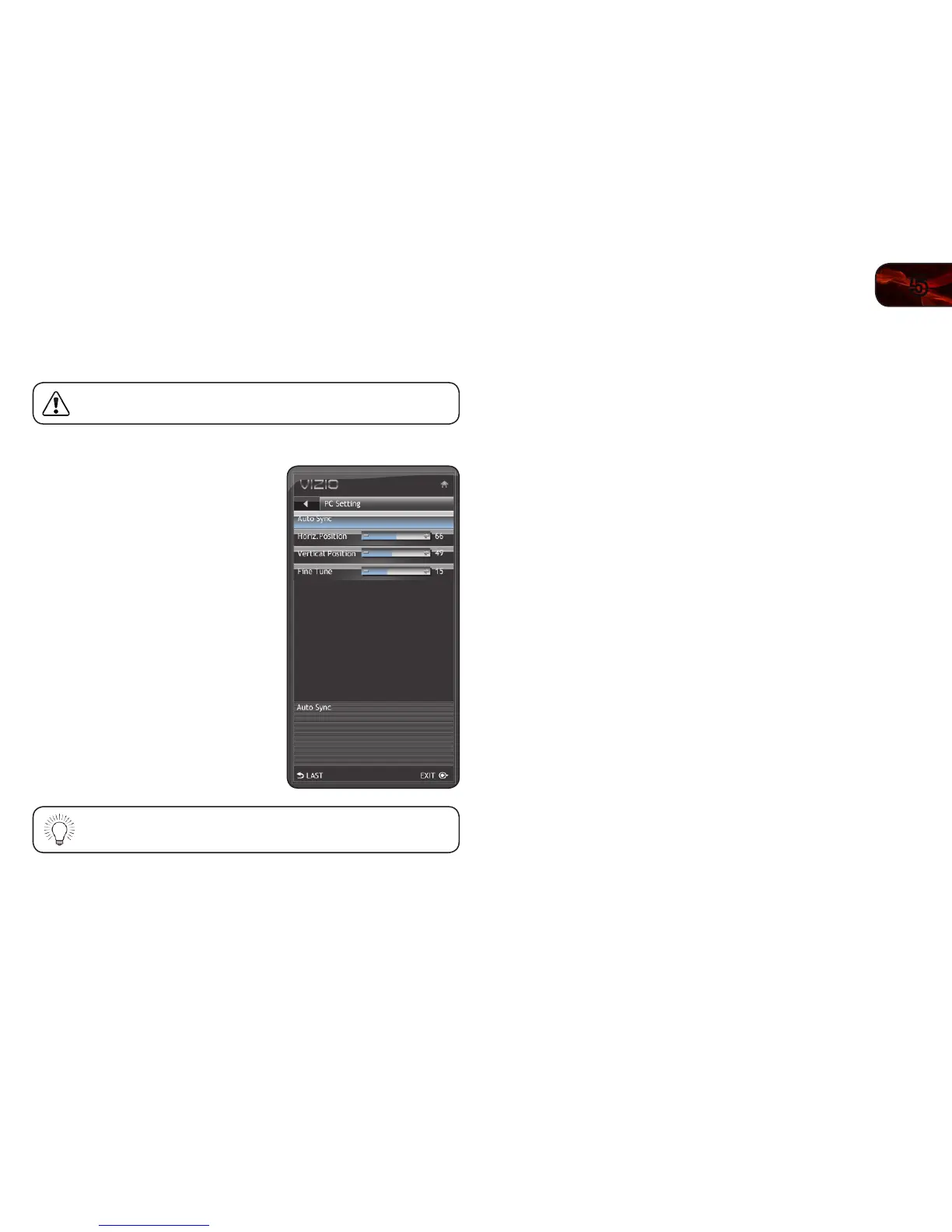
Adjusting the TV Settings for Use with A PC
Your TV can be used to display output from a home computer using the RGB port.
These settings are only available when viewing content from the
RGB port.
To adjust the PC settings:
1. Press the MENU button on the remote.
The on-screen menu is displayed.
2. Use the Arrow buttons on the remote to
highlight the TV icon and press MENU/
OK. The TV Settings menu is displayed.
3. Use the Arrow buttons to highlight PC
Setting and press MENU/OK.
4. Use the Arrow and MENU/OK buttons to
adjust each of the following options:
Horiz. Position - Adjust the horizontal (left/
right) position of the picture.
Vertical Position - Adjust the vertical (up/
down) position of the picture.
Fine Tune - Adjust the synchronization
between the PC and the TV. Increase
or decrease this setting if you see
“waviness” or a blurry picture.
If you would like the TV to automatically adjust the picture for best
quality, select Auto Sync and press MENU/OK.


 To Next Page