32
5
M3D420SR/M3D421SR/M3D460SR/M3D550SR
Using the Info Window
The Info Window can be displayed by pressing the INFO or GUIDE button on
the remote:
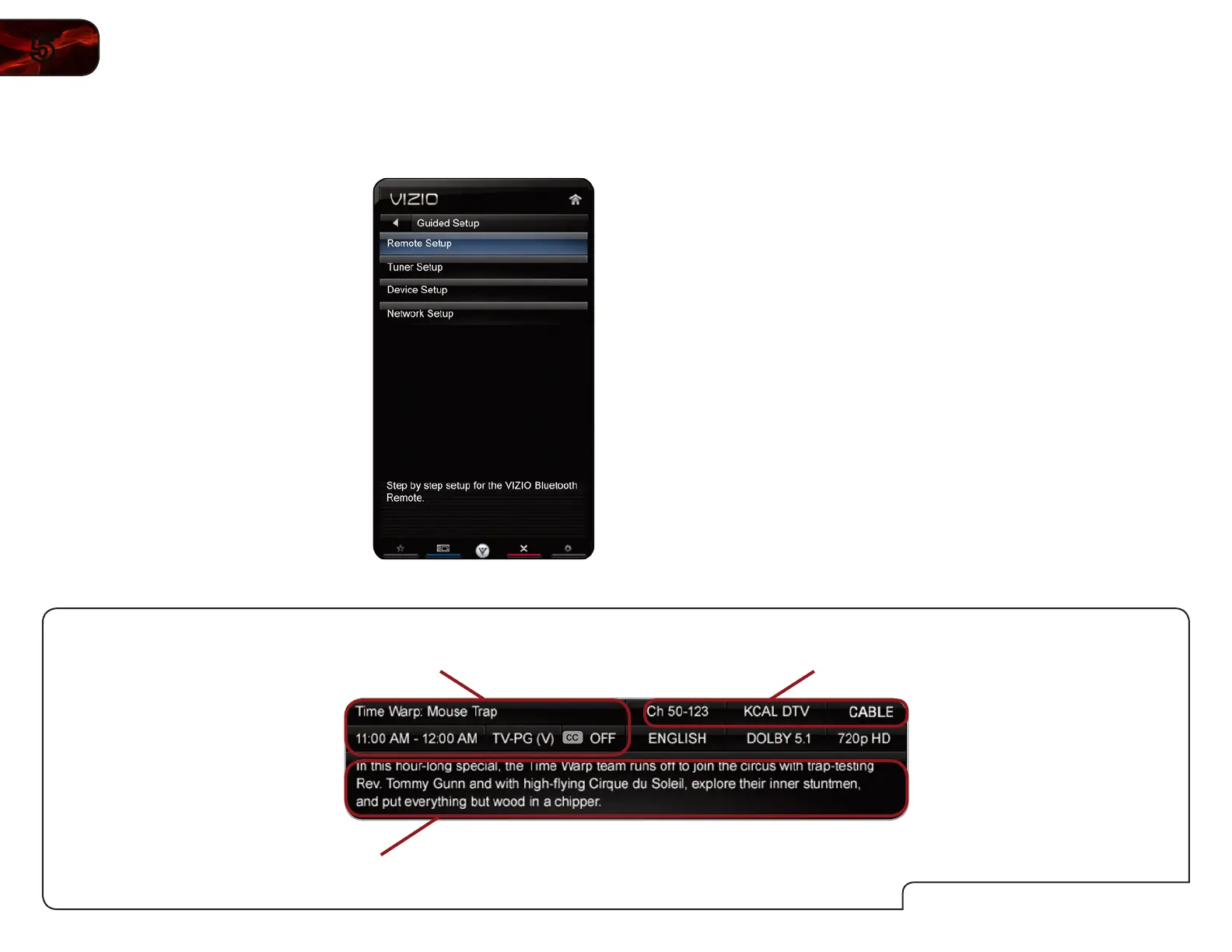
• PresstheINFO or GUIDEbuttononetimetodisplaychannelandinput
information.
• PresstheINFO or GUIDEbuttontwotimestodisplaytheprogramtitle
andclosedcaptioninginformation.
• PresstheINFO or GUIDEbuttonthreetimestodisplaytheprogram
description.
InfoWindow
ProgramDescription
ProgramTitle/CCInformation
Channel/InputInformation
UsingGuidedSetup
The TV’s Setup App can be used to easily set up the TV tuner or to connect the
TV with your network.
To access guided setup:
1. Press the MENU button on the remote.
The on-screen menu is displayed.
2. Use the Arrow buttons on the remote
to highlight the Help icon and press
OK. The Help menu is displayed.
3. Highlight Guided Setup and press OK.
4. Highlight Tuner Setup or Network
Setup and press OK.
5. Follow the on-screen instructions.
When finished, press the EXIT button
on the remote.


 To Next Page